The Primera LX610 combines color label printing with a digital-cutting workflow, but the media choice depends on how you plan to use the printer. Digital cutting uses Primera-approved continuous media with an identifying smart chip. Printing on compatible pre-die-cut labels is a separate workflow and should not be confused with cutting ordinary continuous stock.
This guide explains the distinction and links to media, printer information and official compatibility guidance. Before preparing artwork or ordering a roll, confirm the media width, printable area and cutting limits for your intended workflow. Check the selected coating and ink compatibility as well as the roll configuration, and test the complete process for your application.
View LX610 Continuous Media | View the LX610 Printer | Ask About Media Compatibility
Two Different Media Workflows
| Workflow | Media requirements | Maximum print width |
|---|---|---|
| Digital die-cutting | Primera-approved continuous cutting media with the identifying smart chip | 4.1 inches (104 mm) |
| Pre-die-cut printing | Compatible labels already cut to shape; use the proper hub and sensing setup | 5 inches (127 mm) |
For digital cutting, Primera specifies 4.75 inch media width. The printable area is narrower than the media. Check the official LX610 specifications for supported dimensions and limits before preparing artwork.
Use Approved Media for Digital Cutting
Primera’s approved cutting media uses a smart chip to identify the roll and track the material remaining. Do not transfer a chip to ordinary continuous label stock. The liner, coating and cutting performance must be suitable for the LX610 cutting system.
Read Primera’s LX610 media guidance before choosing between digital cutting and pre-die-cut printing.
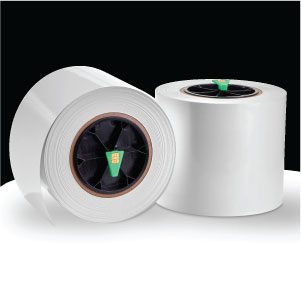
View the linked LX610 media product for available materials, pack details and current pricing.
LX610 Printer Overview
Primera lists thermal inkjet printing at up to 1200 x 4800 dpi with a single high-capacity cyan, magenta and yellow cartridge. Pre-die-cut print speed is listed at up to 4.5 inches per second; digital cutting speed depends on the design. Dye and pigment ink options are available. Confirm the selected ink, material and settings for your application.
View the LX610 Printer Product Page
Supplies and Current Setup Resources
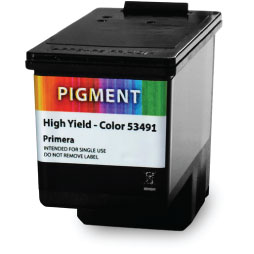
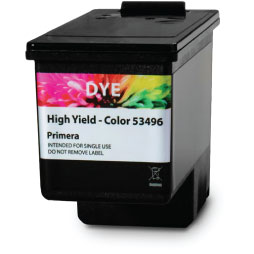
Confirm the correct cartridge and supplies for your printer. For current software, drivers and operating-system requirements, use Primera’s LX610 downloads and support page.
Frequently Asked Questions
Can the LX610 cut labels from any continuous roll?
No. Digital cutting requires Primera-approved continuous media with its identifying smart chip. Standard continuous label stock is not interchangeable with the approved cutting media.
Can I use pre-die-cut labels in the LX610?
Compatible pre-die-cut media can be used for printing, with the appropriate hub and sensing setup. The printer’s digital die cutter is not used for this stock. Check the exact media specifications before ordering.
What is the maximum LX610 print width?
Primera lists a maximum print width of 4.1 inches (104 mm) for digital die-cutting and 5 inches (127 mm) for pre-die-cut media. Printable width and total media width are different specifications.
Which ink does the LX610 use?
Primera lists a single high-capacity cyan, magenta and yellow cartridge with dye and pigment options. Confirm the cartridge and material pairing for your artwork and durability requirements.
Where can I find current software and setup instructions?
Use Primera’s LX610 downloads and support resources for current drivers, software, operating-system requirements and media setup instructions.