Find a Template That Matches Your Label Layout
Download free label templates by size and shape for address labels, shipping labels, product labels, jar lids and more. Choose Microsoft Word, PDF, EPS or JPG files, plus Canva-compatible PNG guides where available. Most downloads use a full 8.5" x 11" sheet layout. The tables also link to matching blank sheets, die-cut rolls and continuous roll widths.
Before you print: Match the label size, shape, labels per sheet, margins and spacing to your specific product. Print one test on plain paper at 100% or Actual Size and compare it with the label sheet.
Jump to: Popular sizes · Circles · Ovals · Squares · Rectangles · Continuous rolls · Specialty · All sizes · Printing help · FAQs
Shop Blank Label Sheets Canva Template Instructions
Popular Label Templates
Start with these common address, shipping, product and full-sheet label sizes. Choose a file format below, or browse the shape and size tables for a matching template page and blank labels.
| Size | Shape | Common Use | Templates |
|---|---|---|---|
| 1 x 2 5/8 | Rectangle | Address labels, return address | JPG · Word · PDF · EPS· PNG |
| 4 x 6 | Rectangle | Shipping labels, carrier labels | JPG · Word · PDF · EPS· PNG |
| 2 x 4 | Rectangle | Shipping, barcodes, product labels | JPG · Word · PDF · EPS· PNG |
| 2 x 2 | Square | Product labels, jar lids, branding | JPG · Word · PDF · EPS· PNG |
| 2" Circle | Circle | Jar lids, cosmetic labels, seals | JPG · Word · PDF · EPS· PNG |
| 4 x 3.33 | Rectangle | Legal envelopes, product labeling | JPG · Word · PDF · EPS· PNG |
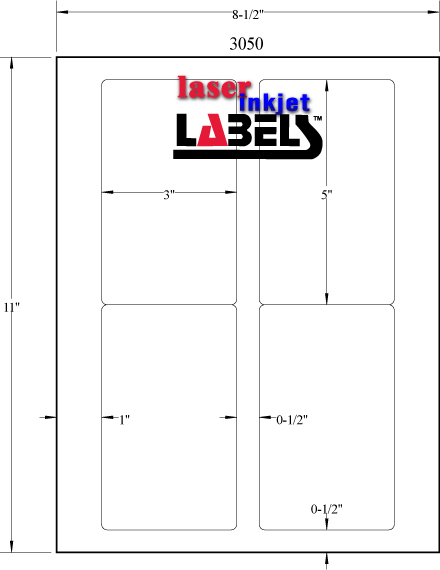
| 3 x 5 | Rectangle | Candle labels, food packaging | JPG · Word · PDF · EPS· PNG |
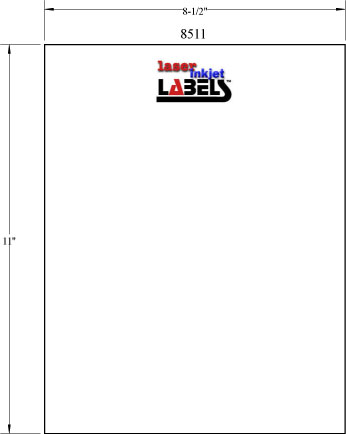
| 8.5 x 11 | Rectangle | Full sheet labels, large packaging | JPG · Word · PDF · EPS· PNG |
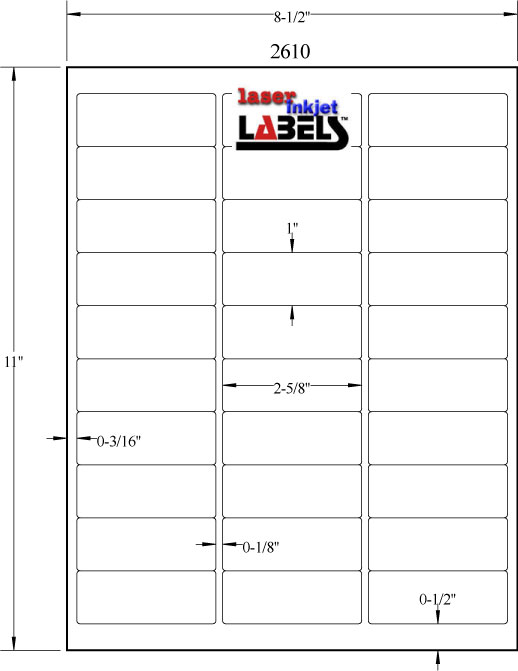


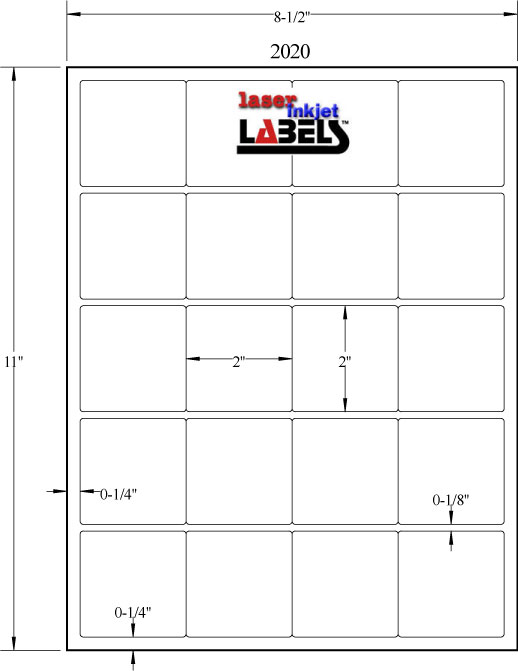

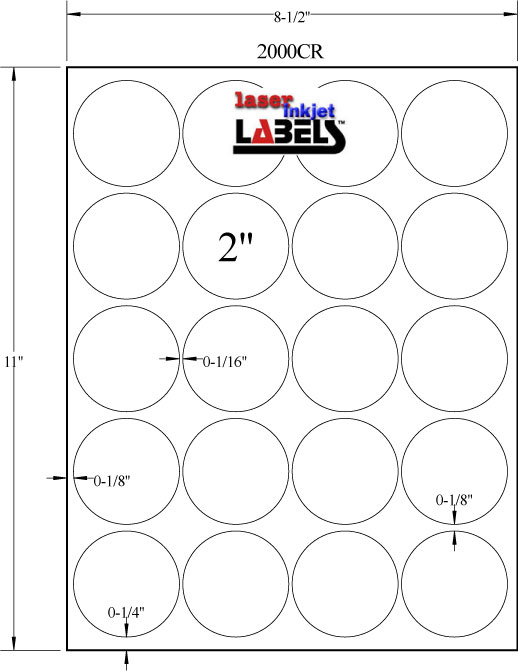

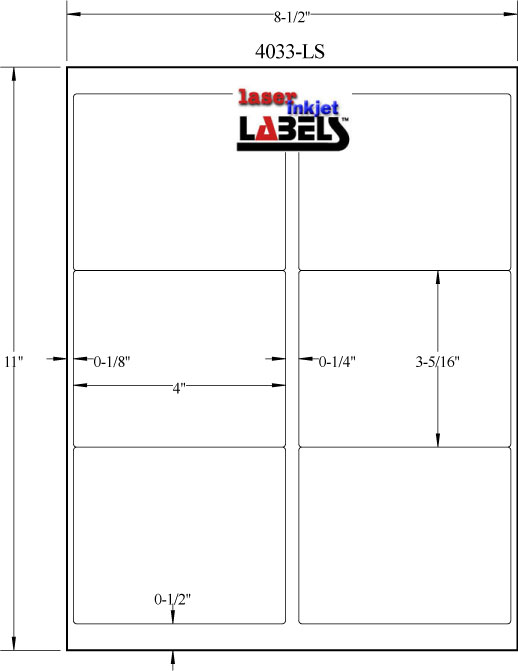



Not sure what label size you need? Visit our Label Size Guides to find the right label dimensions for your application.
Browse Label Templates by Shape
Sheet and roll formats: A downloadable sheet template applies to the sheet layout, even when the matching size is also sold on rolls. "N/A" means a sheet-template download is not listed for that row. For die-cut rolls, set the individual label size in compatible printer software. For continuous rolls, use the fixed width and your required print length.
Label shape affects both the look of your finished product and how your design fits within the template. Browse our free downloadable templates organized by shape to find the right starting point for your project.
Circle Label Templates
Circle labels are a popular choice for jar lids, bottle tops, candle labels, cosmetic containers, and decorative seals. Their symmetrical shape makes them naturally eye-catching, and because there are no corners, designs tend to look clean and polished on curved surfaces. Our circle templates are available in sizes ranging from 1/2" up to 4" in diameter.
 |
 |
|
|---|---|---|
| Label Size | View Templates | Shop Matching Labels |
| 1/2" | 0.5 Inch Round | 0.5" Labels on Sheets |
| 3/4" | 0.75 Inch Round | 0.75" Label on Sheets & Rolls |
| 1" | 1 Inch Round | 1" Labels on Sheets & Rolls |
| 1 1/2" | 1.5 inch Round | 1.5" Labels on Sheets & Rolls |
| 1 2/3" | 1.67 inch Round | 1.67" Labels on Sheets |
| 2" | 2 inch Round | 2" Labels on Sheets & Rolls |
| 2 1/4" | N/A | 2.25" Labels on Rolls |
| 2 1/2" | 2.5 inch Round | 2.5" Labels on Sheets & Rolls |
| 3" | 3 inch Round | 3" Labels on Sheets & Rolls |
| 3 1/4" | 3.25 inch Round | 3.25" Labels on Sheets |
| 3 1/3" | 3.33 inch Round | 3.33" Labels on Sheets |
| 3 1/2" | N/A | 3.5" Labels on Rolls |
| 4" | 4 inch Round | 4" Labels on Sheets & Rolls |
Oval Label Templates
Oval labels offer the softness of a circle with more horizontal surface area for text and design, making them a favorite for wine bottles, food jars, candles, and health and beauty products. Our oval templates are available in multiple sizes including popular wine and jar label dimensions.
| Label Size | View Templates | Shop Matching Labels |
|---|---|---|
| 2" x 3" | N/A | 2" x 3" Labels on Rolls |
| 2 1/2" x 1 3/4" | 2.5 inch x 1.75 Inch | 2.5" x 1.75" Labels on Sheets |
| 2 5/8" x 1 1/2" | 2.625 inch x 1.5 inch | 2.625" x 1.5" Labels on Sheets |
| 2.647" x 2.1" | 2.647 inch x 2.1 inch | 2.647" x 2.1" Labels on Sheets |
| 3 1/4" x 2" | 3.25 inch x 2 inch | 3.25" x 2" Labels on Sheets |
| 3 7/8" x 1 15/16" | 3.875 inch x 1.9375 inch | 3.875" x 1.9375" Labels on Sheets |
| 4" x 2" | 4 inch x 2 inch | 4" x 2" Labels on Sheets |
| 4" x 2 1/2" | N/A | 4" x 2.5" Labels on Rolls |
Square Label Templates
Square labels deliver a clean, modern look that works well for product branding, promotional stickers, packaging seals, and box top labels. Our square templates include popular sizes like 1.8 x 1.8, 2 x 2, 2.5 x 2.5, and 3 x 3.
| Label Size | View Templates | Shop Matching Labels |
|---|---|---|
| 1 1/2" x 1 1/2" | N/A | 1.5" x 1.5" Labels on Rolls |
| 1 5/16" x 1 5/16" | 1.3125 inch x 1.3125 inch | 1.3125" x 1.3125" Labels on Sheets |
| 1.8" x 1.8" (Sq Crn) | 1.8 inch x 1.8 inch | 1.8" x 1.8" Labels on Sheets |
| 2" x 2" | 2 inch x 2 inch | 2" x 2" Labels on Sheets & Rolls |
| 2 1/2" x 2 1/2" | 2.5 inch x 2.5 inch | 2.5" x 2.5" Labels on Sheets & Rolls |
| 3" x 3" | 3 inch x 3 inch | 3" x 3" Labels on Sheets & Rolls |
| 3 1/2" x 3 1/2" | N/A | 3.5" x 3.5" Labels on Rolls |
| 4" x 4" | N/A | 4" x 4" Labels on Rolls |
| 5" x 5" | N/A | 5" x 5" Labels on Rolls |
| 6" x 6" | N/A | 6" x 6" Labels on Rolls |
| 8" x 8" | N/A | 8" x 8" Labels on Rolls |
Rectangle Label Templates
Rectangle and square labels are the most versatile and widely used shapes in printing. They work across nearly every application — from shipping and address labels to product packaging, barcodes, inventory tags, and office organization. Our rectangle templates range from small 1/2" x 1" labels all the way up to full 8.5" x 11" sheet labels, giving you complete coverage for any job size or print run. All Labels have rounded corners unless otherwise noted by (Sq Crnr) indicating that they have Square Corners.
Continuous Roll Label Widths
Continuous roll labels are supplied as one uninterrupted strip of label material with no gaps or die cuts. The roll width is fixed, while the printed label length can change for each design or print job. Because there is no fixed label length, these products do not use traditional sheet-label templates. Select a width below to view compatible materials, roll configurations and printer options.
View all Continuous Inkjet Roll Labels
CD & Specialty Label Templates
We also offer templates for CD labels, USPS Click-N-Ship labels, window labels, and integrated labels for packing slips and invoices. These specialty templates are formatted to exact postal and industry specifications.
| Label Size | View Templates | Shop Matching Labels |
|---|---|---|
| 2 3/8 x 3 1/4 Wax Melt Clamshell | Wax Melt 6 Pc Clamshell | Wax Melt 6 Pc Clamshell Labels on Sheets |
| 4 1/2 CD | 4.5 inch CD Labels | 4 1/2" CD Labels on Sheets |
| USPS Click n' ship® | USPS Click n' ship® | USPS Click n' ship® |
| USPS NetStamps® | USPS NetStamps® | Netstamps Labels on Sheets |
| 2.0625 x 2.15 Lip Balm Labels | Lip Balm Labels | Lip Balm Label on Sheets |
| 8 x 10 Reversed Window Sticker | Car Dealer Window Stickers | Car Dealer Window Stickers |
| IL-A | Labels on Sheets | |
| IL-B | Labels on Sheets | |
| IL-C | Labels on Sheets | |
| IL-D | Labels on Sheets |
Browse All Label Templates by Size


Continuous Roll Label Widths
Continuous roll labels have a fixed roll width but no fixed label length. They are supplied without gaps or die cuts, allowing compatible printers and finishing systems to print and cut labels at different lengths. Use the variable-length printing guide for setup information, then select a width below to shop matching continuous roll labels.
Need Help Choosing a Label Size?
Not sure which label size works best for your product?
Explore our Label Size Guides to find the perfect fit.
How to Use Label Templates
Choose your format: Use Word (DOC) for text and mailing layouts, PNG for Canva, PDF or EPS for compatible design software, and JPG for a visual layout reference. Available formats vary by size. The PNG files are placement guides, rather than editable Canva design links.
How to Use the Template in Canva
- Create a design matching the full sheet dimensions. For a standard sheet template, use 8.5 x 11 inches.
- Upload the PNG guide. Position it to cover the whole page proportionally, without cropping or adding margins.
- Add your text and artwork within each label area, then duplicate the design to the other label positions.
- Remove the PNG guide before downloading so its outlines do not print.
- Download as PDF Print. For a precut sheet, leave crop marks and bleed off to preserve the sheet dimensions. Print a plain-paper test at 100% or Actual Size.
See the complete Canva label template instructions for screenshots and setup help.
How to Use the Microsoft Word Template
Download the DOC file and open it in desktop Microsoft Word. Click inside the label table and use Table Layout > View Gridlines if the cells are hard to see; menu wording varies by version. Gridlines do not print. Keep the supplied paper size, margins, cell sizes and spacing. Add your text or images without letting them expand the table, then test on plain paper at 100% or Actual Size.
For mail merge and other printing help, visit our label printing guide. Microsoft also provides Word label instructions.
How to Use the PDF, EPS or JPG Template
Open PDF or EPS files in software that supports that format. Keep the original page dimensions and use the template as a separate guide layer with your artwork above it. Hide or remove the guide before exporting. JPG files show the sheet layout and may include dimensions or notes. Use them as references or placement guides, rather than printing those notes on the finished labels. Keep all imported files at their intended physical size.
Check Alignment Before Printing on Labels
- Match the template to your product, including label count, margins and gaps.
- Set the correct paper size and orientation. Use 100% or Actual Size instead of Fit, Shrink or borderless enlargement.
- Print on plain paper and hold it behind a label sheet against a light to check every row.
- If every label shifts by the same amount, check page placement and printer margins. If the shift grows down the page, check scaling, spacing and paper feed before moving each design.
- Use label stock approved for your printer, with the recommended media setting and feed path.
Printing on rolls: Die-cut labels require the correct width, height, orientation and gap or mark sensing. Continuous stock uses a fixed width and the print length supported by your printer and finishing setup. Configure either format in compatible roll-printer software rather than printing a full sheet template.
For software-specific printing options, see Canva personal-printer help. To compare an Avery product number, use our Avery Label Size Comparison Chart and verify the complete layout.
Shop Matching Blank Labels
Use the shopping column beside each size to find matching blank labels. Confirm whether you need sheets or rolls, then select a material approved for your printer and application. The same size may use different layouts or roll configurations.
| If you are printing... | Recommended label material | Shop |
|---|---|---|
| Address labels, office labels | White uncoated | White Uncoated Labels |
| Product labels, packaging, branding | White semi-gloss for inkjet, or a compatible high-gloss stock | Semi-Gloss Labels |
| Candle, cosmetic, or food labels | Gloss or kraft depending on brand style | High Gloss Labels · Kraft Labels |
| Projects that need water-resistant labels | Printer-compatible film; check ink and finished-print water resistance | Clear Labels · Poly Laser |
| Labels with removable adhesive | White removable adhesive | Removable Labels |
| Shipping labels | White uncoated or semi-gloss | Shop All Sheet Labels |
Not sure which material is right for your project? Visit our Blank Label Guide or contact our team for a recommendation.
Frequently Asked Questions
Are these label templates free to download?
Yes. The templates linked on this page are free to download with no account or purchase required. Available formats vary by size.
Which label template format should I choose?
Use DOC for Microsoft Word, PNG as a Canva placement guide, PDF or EPS for compatible design software, and JPG as a layout reference. Check the available formats on the page for your label size.
How do I match a template to my label sheets?
Match the product or template number, label dimensions, shape, labels per sheet, margins and spacing. Labels with the same dimensions can have different sheet layouts. Check a plain-paper test against your actual label sheet.
How do I use a Word label template?
Download the DOC file and open it in desktop Microsoft Word. Click inside the label table and turn on View Gridlines if needed. Keep the original table dimensions, margins and paper size, add your text or images, then test on plain paper at 100% or Actual Size.
Can I use these label templates in Canva?
Yes. Where a PNG file is available, upload it into a Canva design matching the full sheet dimensions. Position it edge to edge without cropping, add your artwork, then remove the PNG guide before downloading a PDF Print file. Test the PDF at 100% or Actual Size.
Why are my printed labels misaligned?
First check the template layout, paper size, orientation and 100% or Actual Size setting. A constant offset can come from placement or printer margins. An offset that grows down the sheet can come from scaling, spacing or paper feed. Test one sheet on plain paper before adjusting the design.
Should template outlines appear on my finished labels?
No. Remove the PNG or JPG placement guide, or hide the PDF or EPS guide layer, before exporting the finished artwork. Word table gridlines are editing aids and do not print, but applied table borders can print. Check the print preview.
Do these templates work with Avery label sizes?
Some LaserInkjetLabels.com sheet layouts match Avery sizes. Use the Avery Label Size Comparison Chart, then compare dimensions, labels per sheet, margins and spacing before printing. A size match alone does not guarantee the same layout.
Can I use a sheet template with a roll label printer?
Use the sheet templates for the matching sheet layout. For die-cut rolls, set the exact label width, height, orientation and gap or mark sensing in compatible printer software. Continuous rolls have a fixed width and variable length. Neither roll format uses a full 8.5 x 11 sheet layout.
Do the templates work with inkjet and laser printers?
The templates are layout guides. Select label stock made for your printer technology, confirm the printer supports the sheet or roll dimensions, and follow its media and feed settings. A template cannot make incompatible label material suitable for a printer.
Find a Label Size · Compare Blank Labels · Back to the Design Center
Reviewed October 21, 2026. Avery® is a registered trademark. LaserInkjetLabels.com is an independent supplier and is not affiliated with Avery.