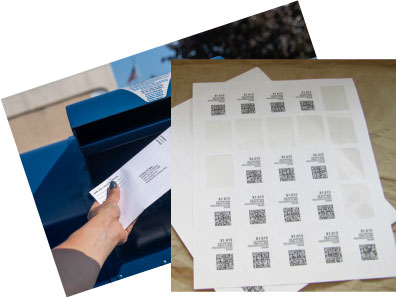
Blank NetStamps-compatible labels provide a printable surface for postage produced through a supported postage-printing setup. They are supplied without postage, so selecting the correct software layout and printer settings is part of preparing a usable sheet. The label dimensions, spacing and feed alignment need to match the product you order.
Explore the compatible sheets linked below and use our setup guide for alignment and troubleshooting. Print a plain-paper test before using postage to check the position of the design. Follow your postage service instructions for the mailpiece and service you are using; a NetStamps workflow should not be assumed to replace a shipping-label workflow for every package.
View NetStamps-Compatible Sheets and Current Pricing | Setup and Troubleshooting Guide
Blank Sheet Labels for Your Postage Setup
The linked product is LaserInkjetLabels.com item 1217: 1.25 x 1.75 inch blank labels, 25 per standard 8.5 x 11 inch sheet, supplied in a 10-sheet pack. The product is listed for compatible laser and inkjet printers. Check the current product details and use the matching software layout before printing.
These are blank labels, not prepaid stamps. Purchase and print postage through your postage software. Product pricing covers the label sheets; postage and any software charges are separate.
Print a Sample Before Printing Postage
- Confirm that your label sheet matches the selected NetStamps layout.
- Check the printer, tray, page size and feed direction.
- Use the software’s sample-printing option to check alignment before printing postage.
- Follow our NetStamps setup guide for first-use setup, partial sheets and troubleshooting.
Check Mailing Eligibility
Stamps.com supports NetStamps for domestic and international letters and postcards. Do not assume that a NetStamps label replaces a shipping label for every package or service. Follow the current Stamps.com Printing NetStamps instructions and use the shipping-label workflow where required.
Frequently Asked Questions
Do these blank labels include postage?
No. These are blank label sheets. Postage is purchased and printed through your postage software; the label purchase does not include postage.
Which NetStamps-compatible sheet is linked here?
LaserInkjetLabels.com item 1217 has 1.25 x 1.75 inch labels, 25 per 8.5 x 11 inch sheet, in a 10-sheet pack. Check the current product listing before ordering.
Can I use an inkjet or laser printer?
Item 1217 is listed for compatible inkjet and laser printers. Confirm the sheet layout and printer settings, then print an alignment sample before printing postage.
Can I use NetStamps for every package?
No. Mailing eligibility depends on the service and mailpiece. Check current Stamps.com instructions; use the shipping-label workflow when your shipment requires a shipping label.
Where can I find setup and alignment help?
Use our How to Print NetStamps setup and troubleshooting guide for sheet and roll setup, sample printing and alignment checks.