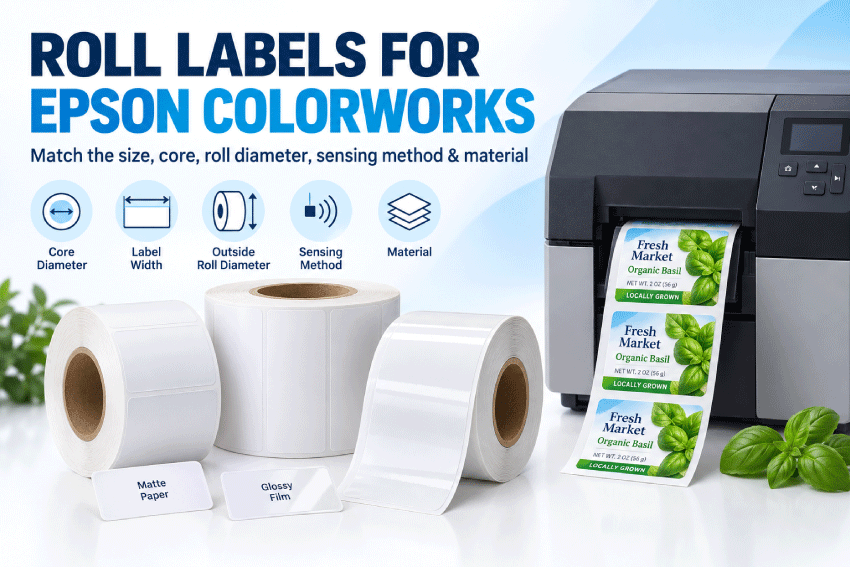
Choosing blank roll labels for an Epson ColorWorks printer starts with the exact printer model and the specifications of the media it accepts. Label dimensions alone do not establish compatibility: liner width, core size, outside roll diameter, sensing method and the coating used for inkjet printing also affect whether a roll is suitable.
This guide helps you compare paper and BOPP inkjet roll options and understand the checks to make before ordering. Whether you are printing product labels, barcodes or short runs of changing designs, match the selected roll to the current guidance for your printer and test print quality, feeding and adhesion with your actual application.
Browse All Blank Inkjet Roll Labels
Important: Always compare the roll specifications with the current manual for your exact printer and configuration. Epson and ColorWorks names are used for identification only. LaserInkjetLabels.com is not affiliated with or endorsed by Seiko Epson Corporation or Epson America, Inc.
For the latest printer lineup and support information, see Epson’s official ColorWorks printer overview, then open the support page for your exact model.

Quick Answer: Which Labels Work With Epson ColorWorks Printers?
Many Epson ColorWorks printers use coated inkjet roll labels, but compatibility depends on the exact model. A roll is a potential match only when all of these specifications agree with the printer:
- Label width: The first dimension fits across the roll and within the printer’s printable area.
- Label length: The second dimension feeds into the printer and falls within its supported length range.
- Liner width: The complete web, including the margins beside the label, fits the media path.
- Core and roll diameter: The roll fits the internal holder or an approved external unwinder.
- Sensing: The printer is configured for gap, black-mark or continuous media.
- Material: The surface coating accepts the printer’s ink and suits the product environment.
- Configuration: Cutter and peeler models may have different application requirements.
If you are uncertain, send us the complete model number and desired label size before ordering.
Epson ColorWorks Models Covered by This Guide
Epson’s current U.S. ColorWorks range includes compact, mid- to high-volume and high-volume printer families. Older printers remain in use, so both current and legacy models are included below.
| Epson ColorWorks Family | Printer Class | Label-Ordering Notes |
|---|---|---|
| CW-D3800 | Current compact 4-inch dye-ink printer | Confirm that the label coating is appropriate for dye ink, then verify width, core, roll diameter and sensing in the manual. |
| CW-C4000 | Current compact 4-inch pigment-ink printer | Often paired with compact rolls. Verify the exact gloss-ink or matte-ink version and the permitted media dimensions. |
| CW-C6000A / CW-C6000P | Current 4-inch pigment-ink family | The A model has an auto cutter; the P model uses peel-and-present. Confirm roll construction and application workflow. |
| CW-C6500A / CW-C6500P | Current 8-inch pigment-ink family | Wider media capacity does not make every roll compatible. Check liner width, print width, core, roll diameter and cutter or peeler needs. |
| CW-C8000 | Current high-volume 4-inch pigment-ink printer | Confirm media dimensions and whether the job uses the internal roll holder or an approved external feeding setup. |
| C3400 / C3500 | Legacy compact printers | Compact rolls are a common starting point, but the exact legacy manual remains the authority. |
| C7500 / C7500G | Legacy high-volume printers | Confirm the ink version, roll capacity, sensing and media coating before ordering standard or higher-capacity rolls. |
What about the Epson C831? The C831 uses a different media-handling format from the standard internal roll-fed ColorWorks printers on this page. Do not choose a standard roll solely from the Epson brand name; contact us with the complete media requirements.
For a broader comparison of Epson, Primera, Afinia and other roll-fed printers, use the Inkjet Roll Label Printer Compatibility Guide.
How to Order the Right Epson Roll Labels
- Record the complete printer model. Include A, P, G or other letters shown on the printer label.
- Choose the finished label size. Measure the application surface, then leave clearance from container curves, seams and edges.
- Confirm roll orientation. The first dimension is across the roll; the second dimension feeds into the printer.
- Check the liner width. The liner is normally slightly wider than the die-cut label.
- Match the core and outside diameter. Both must fit the internal holder or approved external unwinder.
- Select the sensing method. Gap sensing is common for opaque die-cut labels. Black marks are generally unnecessary unless the material or printer setup requires them.
- Choose an inkjet-compatible material. Match the coating to the printer ink and the paper or film to the product environment.
- Test before production. Verify feeding, sensing, print position, drying and adhesion on the actual package.
Understand Width Across the Roll and Length Into the Roll
LaserInkjetLabels.com lists roll-label dimensions as width across the roll × length into the roll. A 2.25" × 4" label is 2.25 inches wide across the web and advances 4 inches through the printer for each label.
The printer must accommodate the complete liner width, not just the finished label. The printable area may also be narrower than the accepted media width, so keep critical text, barcodes and logos inside the safe print area.
Choose the Correct Core and Outside Roll Diameter
The core diameter is the diameter of the tube at the center of the roll. The outside roll diameter is measured across the widest part of the complete roll. Both measurements matter.
| LaserInkjetLabels.com Configuration | Core | Maximum Outside Diameter | When to Consider It |
|---|---|---|---|
| Compact / Mini Roll | 2" | 4" | Selected compact Epson printers, including common C3400, C3500 and C4000 applications. Verify the exact model. |
| Standard Roll | 3" | 6" | Selected mid- and high-volume Epson printers, including common C6000, C6500 and C7500 applications. Verify the exact model. |
| Double-Capacity Roll | 3" | 8" | Only when the exact printer or an approved external unwinder provides clearance for an 8-inch roll. |
| Triple-Capacity Roll | 3" | 10" | Only with equipment designed for a 10-inch roll or a compatible external unwinder. Do not assume an Epson printer accepts this configuration. |
Available configurations vary by label size and material. A larger roll reduces roll changes, but it is not useful if the roll cannot fit or feed correctly.
Gap, Black-Mark and Continuous Media
| Media Type | Best Use | Epson Setup Check |
|---|---|---|
| Die-cut labels with a gap | Most opaque paper and white BOPP product labels | Select gap or transmissive sensing and calibrate the loaded media. |
| Black-mark media | Applications where the printer cannot reliably detect the gap, often including clear materials | Confirm the printer’s required mark position, size and sensor location before ordering. |
| Continuous media | Variable-length labels and applications cut to length | Confirm that the exact printer and cutter support the desired continuous material and finished length. |
A black bar is not necessary for most ordinary opaque die-cut labels. Gap sensing is usually the simpler choice. Black-mark sensing is commonly considered for clear products or other constructions where the sensor cannot consistently detect the space between labels.
Learn About Continuous Inkjet Roll Labels
Paper and BOPP Materials for Epson ColorWorks Labels
Choose the material for both the printer and the end use. The printer’s ink must adhere to the coating, while the label and adhesive must withstand the package surface, moisture, oil, refrigeration and handling conditions.
| Material | Appearance | Common Uses | Important Test |
|---|---|---|---|
| White Uncoated | Everyday matte paper | Inventory, barcodes, shipping cartons and general product labels | Print quality and moisture exposure |
| Premium White Matte | Smooth premium matte paper | Detailed branding, cosmetics, food, candles and retail goods | Ink setting, drying and color appearance |
| White Semi-Gloss | Balanced sheen | Product labels, bottles, jars and retail packaging | Smudge resistance and barcode readability |
| White High Gloss / ViVidGloss | Bright glossy paper | Color-forward branding and shelf presentation | Ink compatibility, drying and abrasion |
| Brown Kraft | Natural brown paper | Coffee, candles, handmade foods and rustic packaging | Color shift caused by the brown background |
| White Matte Poly BOPP | Matte white film | Products exposed to moisture, oil, refrigeration or frequent handling | Ink adhesion and application durability |
| White PolyGloss BOPP | Glossy white film | Beverages, bath and body, cosmetics and moisture-prone packaging | Drying, abrasion and condensation exposure |
| Clear BOPP | Clear glossy film | No-label-look applications on bottles, jars and clear packaging | Ink appearance, sensor reliability and whether black marks are required |
BOPP labels are generally more moisture-resistant than paper labels, but the finished result depends on the facestock, ink, adhesive, exposure time, abrasion and application surface. Test the printed label on the actual product rather than treating any material as universally waterproof.
Compare Inkjet Roll Label Materials
Cutter and Peeler Models Need Different Workflows
The CW-C6000 and CW-C6500 families are available in auto-cutter and peel-and-present configurations. The finished label size may be the same, but the production workflow is different:
- Auto-cutter models: Cut the media after a label or job according to the selected driver and printer settings.
- Peeler models: Present a label for immediate application and require a roll construction that feeds and peels reliably.
Confirm the exact A or P model, gap, liner construction, minimum label dimensions and application process before ordering. Do not assume a roll tested in a cutter model will behave identically in a peeler model.
Common Epson Label Problems and What to Check
| Problem | Likely Cause | What to Check |
|---|---|---|
| Roll will not fit | Wrong core or outside diameter | Compare the complete roll with the printer holder and enclosure specifications. |
| Labels skip or stop between positions | Incorrect sensing mode or calibration | Select gap or black-mark sensing as appropriate and recalibrate the loaded media. |
| Print drifts down the roll | Incorrect label length, gap or media setup | Re-enter the into-the-roll dimension and gap, then recalibrate. |
| Artwork is clipped | Design exceeds the printable width | Compare finished label, liner and printable widths; move critical artwork inside the safe area. |
| Ink smears or scratches | Material coating, ink setting or insufficient drying | Confirm the selected material supports the ink system and test the correct driver setting. |
| Clear labels are not detected | Gap is difficult for the sensor to identify | Check the sensor setting and determine whether the printer requires black-mark media. |
Shop Labels for Epson ColorWorks Printers
Use the printer make-and-model search to narrow the catalog, then confirm every listed specification against your exact Epson printer.
- Shop All Inkjet Roll Labels
- Shop Compact / Mini Rolls
- Shop Standard Rolls
- Shop Double-Capacity Rolls
- Compare Inkjet Roll Label Materials
- View Continuous Inkjet Roll Labels
- Request Help Matching a Roll to Your Printer
Frequently Asked Questions
Are LaserInkjetLabels.com roll labels compatible with every Epson ColorWorks printer?
No single roll configuration fits every Epson ColorWorks printer. Compatibility depends on the exact model, label and liner dimensions, core, outside roll diameter, sensing method, ink system and material. Use the printer search and confirm the specifications in the Epson manual.
Which current Epson ColorWorks printer families use roll labels?
Epson’s current U.S. lineup includes the compact CW-D3800 and CW-C4000, the CW-C6000 and CW-C6500 cutter and peeler families, and the high-volume CW-C8000. Exact media specifications vary by model.
What is the difference between Epson CW-C6000A and CW-C6000P?
The CW-C6000A includes an auto cutter, while the CW-C6000P is designed for peel-and-present operation. Confirm the roll construction and label dimensions required by the exact configuration.
Can I use a 2-inch-core roll in an Epson C4000?
Compact rolls with a 2-inch core and up to a 4-inch outside diameter are a common option for selected C4000 applications. Verify the precise media limits for your complete model before ordering.
Can Epson ColorWorks printers use 8-inch or 10-inch rolls?
Only when the exact printer or an approved external unwinder is designed for that outside diameter. Double-capacity rolls use a 3-inch core with an 8-inch maximum outside diameter; triple-capacity rolls use a 3-inch core with a 10-inch maximum outside diameter. Do not assume either will fit an Epson printer.
Do Epson roll labels need black marks?
Not in most ordinary opaque die-cut applications. Gap sensing is commonly used. Black marks may be needed when the sensor cannot reliably detect the gap, particularly with some clear-label constructions, or when the printer configuration specifically requires them.
Which material is best for products exposed to moisture?
White Matte Poly BOPP, White PolyGloss BOPP and Clear BOPP generally resist moisture better than paper labels. The ink, adhesive, abrasion and exposure conditions still affect performance, so test the printed label on the actual product.
Will the printed color exactly match my screen or Pantone color?
Not automatically. Color depends on the printer, ink set, material, driver settings, artwork color space and viewing conditions. Print and approve a sample when exact brand-color reproduction is important.
Can I order a custom Epson roll-label size?
Custom sizes may be available. Provide the exact printer model, finished label width and length, liner width, core, outside diameter, sensing method, material and quantity when requesting a quote.
Should I test a roll before ordering a production quantity?
Yes. Testing helps verify physical fit, feeding, sensor calibration, print position, ink drying, abrasion resistance and adhesion on the final package.
Need Help Matching Labels to an Epson Printer?
Send us the complete Epson ColorWorks model number, desired label dimensions, preferred material, application surface and exposure conditions. We can help identify likely options for you to compare with the printer manual.
Contact LaserInkjetLabels.com for Epson Label Help