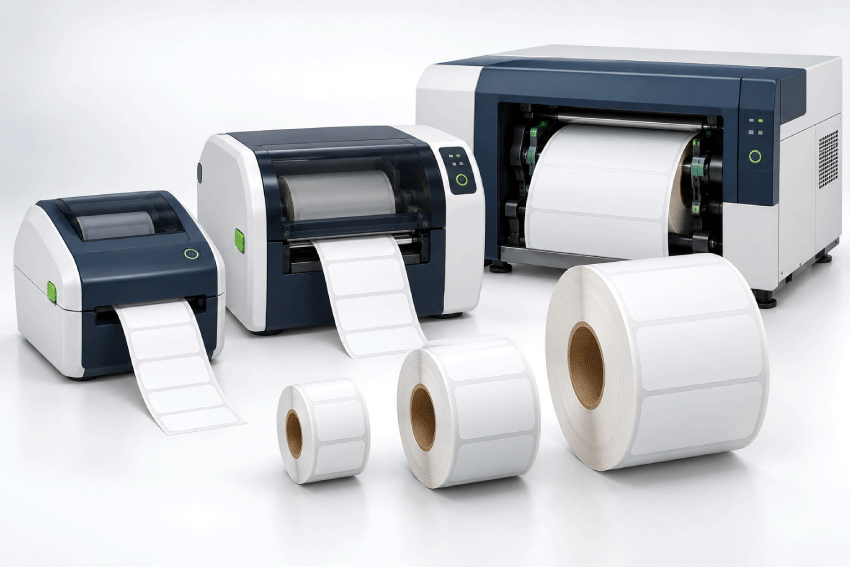
Matching blank inkjet roll labels to a printer requires more than selecting the label size or choosing a familiar brand name. Epson ColorWorks, Primera and Afinia models can have different media limits, sensing methods and roll configurations. Label and liner dimensions, core size, outside roll diameter, orientation and the coating required for the ink system all influence compatibility.
Use the brand guides and specification checks below to narrow the options for your exact model. Confirm the current media requirements in the printer documentation and check any applicator or cutting system used in the workflow. A test roll can help you evaluate feeding, sensing, print quality and the finished label on your product before a larger order.
Find Roll Labels for Your Printer
If you already know the brand of inkjet roll label printer you use, start with the appropriate printer-specific guide:
Labels for Epson ColorWorks Printers
Compatibility information for Epson ColorWorks roll-fed color label printers.
Labels for Primera LX Series Printers
Blank roll label guidance for Primera LX500, LX600, LX610, LX910, LX4000 and related printers.
Labels for Afinia Label Printers
Roll label compatibility guidance for Afinia L502, L801/L801 Plus, L901/L901 Plus and related equipment.

Browse All Blank Inkjet Roll Labels
How Do I Know if Roll Labels Will Fit My Printer?
Before ordering blank roll labels, check these seven specifications against the requirements for your exact printer model.
1. Label Width
The first label dimension normally represents the width of the label across the roll. Your printer must be capable of accepting both the label and its liner.
For example, a 3" x 5" roll label is typically 3 inches across the roll and 5 inches in the feed direction.
2. Label Length
The second dimension is the distance the label travels into the printer. Printers may have minimum and maximum label-length limits, so both dimensions need to be compatible.
3. Liner or Web Width
The backing liner is normally slightly wider than the label itself. A printer's maximum media width therefore needs to accommodate the entire liner, not just the face of the label.
4. Roll Core Diameter
The cardboard core in the center of the roll must match the printer or external media holder.
Common roll-label cores include:
- 2-inch cores used by certain compact printer configurations
- 3-inch cores commonly used by larger commercial and industrial inkjet label printers
Core size cannot be determined from label dimensions alone.
5. Maximum Outside Roll Diameter
The outside diameter (OD) is the overall diameter of a full roll of labels. A roll that is too large may not physically fit inside the printer even when the core and label width are correct.
Outside diameter is one of the most frequently overlooked roll-label specifications.
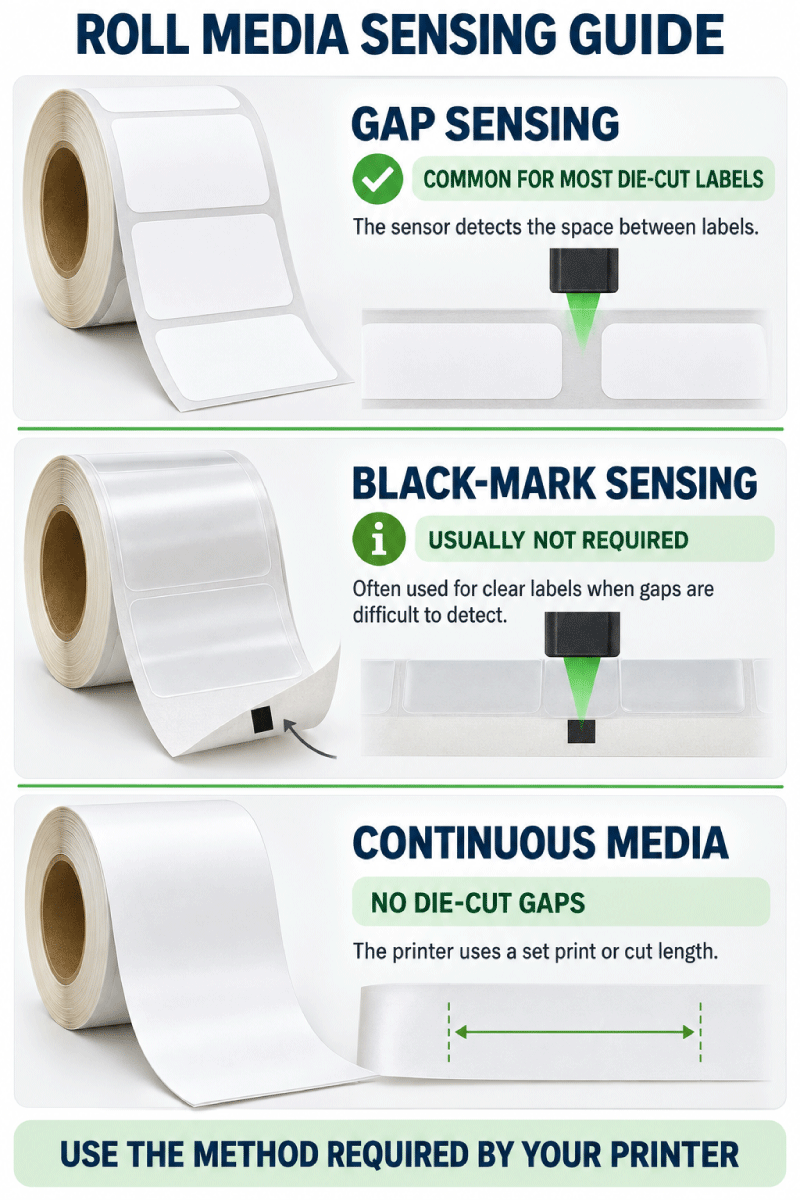
6. Media Sensing Method
The printer needs to know where one label ends and the next begins. Depending on the printer and media, this may be detected using:
- Gap sensing
- Black mark sensing
- Continuous-media mode
- Other printer-specific detection methods
7. Label Material and Ink Compatibility
Inkjet roll labels need a print-receptive surface appropriate for the printer's ink system. Paper, gloss, synthetic, polypropylene and other materials can behave differently depending on whether the printer uses dye, pigment or another ink formulation.
See our Inkjet Roll Label Materials Guide for more information.
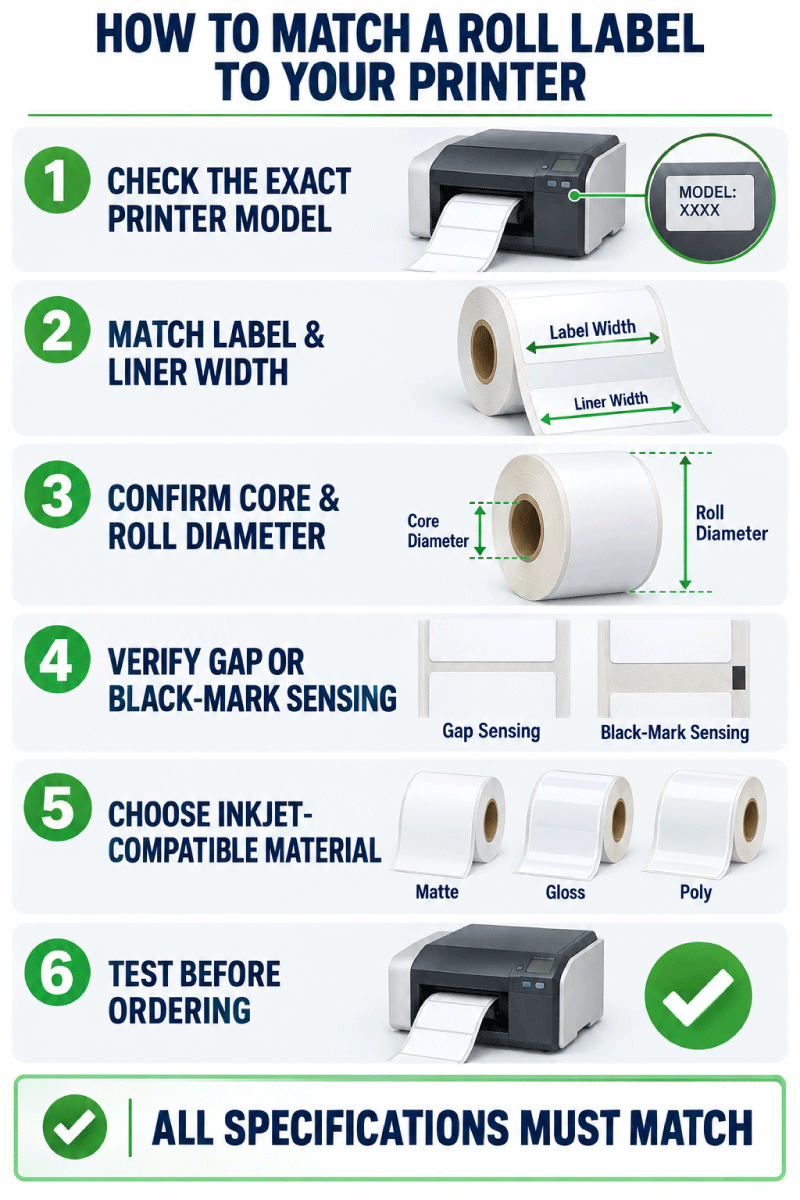
Start With the Exact Printer Model
Two printers from the same manufacturer can require very different roll configurations. For that reason, searching only for "Epson labels," "Primera labels" or "Afinia labels" is not enough to guarantee compatibility.
You should know the exact model number before selecting your roll configuration.
| Printer Family | Examples | What to Verify |
|---|---|---|
| Epson ColorWorks | C3500, C4000, C6000, C6500, C8000 and related models | Media width, core, OD, gap or black mark sensing, continuous-media capability and material |
| Primera LX Series | LX500, LX600, LX610, LX910, LX4000 | Maximum label width, core, OD, label length, sensing and ink type |
| Afinia Label | L502, L801/L801 Plus, L901/L901 Plus | Media width, 3-inch core requirements, roll OD, sensing and ink/media compatibility |
| Other Roll-Fed Inkjet Printers | VIPColor, AstroNova/QuickLabel, NeuraLabel, Colordyne and others | Always verify the complete media specifications for the exact printer |
Printer names and model numbers are provided to help customers identify potential compatibility. LaserInkjetLabels.com is not affiliated with or endorsed by the printer manufacturers referenced on this page.
What Core Size and Roll Diameter Do I Need?
Core size and outside roll diameter are two separate measurements.
Core diameter measures the cardboard tube in the center of the roll.
Outside diameter measures the complete roll from one outside edge to the opposite outside edge through the center.
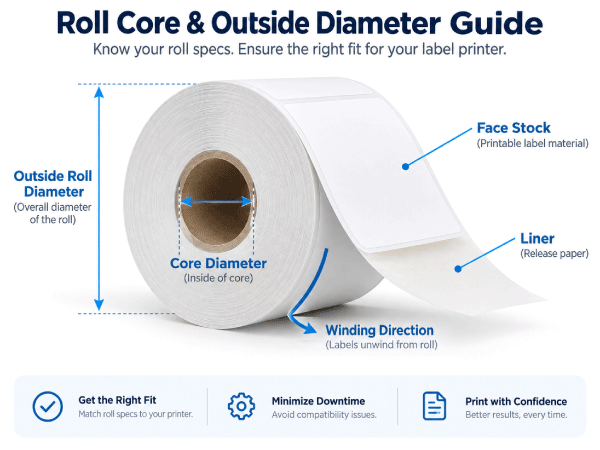
A printer may accept a particular label width but still be incompatible with a roll because the core is wrong or the finished roll is too large.
Never assume that a larger roll means more convenient printing. The roll must first fit the printer's media path or compatible external unwinder.
LaserInkjetLabels.com Roll Configurations
Depending on the label size and product, LaserInkjetLabels.com may offer different roll configurations designed for different printer capacities.
When comparing configurations, pay close attention to:
- Core diameter
- Outside diameter
- Number of labels per roll
- Liner width
- Label orientation
Our Double Capacity Rolls use a 3-inch core with a maximum 8-inch outside diameter.
Will These Roll Labels Work With Epson ColorWorks Printers?
Many LaserInkjetLabels.com blank inkjet roll labels can be used with compatible Epson ColorWorks printers when the label dimensions, liner width, core, outside diameter, sensing method and material meet the requirements of the specific Epson model.
Epson ColorWorks models are not interchangeable from a media standpoint. Compact printers and higher-capacity models can have significantly different roll requirements.
For example, different Epson ColorWorks families may use different:
- Maximum media widths
- Core requirements
- Internal roll diameters
- Gap and black-mark specifications
- Continuous-media settings
View Labels for Epson ColorWorks Roll Label Printers
What Roll Labels Fit Primera LX Printers?
Primera LX printers support different roll sizes depending on the exact model.
For example, the compact LX500 uses a different roll configuration from printers such as the LX600, LX610, LX910 and LX4000. That means a roll designed for one Primera printer should not automatically be assumed to fit another.
When buying blank labels for a Primera printer, verify:
- Minimum and maximum label width
- Maximum label length
- Core diameter
- Maximum roll OD
- Die-cut or continuous-media support
- Ink and material compatibility
For LX610 digital cutting, use Primera-approved continuous media with its identifying smart chip. Compatible pre-die-cut labels use a different workflow; do not assume ordinary continuous media can be used for digital cutting. See the LX610 media guide.
View Labels for Primera LX Roll Label Printers
What Roll Labels Work With Afinia Label Printers?
Afinia printers such as the L502, L801/L801 Plus and L901/L901 Plus are designed for roll-fed label production, but each model has defined requirements for media width, roll diameter, core size, sensing and material.
Several current Afinia commercial printer models use 3-inch cores, but their supported media widths and roll configurations differ.
Always match the roll specifications to the exact Afinia printer rather than relying on the brand name alone.
View Labels for Afinia Roll Label Printers
Does Roll Label Orientation Matter?
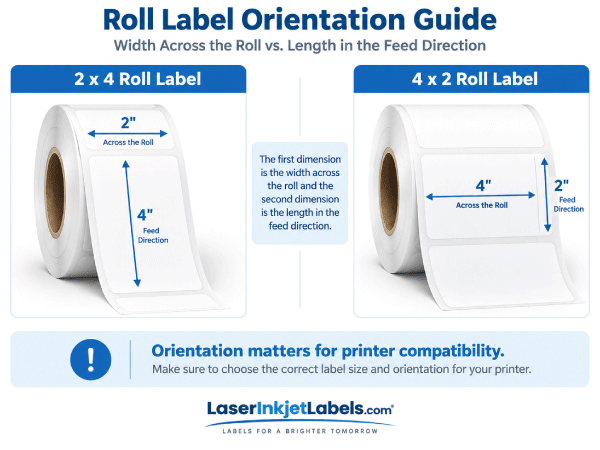
Yes. Orientation determines which label dimension travels across the printhead and which dimension travels in the feed direction.
For LaserInkjetLabels.com roll-label size listings, the first dimension should generally be treated as the dimension across the roll, while the second dimension is the dimension into the roll.
For example:
- 2" x 4" = approximately 2 inches across the roll and 4 inches in the feed direction
- 4" x 2" = approximately 4 inches across the roll and 2 inches in the feed direction
Those two labels may fit the same product but can have very different printer-compatibility requirements.
What Is Gap, Black Mark and Continuous Label Sensing?
Roll label printers use media sensors to determine where printing should start and stop.
Gap Sensing
Gap sensing detects the space between individual die-cut labels on the liner. It is commonly used for standard die-cut roll labels.
Black Mark Sensing
A black registration mark printed on the liner or media provides the printer with a reference point for each label or cut position.
Continuous Media
Continuous roll material has no predetermined die-cut label length. The printer uses continuous-media settings and, when available, a cutter to produce the required finished length.
See our Continuous Inkjet Roll Labels Guide if you need variable-length media.
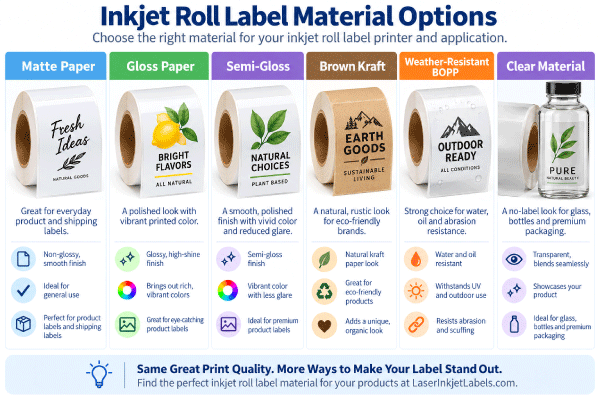
Which Label Material Should I Use in My Inkjet Roll Printer?
Physical roll compatibility is only half of the equation. The face material also needs to accept the printer's ink properly.
Depending on the printer and application, available materials may include:
- White matte paper
- Gloss paper
- Inkjet-coated synthetic materials
- Weather-resistant materials
- Polypropylene/BOPP materials
- Clear inkjet-compatible materials
- Specialty adhesive constructions
The best material depends on both the printer technology and the environment where the finished label will be used.
Compare Inkjet Roll Label Materials
Common Roll Label Printer Compatibility Mistakes
Buying by Label Size Alone
A 3" x 2" label is not automatically compatible with every printer that can print a 3-inch-wide image. The liner, core and complete roll still need to fit.
Ignoring the Liner Width
The label face may fit within the printer's maximum width while the backing liner does not.
Ordering the Wrong Core
A 2-inch and 3-inch core are not interchangeable unless the printer or media holder specifically supports both.
Ordering a Roll With Too Large an Outside Diameter
More labels per roll are useful only when the printer can physically accommodate the larger roll.
Assuming Every Printer From One Brand Uses the Same Media
Epson, Primera and Afinia each manufacture multiple printer families with different media requirements.
Ignoring the Media Sensor
The printer must be able to detect the die-cut gap, black mark or continuous-media configuration being used.
Using Non-Inkjet-Coated Label Material
A material can feed perfectly but still produce poor print quality if its surface coating is not suitable for the ink technology.
What Should I Check Before Ordering Blank Roll Labels?
Have the following information ready before choosing a roll configuration:
- Exact printer manufacturer and model
- Desired label width
- Desired label length
- Maximum supported liner/media width
- Required core diameter
- Maximum supported outside roll diameter
- Gap, black mark or continuous sensing requirement
- Preferred label material
- Application environment such as dry, refrigerated, oily or moisture-prone
If you are unsure about any of these specifications, provide us with the exact printer model and the label size you need.
Ask Us to Help Match a Roll Label to Your Printer
Shop Blank Labels for Inkjet Roll Label Printers
Once you have confirmed the label dimensions and printer specifications, browse our blank inkjet roll labels by size.
Browse All Blank Inkjet Roll Labels
Related Roll Label Pages
Printer Compatibility Guides
- Labels for Epson ColorWorks Roll Label Printers
- Labels for Primera Roll Label Printers
- Labels for Afinia Roll Label Printers
Shop & Learn About Roll Labels
- Shop Blank Inkjet Roll Labels
- Blank Roll Labels
- Blank Inkjet Roll Labels
- Inkjet Roll Label Materials
- Continuous Inkjet Roll Labels
- Custom Printed Roll Labels
Frequently Asked Questions About Inkjet Roll Label Printer Compatibility
How do I know what labels fit my inkjet label printer?
Start with the exact printer model. Compare the printer's supported media width, label-length range, core diameter, maximum outside roll diameter, sensing method and material requirements with the specifications of the roll labels you want to purchase.
Will LaserInkjetLabels.com roll labels work with Epson ColorWorks printers?
Many of our blank inkjet roll labels can work with compatible Epson ColorWorks printers when the roll size, liner width, core, outside diameter, sensing method and material meet the requirements for the exact ColorWorks model.
What labels fit Primera LX printers?
Compatibility varies by Primera model. The LX500, LX600, LX610, LX910 and LX4000 do not all use identical roll configurations. Verify the label width, core diameter, outside roll diameter and supported label length for your exact printer before ordering. For LX610 digital cutting, use Primera-approved continuous media with its identifying smart chip. Compatible pre-die-cut labels use a different workflow; do not assume ordinary continuous media can be used for digital cutting.
What labels work with Afinia printers?
Many Afinia roll-fed inkjet printers use 3-inch-core media, but maximum media width, outside roll diameter and other requirements vary by model. Check your exact Afinia model before ordering.
What is the core size of a label roll?
The core is the cardboard tube at the center of the roll. Common inkjet roll-label configurations use 2-inch or 3-inch cores, but the required core depends on the printer.
What does outside diameter mean on a roll of labels?
Outside diameter, often abbreviated OD, is the diameter of the complete roll when measured through its center. Your printer or external unwinder must be able to accommodate the finished roll diameter.
Is label width the same as liner width?
No. The liner or backing is normally wider than the face of the label. Printer compatibility should therefore be checked against the complete media width, not just the printed label width.
Does label orientation matter?
Yes. A 2" x 4" roll label and a 4" x 2" roll label can require very different printer widths even though they contain the same number of square inches. The first dimension normally represents the width across the roll.
What is gap sensing?
Gap sensing allows the printer to detect the space between die-cut labels so it knows where each label begins and ends.
What is black mark sensing?
Black mark sensing uses a printed registration mark on the media or liner to tell the printer where to position or cut each label.
Can I use continuous roll labels in an inkjet label printer?
Yes, when the printer supports continuous media. Continuous stock has a fixed width but no predetermined die-cut length, allowing the printer and cutter to establish the finished label length.
Do roll labels use the same templates as sheet labels?
No. Roll labels are designed for roll-fed label printers. Most compatible printers allow you to enter the label dimensions directly into the printer driver or label-design software, so a sheet-style template is generally not required.
Can I use roll labels in a standard desktop inkjet printer?
No. These roll labels are designed for compatible roll-fed label printers and are not intended for ordinary sheet-fed desktop inkjet or laser printers.
What information should I send if I need help finding compatible labels?
Send us the exact printer manufacturer and model, the label size you need and, if known, the required core size and maximum roll diameter. We can use that information to help identify an appropriate roll-label configuration.
Contact LaserInkjetLabels.com for Printer Compatibility Help
Browse All Blank Inkjet Roll Labels
Back to Blank Roll Labels