Finding the right label template is the first step to printing professional labels at home or at work. Our free label templates are available for every size and shape we carry — downloadable instantly in Microsoft Word, PDF, EPS, and JPG formats so you can start designing and printing right away. Whether you're printing address labels, shipping labels, product labels, or custom designs, every template is pre-formatted to match the exact dimensions of our blank label sheets, so your artwork lines up perfectly every time. No graphic design experience required.
Popular Label Templates
These are the most commonly downloaded label templates across our customer base, spanning address labels, shipping labels, product labels, and specialty sizes. Click any size to download your template or shop matching blank labels.
these sizes should link to individual templates page. EX: /2-625-x-1-Template/ and /2-x-4-template/
| Size | Shape | Common Use | Templates |
|---|---|---|---|
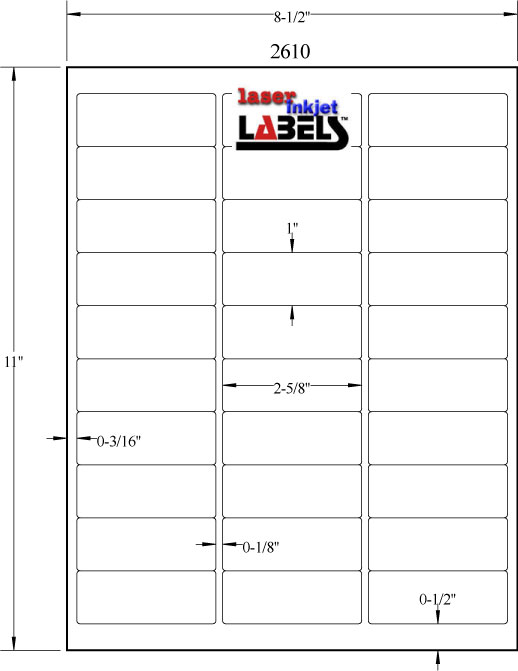
| 2 5/8 x 1 | Rectangle | Address labels, return address | JPG · Word · PDF · EPS |
| 4 x 6 | Rectangle | Shipping labels, carrier labels | JPG · Word · PDF · EPS |
| 2 x 4 | Rectangle | Shipping, barcodes, product labels | JPG · Word · PDF · EPS |
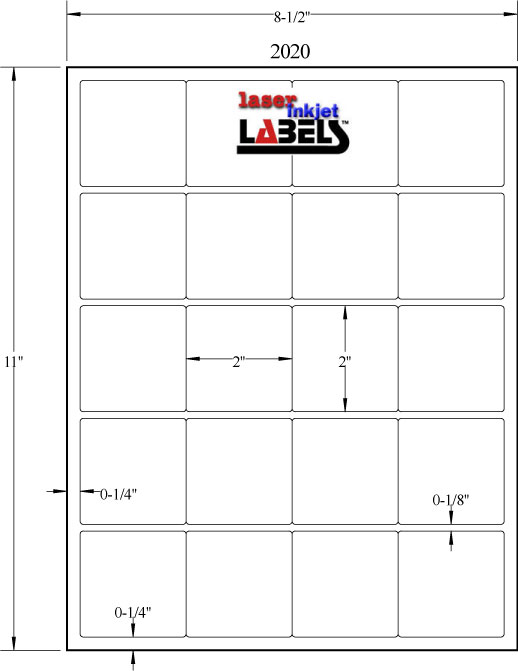
| 2 x 2 | Square | Product labels, jar lids, branding | JPG · Word · PDF · EPS |
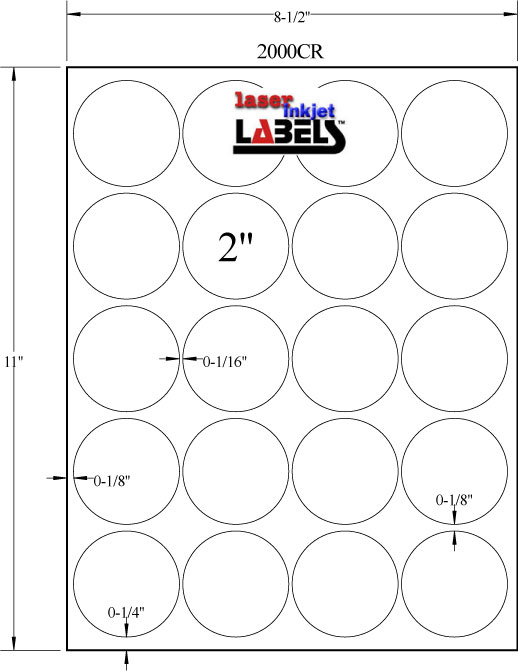
| 2" Circle | Circle | Jar lids, cosmetic labels, seals | JPG · Word · PDF · EPS |
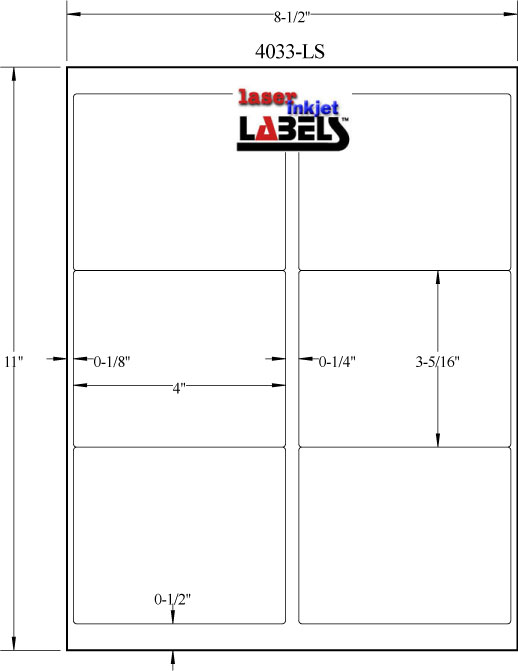
| 4 x 3.33 | Rectangle | Legal envelopes, product labeling | JPG · Word · PDF · EPS |
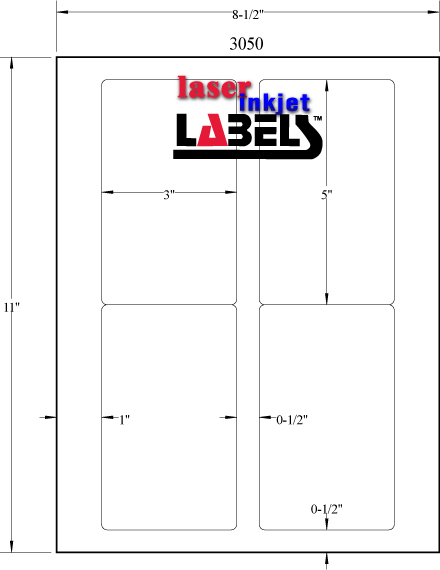
| 3 x 5 | Rectangle | Candle labels, food packaging | JPG · Word · PDF · EPS |
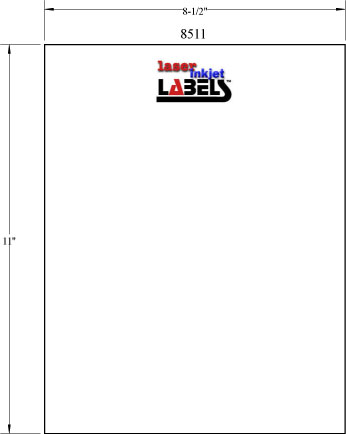
| 8.5 x 11 | Rectangle | Full sheet labels, large packaging | JPG · Word · PDF · EPS |


Browse Label Templates by Shape
Label shape affects both the look of your finished product and how your design fits within the template. Browse our free downloadable templates organized by shape to find the right starting point for your project.
Rectangle & Square Label Templates
Rectangle and square labels are the most versatile and widely used shapes in printing. They work across nearly every application — from shipping and address labels to product packaging, barcodes, inventory tags, and office organization. Our rectangle templates range from small 1/2" x 1" labels all the way up to full 8.5" x 11" sheet labels, giving you complete coverage for any job size or print run.
Browse all rectangle label templates
Circle Label Templates
Circle labels are a popular choice for jar lids, bottle tops, candle labels, cosmetic containers, and decorative seals. Their symmetrical shape makes them naturally eye-catching, and because there are no corners, designs tend to look clean and polished on curved surfaces. Our circle templates are available in sizes ranging from 1/2" up to 4" in diameter.
Browse all circle label templates
Oval Label Templates
Oval labels offer the softness of a circle with more horizontal surface area for text and design, making them a favorite for wine bottles, food jars, candles, and health and beauty products. Our oval templates are available in multiple sizes including popular wine and jar label dimensions.
Browse all oval label templates
Square Label Templates
Square labels deliver a clean, modern look that works well for product branding, promotional stickers, packaging seals, and box top labels. Our square templates include popular sizes like 1.8 x 1.8, 2 x 2, 2.5 x 2.5, and 3 x 3.
Browse all square label templates
CD & Specialty Label Templates
We also offer templates for CD labels, USPS Click-N-Ship labels, window labels, and integrated labels for packing slips and invoices. These specialty templates are formatted to exact postal and industry specifications.
Browse specialty label templates
Browse Label Templates by Size
Not sure which size you need? Use this quick-reference guide to find the right label template by dimension. All templates are free to download and pre-sized to match our blank label sheets exactly.
Small Label Templates (under 2")
Small labels are ideal for return addresses, price tags, jewelry tags, spice jars, lip balm tubes, and product coding. Popular small label template sizes include 1/2" circle, 3/4" circle, 1" circle, 1/2 x 1, 3/4 x 1.5, 1 x 1.125, and 1.5 x 2.
Medium Label Templates (2" – 4")
Medium labels cover the widest range of everyday applications including product labels, shipping labels, address labels, candle labels, and food packaging. This is the most popular size range in our catalog. Popular medium template sizes include 2 x 1, 2 x 2, 2 x 3, 2 x 4, 2.625 x 1, 3 x 5, 4 x 1, 4 x 2, 4 x 3, and 4 x 6.
Large Label Templates (4" and above)
Large labels are used for full-face product labels, shipping cartons, signage, and half-sheet or full-sheet applications. Popular large template sizes include 4 x 5, 4.25 x 5.5, 6 x 4, 7 x 5, 8 x 10, 8.5 x 5.5, and 8.5 x 11.
Circle Label Templates by Diameter
Circle label templates are available in the following diameters: 1/2", 3/4", 1", 1.5", 1.67", 2", 2.5", 3", 3.25", 3.33", and 4".
Oval Label Templates by Size
Oval label templates are available in: 2.5 x 1.75, 2.625 x 1.5, 2.621 x 2.1, 3.25 x 2, and 3.875 x 1.9375.
Need help learning how to use Label Templates using MicroSoft Word? Watch this video: Video Help for Word Templates


these sizes should link to individual templates page. EX: /2-625-x-1-Template/ and /2-x-4-template/
How to Use Label Templates
Our label templates are designed to work with the software you already have. Here is how to get started in each format.
How to Use the JPG Template
The JPG image shows the exact physical layout of labels on the sheet, with all dimensions, margins, and label spacing clearly marked. Use the JPG when your design software requires you to manually enter label dimensions, or when you want a visual reference before setting up your artwork. Print the JPG at 100% scale on plain paper first to verify alignment before printing on your label sheets.
How to Use the Microsoft Word Template
Right-click the Word template link and choose "Save As" to download it to your computer. Open the file in Microsoft Word. If the label outlines are not visible, go to the Layout tab and turn on View Gridlines. Type or paste your content directly into each label cell. When you are ready to print, load your blank label sheets into the printer tray and print at 100% scale — never use "fit to page" as this will scale your layout and cause misalignment.
How to Use the PDF Template in Illustrator or Inkscape
Right-click the PDF template link and save it to your computer. Open it in Adobe Illustrator, Inkscape, or your preferred design application. Lock the template as its own layer, then create a new layer above it for your artwork. Design within the label boundaries on the top layer. Before printing, hide or delete the template layer so the label outlines do not print on your finished labels.
How to Use the EPS Template
EPS templates are vector files best suited for Adobe Illustrator, CorelDRAW, and other professional design applications. Open the EPS file and use it as your base layout layer. Because EPS files are fully scalable vector files, they are the preferred format for high-resolution label artwork intended for professional printing.
Pro Tips for Template Printing
- Always print a test sheet on plain paper before loading your label stock to check alignment and margins.
- Always print at 100% scale — never use "shrink to fit" or "fit to page" settings.
- If labels are printing slightly off, adjust your printer's paper size setting to match the sheet dimensions exactly.
- Check out our Avery Compatible Size Chart if you are looking to match a specific Avery label number.
Shop Matching Blank Labels
Every template in our library corresponds directly to a blank label sheet available in our store. Once you have your template set up, shop the matching blank label in the material and finish that fits your application.
| If you are printing... | Recommended label material | Shop |
|---|---|---|
| Address labels, office labels | White uncoated | White Uncoated Labels |
| Product labels, packaging, branding | White semi-gloss or high gloss | Semi-Gloss Labels |
| Candle, cosmetic, or food labels | Gloss or kraft depending on brand style | High Gloss Labels · Kraft Labels |
| Outdoor, waterproof, or durable labels | Polyester or poly laser film | Clear Labels · Poly Laser |
| Temporary or repositionable labels | White removable adhesive | Removable Labels |
| Shipping labels | White uncoated or semi-gloss | Shop All Sheet Labels |
Not sure which material is right for your project? Visit our Label Material Guide or contact our team for a recommendation.
Frequently Asked Questions
Are these label templates free to download? Yes. Every label template on this page — in every format — is completely free to download with no account or purchase required.
What software do I need to use these templates? Microsoft Word handles the DOC templates, Adobe Acrobat or any PDF viewer opens the PDF templates, and Adobe Illustrator, Inkscape, or CorelDRAW work with the EPS files. The JPG images open in any photo viewer, browser, or design application.
Do these templates work with Avery label sizes? Many of our label sizes are compatible with Avery sizes. Visit our Avery Compatibility Chart to find the Avery equivalent for any size in our catalog.
Why is my label printing slightly off-center? The most common cause is a "fit to page" or "shrink to fit" print setting scaling your layout. Always print at exactly 100% scale. Also confirm your printer's paper size is set to Letter (8.5 x 11). Running a test print on plain paper before loading label sheets is the best way to catch alignment issues before they waste your label stock.
Can I use these templates with a roll label printer? These sheet-format templates are designed for standard 8.5 x 11 sheet label printers. Roll label printers use continuous roll stock and are typically set up through the printer's own software driver rather than a Word or PDF template.
Do the templates work for both inkjet and laser printers? The templates themselves work in any printer — they are just layout guides. What matters for print quality is using the correct blank label material for your printer type. Visit our blank labels page to shop by printer type.
Can I edit the templates in Canva or Google Docs? The PDF and JPG templates can be imported into Canva as background guides. Google Docs has limited support for precise label layouts, so Microsoft Word is recommended for the most accurate results. For professional design work, use the EPS or PDF template in Illustrator or Inkscape.
Need help learning how to use Label Templates using MicroSoft Word? Watch this video: Video Help for Word Templates
Back to Design Center