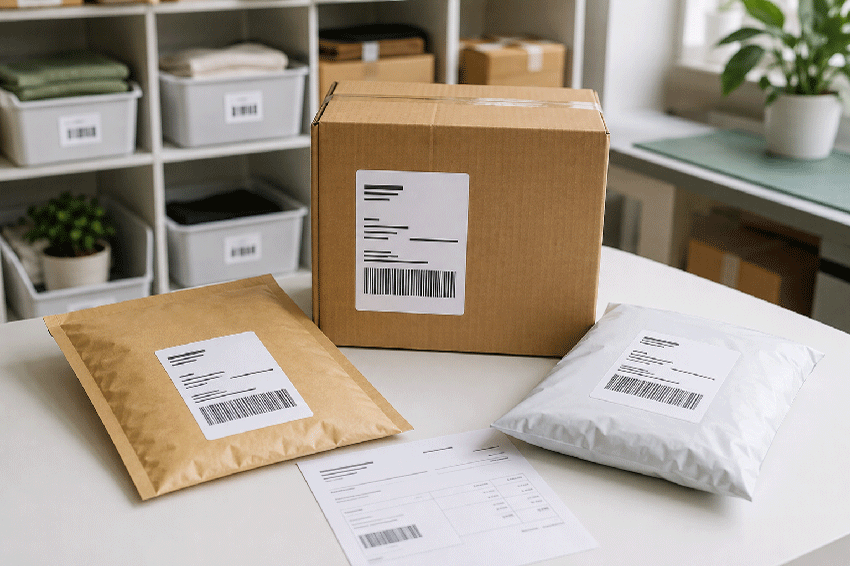
A Shopify store needs labels that keep physical orders accurate from picking through delivery. The first priority is usually the carrier shipping label: it must match Shopify’s selected print format, work with the merchant’s printer and remain flat and scannable on the package. Packing slips, customs documents, order-identification labels and inventory labels support the same fulfillment workflow.
This guide focuses first on shipping and fulfillment rather than on the labels applied to the products a merchant sells. It compares 8.5" × 11" letter-size labels, 4" × 6" shipping labels and conditional 8.5" × 5.5" half-sheet layouts. It also explains bulk printing, packing slips, customs forms, integrated-label workflows and optional packaging or inventory labels.
LaserInkjetLabels.com manufactures blank labels for compatible inkjet and laser printers. It does not sell direct-thermal labels. Always match the Shopify output, printer technology, media construction and page settings before printing a production batch.
Quick Answer
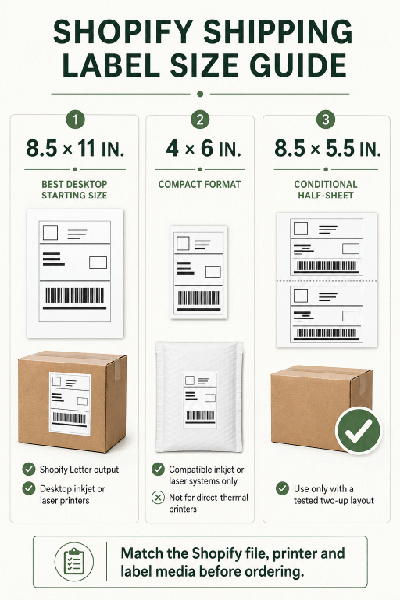
For a U.S. Shopify merchant using a standard desktop inkjet or laser printer, 8.5" × 11" letter-size adhesive sheets are the safest general starting point because Shopify lists Letter as its desktop-printer format. Shopify lists 4" × 6" as its thermal or label-printer format, so use 4" × 6" blank labels from LaserInkjetLabels.com only with a compatible non-thermal inkjet or laser system that correctly handles the file and media. Use 8.5" × 5.5" half-sheet labels only when a tested custom or app-generated layout aligns with the two-label sheet.
| Shopify Store Need | Recommended Starting Size | Best Use |
|---|---|---|
| Desktop shipping-label printing | 8.5" × 11" | Shopify’s Letter output on a compatible desktop inkjet or laser printer |
| Compact shipping-label output | 4" × 6" | Only with verified inkjet/laser printer and media compatibility; not for a direct-thermal printer |
| Tested half-sheet workflow | 8.5" × 5.5" | Two-up custom or third-party output that has been tested against the label template |
| Secondary package ID or routing | 4" × 3.33" or 4" × 2" | Order, routing or handling information separate from carrier postage |
| SKU, barcode or inventory ID | 2" × 1" or 3" × 2" | Compact inventory, bin, product and internal pick labels |
Important: Do not place a branding, SKU or handling label over the address, postage, service indicator, tracking barcode or required clear space on a Shopify-generated carrier label.
At-a-Glance Recommendations
| Best Overall Size for U.S. Desktop Fulfillment | 8.5" × 11" letter-size label |
|---|---|
| Shopify’s Compact Label-Printer Format | 4" × 6"; verify printer technology because Shopify identifies this as its thermal format |
| Best Material for Dry Boxes and Mailers | Permanent white uncoated paper |
| Best Desktop Print Method | Blank sheets in a compatible inkjet or laser printer |
| Best High-Volume Control | Batch orders by fulfillment location and keep each label with its matching packing slip |
| Best Placement | Largest clean, dry and flat panel away from seams, folds, curves and closures |
| Most Important Print Check | Confirm the complete carrier barcode is sharp, correctly scaled and unobstructed |
What Labels Do Shopify Stores Actually Need?
Shopify merchants sell everything from apparel and food gifts to electronics and handmade goods. The label attached to the product depends on what is being sold. Fulfillment labels are more universal: nearly every store shipping a physical order needs carrier postage, and growing stores often add packing, picking, customs and inventory labels.
| Document or Label | Required or Optional? | Purpose |
|---|---|---|
| Carrier shipping label | Required for shipment | Destination and return addresses, service, postage, tracking and carrier barcode |
| Packing slip | Optional but useful | Lists products, SKUs, quantities and order details for picking, checking and customer reference |
| Customs form | Required for applicable international shipments | Provides shipment information required for customs processing |
| Pick, order or SKU label | Optional | Supports batching, inventory control, location routing and order matching |
| Return-information label | Optional | Provides return instructions, a return address or an RMA reference when the workflow requires it |
| Branded packaging label | Optional | Seals tissue, closes a bag, carries a logo or presents a thank-you message |
| Product or compliance label | Depends on the product | Branding, ingredients, warnings, directions, size, barcode or legally required information |
This page concentrates on fulfillment. For labels attached to a specific product, use the appropriate guide for candle jars, cosmetic jars, food jars, product boxes or another application in the Label Size Guides library.
How Shopify Shipping-Label Printing Works
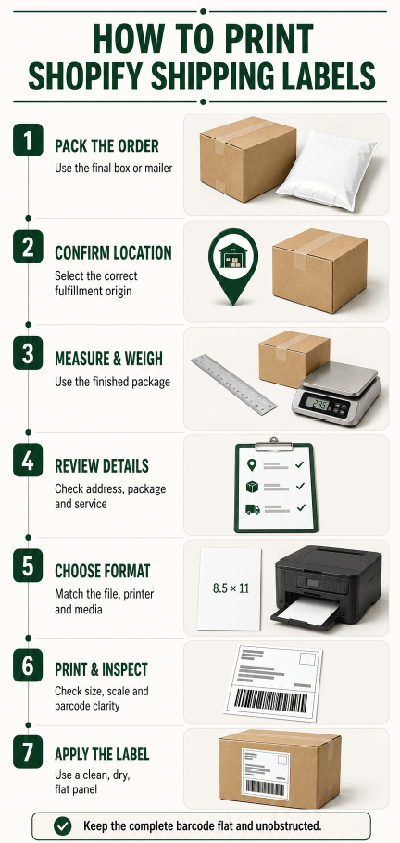
Shopify Shipping lets eligible merchants buy and print carrier labels from the Orders area. The merchant confirms the fulfillment location, package, weight, address and service, then chooses a paper size that matches the printer. Shopify currently identifies Letter and A4 as desktop-printer formats and 4" × 6" as the thermal or label-printer format. Shopify can also provide required customs documentation for applicable international shipments.
- Pack the order. Use the final box, mailer or shipping container before measuring.
- Confirm the fulfillment location. The shipping origin affects available rates, labels and documents.
- Measure and weigh the finished shipment. Use the packed dimensions and total weight.
- Review the address, package and service. Correct errors before purchasing the carrier label.
- Choose the print format. Match Letter, A4 or 4" × 6" output to the actual printer and media.
- Print without unintended scaling. Verify page size, orientation and scale in print preview.
- Inspect and apply. Check the complete address and barcode, then apply the label to a flat package panel.
Shopify’s interface and supported options can change. Confirm current requirements in Shopify’s official shipping-document printing instructions before standardizing a production workflow.
8.5" × 11" Letter-Size Labels: Best Desktop Starting Point
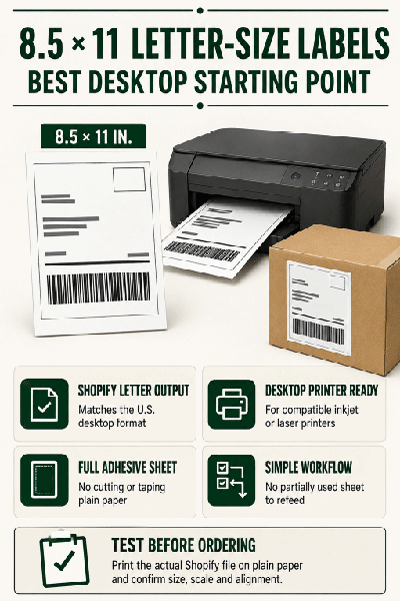
For U.S. stores using a standard desktop inkjet or laser printer, an 8.5" × 11" full-sheet label is the most direct match for Shopify’s Letter output. It provides an uninterrupted adhesive page and avoids relying on an unverified two-up layout.
Why Letter-Size Labels Work Well
- Shopify explicitly lists Letter as a desktop-printer paper size.
- The sheet feeds like familiar U.S. letter-size media in a compatible printer.
- The full adhesive area accommodates the generated label or document without cutting and taping plain paper.
- It is straightforward for stores with varied carriers or document layouts.
- It avoids refeeding a partially used label sheet.
Before purchasing in quantity, print the actual Shopify output on plain paper at the intended settings. Compare it with the label sheet and confirm that the merchant is comfortable using a full sheet for each generated page. Do not enlarge or shrink carrier content merely to fill the adhesive area.
Shop 8.5" × 11" Full-Sheet Labels
4" × 6" Labels: Verify Printer Technology First
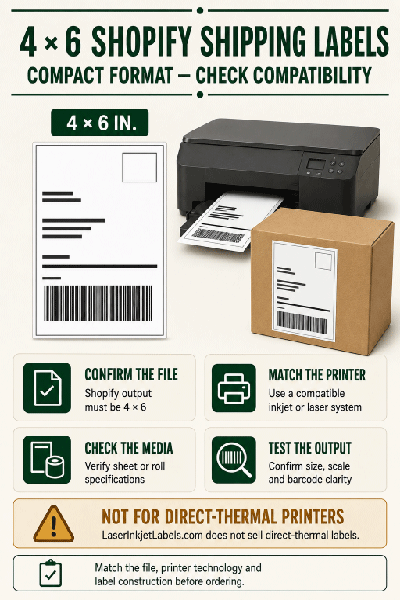
4" × 6" is the compact format widely associated with ecommerce shipping. Shopify’s current documentation describes 4" × 6" as its thermal or label-printer format. That does not mean every 4" × 6" blank label is compatible with every printer.
LaserInkjetLabels.com does not sell direct-thermal labels. Its 4" × 6" products should be selected only for a compatible inkjet or laser printer that accepts the exact sheet or roll construction and can print Shopify’s 4" × 6" output correctly. Do not purchase inkjet or laser labels for a printer that requires direct-thermal media.
Use 4" × 6" Inkjet or Laser Labels Only When:
- The Shopify file is generated at 4" × 6".
- The printer is inkjet or laser, not a direct-thermal model.
- The printer manufacturer approves the exact media size, thickness and construction.
- For rolls, core size, outer diameter, wind direction and sensing method are compatible.
- A test print confirms sharp barcodes, correct orientation and accurate scale.
Shop 4" × 6" Inkjet and Laser Labels
When Can a Shopify Store Use 8.5" × 5.5" Half-Sheet Labels?
Two 8.5" × 5.5" labels fit on a standard letter-size sheet, which can improve material yield. However, Shopify’s standard print-size list identifies Letter, A4 and 4" × 6"—not 8.5" × 5.5". Treat the half-sheet size as a conditional workflow rather than the default Shopify recommendation.
Use half-sheet labels only when a Shopify app, custom document template or other verified process positions the full carrier label on one half of the page. Print a real output file on plain paper and compare it with the 8.5" × 5.5" label template. Confirm which half prints first and whether the printer manufacturer permits refeeding a partially used sheet.
Bulk Shipping Labels and Packing Slips
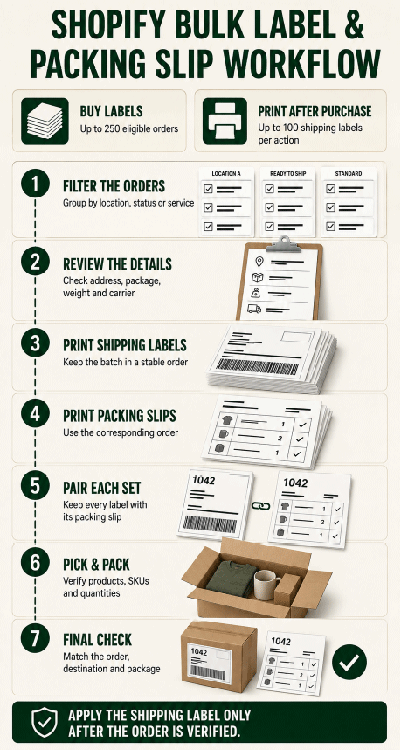
Shopify supports fulfillment at a scale beyond one order at a time. Its current instructions allow merchants to select up to 250 eligible orders when buying labels in bulk. Shopify’s separate post-purchase document screen currently limits one print action to 100 shipping labels. Packing slips can also be printed individually or in bulk from Orders. The practical challenge is keeping each carrier label, packing slip and group of products matched correctly.
A Reliable Batch Workflow
- Filter orders by fulfillment location, status, carrier or shipping method.
- Review addresses, package assignments, weights and services before buying labels.
- Print the carrier-label batch in a stable order.
- Print packing slips in the corresponding order.
- Keep each slip physically paired with the correct label while picking and packing.
- Scan or visually verify the order number, destination and package before sealing.
- Apply the shipping label only after the contents and destination are confirmed.
A packing slip is not a carrier shipping label. Shopify packing slips can show products, SKUs, quantities, shipping and billing details, and merchants can customize the template. Shopify’s Order Printer app can also create invoices, receipts and other order documents. Keep customer-facing documents inside the package unless the workflow specifically calls for an exterior document pouch.
Integrated-Label Forms
An integrated-label form combines a printable document and one or more removable adhesive labels on the same sheet. It can reduce matching steps when the Shopify document template and integrated-label position are designed for each other. It is not automatically compatible with Shopify: download the actual template, compare the label location and run a complete test before ordering.
Customs Documents for International Shopify Orders
International shipments may require a customs form in addition to the carrier label. Shopify can produce customs documentation when required, but the merchant remains responsible for accurate item descriptions, quantities, values, country of origin and other shipment information.
- Do not cover customs information with a branding or handling label.
- Follow the carrier’s instructions for attaching forms or using a document pouch.
- Keep the carrier barcode and customs barcodes flat and visible.
- Use the final package weight and dimensions.
- Review destination-country and carrier requirements before shipping.
Customs rules vary by shipment and can change. Use Shopify and the selected carrier as the operational source for current requirements.
Secondary SKU, Barcode and Inventory Labels
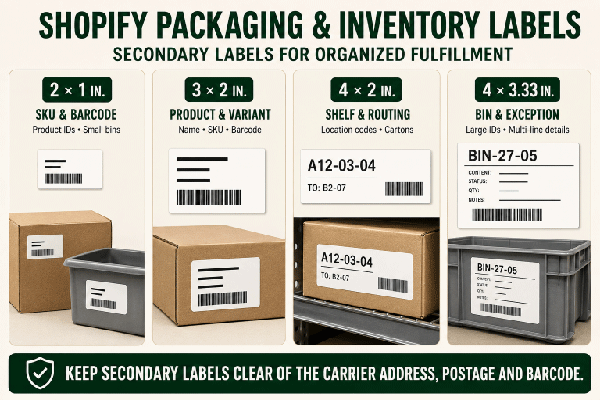
Shopify stores with more products, variants or fulfillment locations often use small internal labels to connect physical inventory with digital records. These labels do not replace the carrier label. They help workers find, verify and replenish products before the order is packed.
| Size | Common Shopify Store Use | Planning Note |
|---|---|---|
| 2" × 1" | Compact SKU, short barcode, product ID or bin label | Keep human-readable text large enough for the viewing distance |
| 3" × 2" | SKU plus product name, variant, barcode or location | Useful when staff need more context than a compact code |
| 4" × 2" | Shelf, tote, carton or longer location label | Provides room for a large location code and secondary text |
| 4" × 3.33" | Large bin, case, routing or exception label | Better for distance viewing and multi-line information |
Shopify’s Retail Barcode Labels app can generate product barcode labels for compatible workflows. Before selecting a blank layout, test the exact app output, barcode symbology, printer settings and scanner performance. A larger label does not correct an invalid or poorly printed barcode.
Optional Branded Packaging Labels
After shipping accuracy is secure, a Shopify merchant may add a separate logo, seal, thank-you, care or promotional label. These labels can reinforce the store’s identity, but they must not interfere with carrier information or package closures.
| Packaging Use | Starting Size | Best Fit |
|---|---|---|
| Small logo or tissue seal | 1.5" round | Small bags, tissue and compact packages |
| General logo or thank-you seal | 2" round | Mailers, boxes, tissue and envelopes |
| Larger branded closure | 2.5" round | Larger boxes, bags and bold logo applications |
| Thank-you, care or social message | 3" × 2" | Several lines of readable customer-facing information |
Place promotional labels away from the carrier label, seams and opening edges. If a label is being used as a tamper seal, test the face stock, adhesive and package surface under actual shipping conditions.
Best Materials for Shopify Shipping and Fulfillment Labels
| Material | Best For | Important Consideration |
|---|---|---|
| White uncoated paper | Everyday boxes, cartons and mailers in dry conditions | Good print contrast and economical; not waterproof |
| White matte paper | Clean text, barcodes and a refined non-gloss appearance | Confirm the coating is compatible with the printer |
| Weather-resistant white poly or BOPP | Packages exposed to moisture, condensation, abrasion or heavier handling | Test ink or toner adhesion and package adhesion before production |
| Removable paper | Temporary tote, bin, shelf or internal routing labels | Not the first choice for a carrier label that must stay attached in transit |
| Clear film | Selective branded packaging uses | Usually unsuitable for carrier barcodes because the package can reduce contrast |
Permanent white paper is the practical starting point for most clean corrugated boxes and smooth mailers. Move to a printer-compatible film when the fulfillment environment genuinely requires greater moisture or abrasion resistance. Test on the actual package surface; recycled board, textured paper, flexible mailers and cold containers can behave differently.
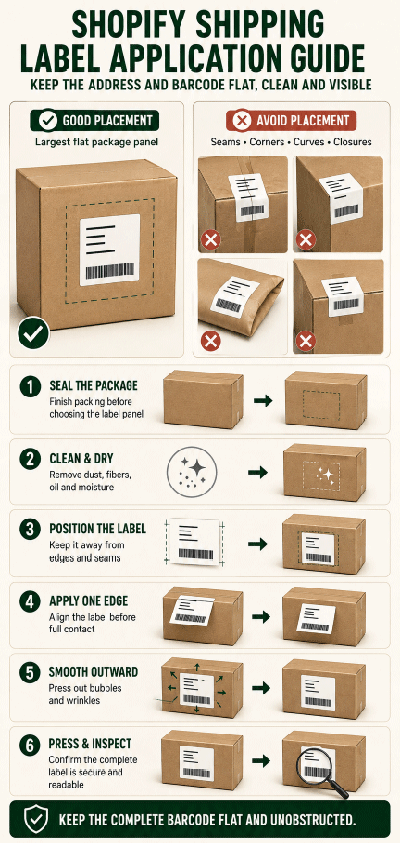
How to Apply a Shopify Shipping Label
- Seal the final package before choosing the label panel.
- Select the largest clean, dry and flat surface.
- Remove dust, fibers, oil or moisture that could weaken adhesion.
- Keep the label away from seams, corners, curves, closures and perforations.
- Apply one edge first, then smooth the label outward to reduce bubbles and wrinkles.
- Press firmly across the complete label, especially around the barcode.
- Confirm the address, service and tracking barcode remain fully visible.
Should I Put Clear Tape Over the Label?
A pressure-sensitive shipping label normally does not need tape. Glossy tape can create glare, wrinkles or bubbles over a tracking barcode. Follow the carrier’s instructions and avoid reflective tape across scan-critical areas.
Blank Sheets, Rolls or Integrated Labels?
| Format | Best For | Shopify Workflow Check |
|---|---|---|
| Blank sheets | Most desktop inkjet and laser printers, small to medium batches and flexible label sizes | Letter-size sheets are the clearest match for Shopify’s U.S. desktop output |
| Inkjet rolls | Compatible roll-fed inkjet printers and repeat production | Match size, core, outside diameter, wind direction, gap and sensing method; not direct thermal |
| Integrated labels | Combined packing document and removable adhesive label workflows | The document template must align exactly with the integrated-label position |
Choose the format from the printer and workflow, not from label dimensions alone. A 4" × 6" inkjet roll and a 4" × 6" direct-thermal roll may share dimensions but are not interchangeable.
Common Shopify Label Mistakes
- Assuming every 4" × 6" label is thermal-compatible. Printer technology and media construction must match.
- Treating half-sheet labels as a native Shopify format. Use them only with tested output that aligns correctly.
- Using the wrong fulfillment location. Shipping origin affects rates and label details.
- Entering product dimensions instead of packed dimensions. Measure and weigh the finished shipment.
- Scaling the carrier label to fill a sheet. Unintended scaling can affect barcode readability.
- Mixing labels in a bulk batch. Keep each label, packing slip and order together.
- Placing labels over seams or curves. Barcodes must remain flat and unobstructed.
- Using clear stock for scan-critical labels. The underlying package can reduce contrast.
- Skipping adhesion and scanner tests. Test the printer, label, package and scanner as one system.
Frequently Asked Questions
What is the best label size for Shopify shipping?
For a U.S. Shopify store using a standard desktop inkjet or laser printer, 8.5" × 11" letter-size labels are the safest general starting point because Shopify lists Letter as a desktop-printer format.
Can I print Shopify shipping labels with an inkjet or laser printer?
Yes. Shopify supports desktop-printer output in Letter and A4 sizes. Use printer-compatible inkjet or laser media, select the matching paper size and test the real output before printing a batch.
Can I use 4" × 6" labels for Shopify orders?
Shopify provides 4" × 6" output as its thermal or label-printer format. LaserInkjetLabels.com does not sell direct-thermal labels, so its 4" × 6" products should be used only with a compatible non-thermal inkjet or laser printer that accepts the exact media.
Can I use 8.5" × 5.5" half-sheet labels with Shopify?
Only when a tested app, custom template or other workflow places the complete output on one half of a letter-size sheet. Half-sheet is not one of Shopify’s listed standard paper sizes, so compare a plain-paper test with the label template first.
How many Shopify shipping labels can I buy in bulk?
Shopify’s current Help Center allows merchants to select up to 250 eligible orders when buying labels in bulk. Its separate post-purchase document screen currently limits one print action to 100 shipping labels. Review every order, package, address and service before purchasing a large batch.
Do Shopify orders need packing slips?
A packing slip is separate from carrier postage and is not always required, but it helps with picking, checking and customer reference. Shopify can print packing slips individually or in bulk.
Can I customize Shopify packing slips?
Yes. Shopify supports packing-slip template customization, and its Order Printer app can create additional order documents. Test any customized output before pairing it with an integrated-label form.
What should I do for international Shopify orders?
Complete all required customs information accurately and print the customs documents Shopify or the carrier provides. Follow the carrier’s current instructions for placement or document pouches, and keep all barcodes visible.
What label material is best for Shopify packages?
Permanent white uncoated paper is a practical starting point for clean, dry boxes and mailers. Use a printer-compatible white film when more resistance to moisture or abrasion is needed, and test adhesion on the actual package.
Where should I place a Shopify shipping label?
Use the largest clean, dry and flat package panel. Avoid seams, folds, closures, corners, curves and heavily textured areas, and keep the complete carrier barcode flat.
Can I print SKU or barcode labels for Shopify inventory?
Yes. Shopify’s Retail Barcode Labels app can support compatible product-label workflows. Select the label size from the required content and scanner needs, then test the exact output, printer and barcode before production.
Can I use roll labels for Shopify shipping?
Only when the roll construction and printer technology match. Confirm size, core, outside diameter, wind direction, sensing method and inkjet compatibility. Do not use LaserInkjetLabels.com roll labels in a printer that requires direct-thermal media.
How should I test labels before fulfilling customer orders?
Generate a real Shopify document, print it with the intended printer settings, verify scale and alignment, scan the barcode when possible, apply it to the actual package and test adhesion before printing a larger batch.
Shop Labels for Shopify Shipping and Fulfillment
- 8.5" × 11" Full-Sheet Labels
- 4" × 6" Inkjet and Laser Labels
- 8.5" × 5.5" Half-Sheet Labels
- 4" × 3.33" Package Labels
- 4" × 2" Address and Routing Labels
- 3" × 2" Inventory and Packaging Labels
- 2" × 1" SKU and Barcode Labels
- All Blank Sheet Labels
Related Guides
- What Size Label for Mailing Labels?
- What Size Label for Return Labels?
- What Size Label for Inventory Labels?
- Labels for Etsy Sellers
- All Label Size Guides
Shopify is a trademark of Shopify Inc. LaserInkjetLabels.com is not affiliated with or endorsed by Shopify Inc. Platform features and print options may change; verify current settings in Shopify before purchasing labels.
If you still need help choosing a layout, print the actual Shopify file on plain paper, measure the printed area and compare it with a downloadable template. Our team can help identify a compatible blank label once the output size, printer technology and application surface are known.
See All Label Templates | See All Label Sizes
Questions? Call 888-933-8498 or contact LaserInkjetLabels.com.