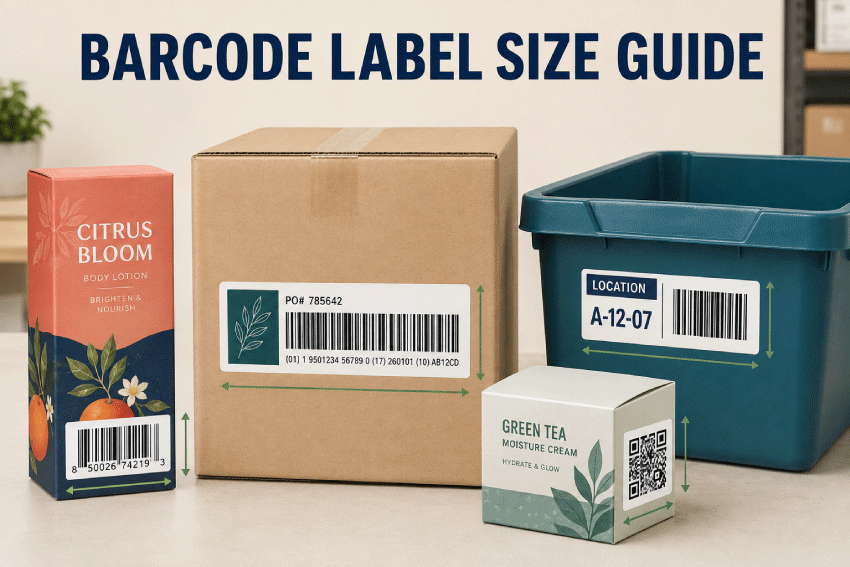
Choosing a barcode label size involves more than measuring the black bars or square code. The adhesive label must provide enough room for the complete barcode symbol, required quiet zones, human-readable numbers, product text and a margin that keeps the printed code away from the label edge. It must also fit the package, print clearly on the selected printer and scan reliably in the environment where it will be used.
A label that looks large enough on a computer screen can fail after printing if the barcode is reduced too far, stretched, placed too close to an edge, printed on a reflective surface or wrapped around a curve. The correct dimensions depend on the barcode type, encoded data, scanner, printing resolution, package surface, viewing distance and any standards that apply to the application.
This guide explains practical label-size starting points for UPC-A and EAN-13 retail barcodes, Code 128 and GS1-128 logistics codes, QR Codes, Data Matrix symbols, warehouse location labels, inventory labels and product-box barcodes. These recommendations are starting points for testing—not substitutes for the applicable GS1, retailer, carrier, customer or regulatory requirements.
LaserInkjetLabels.com offers blank labels on sheets, blank labels on rolls and custom printed labels for barcode, inventory and product-identification applications.
Quick Answer: What Size Label Do I Need for a Barcode?
The best barcode label is large enough to contain the complete barcode at an appropriate size, preserve every required quiet zone and leave additional space between the symbol and the physical label edge. For many product and inventory applications, labels between 1" × 1" and 4" × 3" provide useful starting points. The final label size depends on the type of barcode and how much additional text must appear with it.
| Barcode Application | Practical Label Starting Points | Primary Consideration |
|---|---|---|
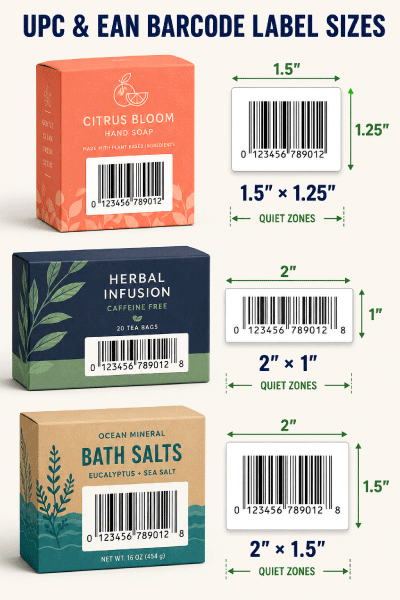
| UPC-A or EAN-13 retail barcode | 1.5" × 1.25", 2" × 1", 2" × 1.5" | Preserve the required symbol proportions, bar height and quiet zones. |
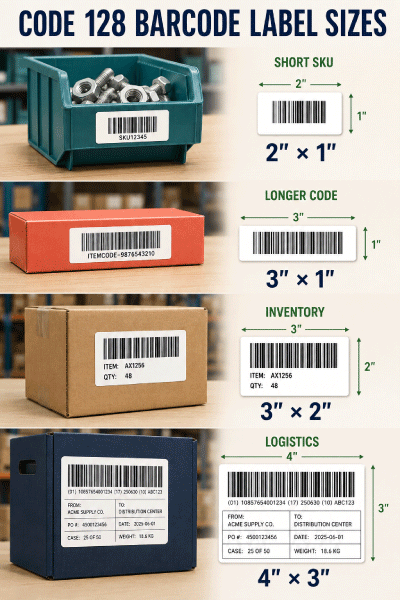
| Code 128 inventory or SKU barcode | 2" × 1", 2" × 1.5", 3" × 1", 3" × 2" | More encoded characters generally create a wider symbol. |
| GS1-128 logistics barcode | 3" × 2", 4" × 2", 4" × 3" | Encoded Application Identifiers and data determine symbol width. |
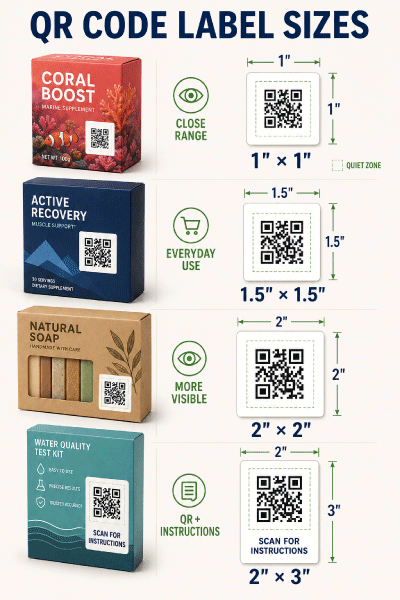
| QR Code | 1" × 1", 1.5" × 1.5", 2" × 2", 2" × 3" | Preserve the square symbol and four-module quiet zone on every side. |
| Data Matrix or compact 2D code | 0.75" × 0.75", 1" × 1", 1.5" × 1.5" | Module size, print resolution and scanner capability control the minimum. |
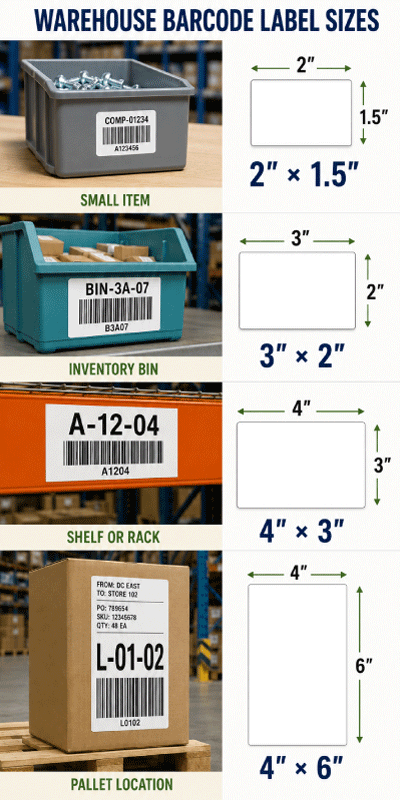
| Warehouse bin, shelf or pallet location | 3" × 2", 3" × 3", 4" × 3", 4" × 6" | Increase barcode and text size for greater scanning distance. |
Important: Do not choose a label solely from this table. Generate the final barcode with the exact data, print it at 100% scale on the intended printer, apply it to the actual product or location and test it with the scanners and software used in production.
Barcode Symbol Size and Adhesive Label Size Are Not the Same
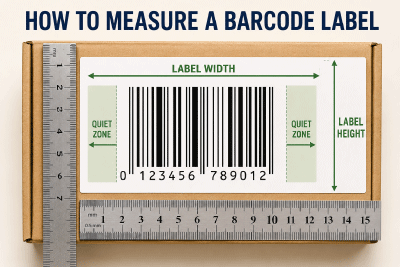
The barcode symbol is the scannable pattern. The barcode label is the physical adhesive piece that holds the symbol and any supporting information. The label must be larger than the barcode because the printed symbol needs clear space around it.
- Symbol width: The complete width of the bars or modules plus required quiet zones.
- Symbol height: The required bar height for a linear barcode or the complete square height of a 2D code.
- Quiet zone: Blank space surrounding the symbol that must remain free of text, borders, graphics and package edges.
- Human-readable interpretation: Numbers or text printed with the barcode so the data can be read when scanning is unavailable.
- Label-edge margin: Extra space between the required symbol area and the physical edge of the adhesive label.
- Supporting content: Product name, SKU, location, lot, expiration date, price or instructions printed outside the quiet zone.
When the label is cut exactly to the barcode footprint, normal printing and application variation can place a required quiet zone against the edge or onto the package background. A modest additional margin makes alignment easier and protects the code from nearby graphics.
At-a-Glance Barcode Label Recommendations
| Best General Shape | Rectangle for linear barcodes; square or rectangle for QR and Data Matrix codes |
|---|---|
| Best Color Combination | Dark barcode on a clean, light, non-patterned background |
| Best Everyday Material | White Uncoated or Semi-Gloss Paper for clean, dry indoor use |
| Best Moisture-Resistant Choice | White Matte BOPP, Glossy BOPP or compatible laser poly |
| Best for Small Batches | Blank sheet labels printed with a compatible desktop laser or inkjet printer |
| Best for Regular Production | Roll labels used with a compatible roll-fed label printer |
| Best for Variable Data | Sheet or roll labels printed from barcode software connected to clean source data |
| Best Quality Check | Verify the final printed and applied barcode—not only the digital artwork |
Common Barcode Types and Their Label-Size Needs
| Barcode Type | Common Use | How Size Is Determined |
|---|---|---|
| UPC-A | Retail products commonly sold in the United States and Canada | GS1 application specifications define X-dimension, bar height and quiet zones. |
| EAN-13 | Retail products used internationally | Similar dimensional controls to UPC-A, with required quiet zones and bar height. |
| Code 128 | SKUs, inventory, assets, work orders and internal tracking | Width changes with data length, character set and selected X-dimension. |
| GS1-128 | Cases, logistics and structured GS1 data | Application Identifiers, encoded data and the applicable GS1 specification determine size. |
| QR Code | Web links, instructions, promotions, authentication and product information | Version, data, error correction, module size, scanning distance and quiet zone affect size. |
| Data Matrix | Small-item identification, components, healthcare and industrial applications | Symbol dimensions depend on encoded data, module size and the governing application rules. |
Never convert one barcode type into another merely to fit a preferred label. The required symbology comes from the retailer, trading partner, internal system, carrier, customer or regulatory program that will read the code.
UPC-A and EAN-13 Barcode Label Sizes
UPC-A and EAN-13 symbols used at general retail point of sale are controlled by GS1 specifications. At the GS1 target X-dimension of 0.330 millimetre, the complete EAN-13 or UPC-A width—including minimum quiet zones—is 113 modules, or approximately 37.3 millimetres (1.47 inches). The target bar height is 22.85 millimetres (0.90 inch), before allowing for the human-readable digits and additional label margin.
GS1 also lists a minimum X-dimension of 0.264 millimetre for general retail point-of-sale symbols, with a minimum bar height of 18.28 millimetres (0.72 inch). That smaller size should not be treated as permission to squeeze every UPC onto the smallest possible label. Print process, resolution, substrate, scanner performance and retail requirements still matter, and larger compliant symbols are generally easier to scan.
| Label Size | When It May Work | Planning Note |
|---|---|---|
| 1.5" × 1.25" | Compact UPC/EAN layouts when the verified symbol and digits fit with adequate margins | Test carefully; the full-size target symbol is approximately 1.47 inches wide before additional label margin. |
| 2" × 1" | Wide, compact barcode-only layouts using an appropriately sized verified symbol | Confirm that human-readable digits, bar height and top/bottom clearance fit. |
| 2" × 1.5" | UPC/EAN plus product name, SKU or price | Provides more vertical room and easier separation between text and quiet zones. |
| 2" × 3" | Product identification label with barcode, description and secondary information | Use portrait or landscape orientation according to the package panel. |
| 3" × 2" | Roomy retail, case or multipurpose barcode label | Supports a generous symbol, text and application margin. |
Code 128 and GS1-128 Barcode Label Sizes
Code 128 is a high-density linear symbology frequently used for internal product codes, inventory, assets, work orders and shipping-related data. GS1-128 is a structured subset of Code 128 that uses GS1 Application Identifiers. They are related, but they are not interchangeable.
A Code 128 symbol does not have one fixed physical width. Its width changes with the number and type of encoded characters, the selected code set and the X-dimension. A short numeric SKU may fit comfortably on a 2-inch-wide label, while a long alphanumeric value or GS1-128 string may need 3, 4 or more inches.
GS1 specifies compulsory left and right quiet zones for GS1-128 of at least 10 times the X-dimension. GS1 also limits the complete symbol length, including quiet zones, to 165.10 millimetres (6.5 inches) and limits the encoded data characters. The application specification determines the permitted X-dimension and height.
- 2" × 1" for short internal SKUs or asset codes.
- 2" × 1.5" when a description, item number or location appears with the code.
- 3" × 1" for wider Code 128 symbols with limited supporting text.
- 3" × 2" for inventory and product labels with readable descriptions.
- 4" × 2" for longer logistics data and greater scanning distance.
- 4" × 3" for cases, warehouse handling and multi-field labels.
QR Code Label Sizes
A QR Code is square, but it does not have one universal physical size. The number of modules changes with the symbol version and encoded data. The printed module size, scanner or phone camera, viewing distance, contrast, surface and error-correction setting all influence the final size.
DENSO WAVE, the developer of QR Code, specifies a clear margin four modules wide on every side. Nothing should enter that quiet zone—not a border, product photograph, background pattern, text or the physical label edge. The adhesive label therefore needs to be larger than the QR symbol area.
| Label Size | Typical Starting Use | Important Test |
|---|---|---|
| 1" × 1" | Simple short-data QR Code scanned at close range | Confirm adequate module size and the full four-module quiet zone. |
| 1.5" × 1.5" | General product information, menus, instructions or web links | Test with multiple phones under normal lighting. |
| 2" × 2" | More visible consumer-facing QR Code or longer scanning distance | Verify the applied code remains flat and free of glare. |
| 2" × 3" | QR Code plus a call to action, instructions or short URL | Keep all supporting copy outside the four-module quiet zone. |
| 3" × 3" | Large displays, cartons, kits or warehouse scanning | Match the size to the intended viewing and scanning distance. |
Encoding a long tracking URL directly can create a denser symbol with smaller modules. A short, stable redirect URL can simplify the QR Code and allow the destination to be updated later, but the redirect must be maintained for as long as the printed labels remain in circulation.
Data Matrix and Small 2D Barcode Labels
Data Matrix can encode information in a compact square or rectangular symbol and is used in industrial, component, healthcare and small-item applications. A small-looking code is not automatically easy to print or scan. The minimum module size, quiet zone, print quality and data structure depend on the application standard and scanning system.
Labels measuring 0.75" × 0.75", 1" × 1" and 1.5" × 1.5" can be useful physical starting points for compact 2D codes, but the final symbol should be generated from the actual data and verified after printing. Use a larger label when human-readable text, a part number, lot information or instructions must appear beside the code.
Warehouse, Shelf, Bin and Inventory Barcode Labels
Warehouse barcode labels often need to scan from farther away than a product barcode at a checkout counter. A worker may scan a shelf from several feet away, a forklift operator may read a location label from an aisle or a receiving team may scan cases while they are moving. Increasing the physical size of the code and supporting text can improve visibility, but the code must still be printed within the requirements of the chosen symbology.
| Warehouse Application | Practical Starting Size | Layout Recommendation |
|---|---|---|
| Small item or component | 2" × 1" or 2" × 1.5" | Barcode plus short item number. |
| Inventory bin | 3" × 2" | Large barcode with bold human-readable location. |
| Shelf or rack beam | 4" × 2" or 4" × 3" | High-contrast code and location visible from the aisle. |
| Case or carton | 4" × 3" or 4" × 6" | Keep the code away from seams, tape, corners and corrugated ridges. |
| Pallet or long-distance location | 4" × 6" or larger tested format | Coordinate symbol size with scanner range and installation height. |
How to Measure a Product or Location for a Barcode Label
- Identify the required barcode type. Confirm the symbology, data structure and standards before designing the label.
- Generate the final barcode. Use the exact data and intended X-dimension or module size. A placeholder code may have a different width or density.
- Measure the complete symbol. Include quiet zones, required bar height and human-readable interpretation.
- Add supporting content. Allow room for the SKU, product name, location, lot, date or instructions without entering the quiet zone.
- Add label-edge margin. Leave space for normal printing, cutting and application variation.
- Measure the usable package panel. Avoid curves, seams, folds, ridges, windows, tape paths and areas that will be covered.
- Print at 100% scale. Do not use “fit to page” or automatic scaling.
- Apply and scan the final label. Test the actual printer, material, package, scanner, software and operating distance.
Measure the package after it is filled and closed. Flexible bags can bow, bottles can introduce curvature and corrugated boxes can create ridges that were not apparent on a flat sample.
Barcode Label Layouts
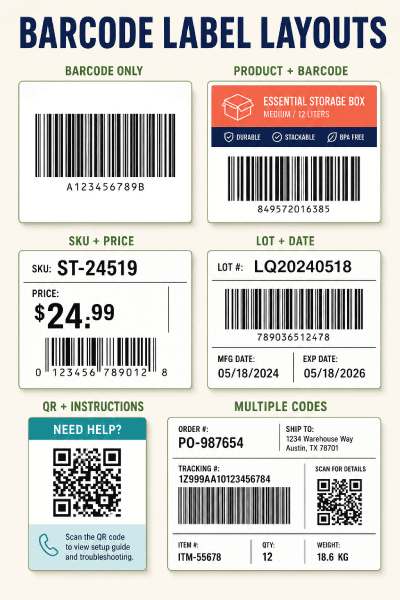
The barcode should be the most protected element in the layout. Keep decorative artwork, borders and text outside its quiet zones. Place supporting information where it remains easy to read without reducing the barcode below the required size.
- Barcode only: Useful when the item number is already built into the human-readable interpretation.
- Barcode with product name: Supports picking, receiving and manual verification.
- Barcode with SKU and price: Useful for retail, inventory and temporary product identification.
- Barcode with lot or date: Provides variable production information without changing the main package artwork.
- QR Code with call to action: Explains why a customer should scan and what information will open.
- Multiple codes: Separate every symbol and label each purpose so scanners and users do not select the wrong code.
Best Materials for Barcode Labels
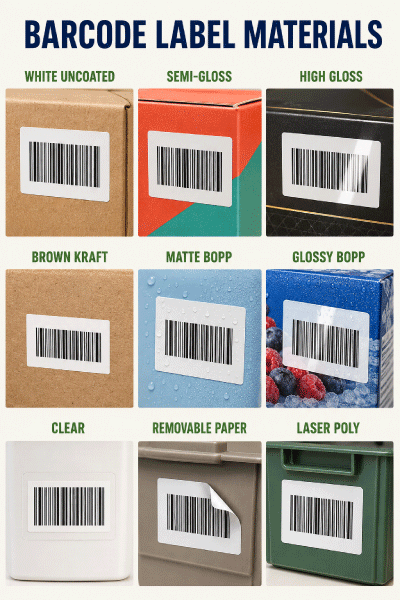
| Material | Recommended Barcode Use |
|---|---|
| White Uncoated Paper | Economical indoor inventory, product, carton and temporary barcode labels. |
| Semi-Gloss Paper | Retail products needing strong printed color with a moderate sheen. |
| White High Gloss | Premium dry packaging when glare does not interfere with the scanner. |
| Brown Kraft | Natural packaging when barcode contrast and scanner performance have been verified. |
| White Matte BOPP | Moisture-resistant labels with low glare and a smooth scanning surface. |
| Glossy BOPP | Moisture-resistant product labels with vivid color, tested for reflective glare. |
| Clear Material | No-label appearance only when the package beneath provides a consistent light background and sufficient contrast. |
| White Removable Paper | Temporary price, inventory, routing or promotional barcodes where clean removal is important. |
| Laser Poly | Durable sheet labels for compatible laser printers and demanding handling. |
White label material generally provides the safest starting background because it creates predictable contrast. Kraft fibers, metallic effects, transparent facestocks, dark packages, colored patterns and glossy reflections can reduce readability. Clear material is not automatically waterproof and does not create a white quiet zone by itself.
Water-Resistant Film vs. Paper Barcode Labels
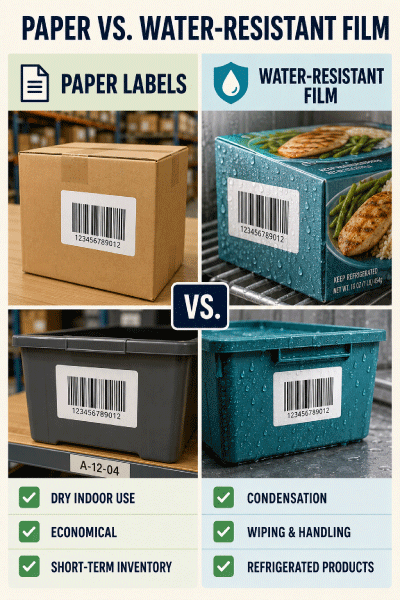
Paper labels are appropriate for many dry indoor products, bins and cartons. Film becomes more useful when labels will encounter refrigeration, condensation, wiping, oily handling, wet packing areas or outdoor exposure. The barcode must remain flat, high contrast and undamaged throughout its required life.
| Condition | Recommended Starting Material |
|---|---|
| Dry indoor product or inventory | White uncoated or semi-gloss paper |
| Refrigerated or condensation-prone package | White Matte BOPP, Glossy BOPP or tested laser poly |
| Frequently wiped bin or container | Durable film matched to the printer and cleaning conditions |
| Temporary barcode or price label | White removable paper tested on the actual surface |
| Outdoor or harsh environment | A construction specifically tested for weather, abrasion, adhesive life and print durability |
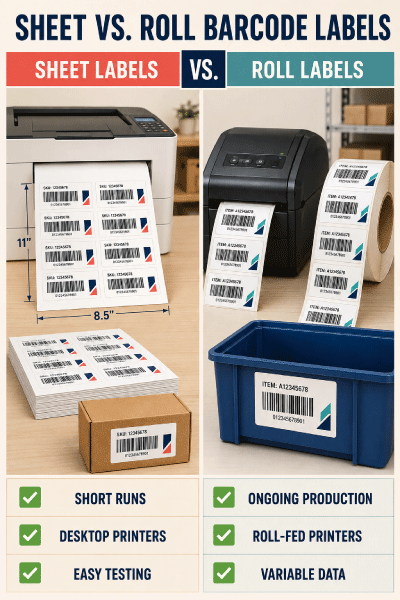
Sheet Labels vs. Roll Labels for Barcodes
| Sheet Labels | Roll Labels |
|---|---|
| Convenient for prototypes, short batches and occasional barcode printing. | Efficient for regular production and larger quantities. |
| Designed for compatible desktop inkjet or laser printers. | Designed for compatible dedicated roll-fed label printers. |
| Easy to print several products or barcode designs as needed. | Supports continuous variable-data printing from a barcode database. |
| Flexible for hand application to products, shelves and bins. | Suitable for manual, semi-automatic or automatic application when configured correctly. |
| Useful for testing the barcode, material and package before scaling. | Across-roll and into-roll dimensions, gap, core and unwind must match the printer or applicator. |
For variable barcodes, confirm that the software creates a unique code for each record and that the printed human-readable value matches the encoded value. Maintain controls that prevent duplicate serial numbers, skipped records and labels applied to the wrong product.
Printer Resolution and Barcode Quality
A sharp digital barcode file does not guarantee a sharp printed barcode. Printer resolution, dot gain, ink spread, toner coverage, media coating, print speed, maintenance and scaling can change the bar or module dimensions.
- Use barcode-generation software that supports the selected symbology and printer resolution.
- Print at 100% scale and disable automatic fit or shrink settings.
- Use dark, solid bars without gradients, shadows or transparency.
- Allow inkjet output to dry before stacking, wiping or scanning.
- Keep laser sheets clean and use materials rated for the printer.
- Maintain printheads and replace supplies before missing dots create broken bars or modules.
- Do not assume a successful phone scan proves compliance with a retail or logistics standard.
- Use an appropriate barcode verifier when a customer or standard requires measured symbol quality.
Where to Place Barcode Labels
Apply barcode labels to a smooth, flat area that remains visible during scanning. Keep them away from folds, seams, corners, box flaps, shrink-wrap wrinkles, bag gussets, bottle shoulders and strongly curved surfaces. Avoid placing a barcode where packing tape, straps or another label may cover it.
On a small round bottle, orienting a linear barcode vertically may reduce the amount of the symbol that curves away from the scanner at one time, but the final orientation must be tested. On corrugated cartons, choose the smoothest panel and avoid strong ridges or damage. On warehouse racks, place labels at a consistent height and angle so workers know where to scan.
Common Barcode Label Mistakes
- Choosing the adhesive label before generating the final barcode data.
- Confusing barcode-symbol dimensions with the physical label dimensions.
- Reducing a UPC or EAN symbol below the permitted application specification.
- Truncating linear barcode height to make the design fit.
- Placing text, borders or artwork inside the quiet zones.
- Stretching a barcode horizontally or vertically instead of scaling it proportionally.
- Using a dark, patterned or transparent background that reduces contrast.
- Printing on glossy material without testing reflective glare.
- Wrapping a linear barcode too far around a small bottle or curved container.
- Placing the barcode over a seam, fold, corrugated ridge or flexible gusset.
- Using a low-resolution screenshot instead of a properly generated barcode file.
- Allowing print software to resize the page automatically.
- Testing only the screen image instead of the final printed and applied label.
- Using a phone scan as the only quality test for a retail or logistics barcode.
- Printing variable labels without checking for duplicates or record mismatches.
Barcode Label Buying Checklist
Before ordering barcode labels, confirm:
- The required barcode symbology and governing standard.
- The exact data that will be encoded, including the longest expected value.
- The required X-dimension or module size, bar height and quiet zones.
- The human-readable numbers and supporting text that must appear.
- The flat usable width and height of the product, carton, bin or shelf location.
- The required scanning distance, scanner type and operating environment.
- The correct material for moisture, abrasion, temperature and removal needs.
- Compatibility with the intended inkjet, laser or roll-fed printer.
- Whether labels will be applied by hand or by an applicator.
- The roll core, outside diameter, gap, sensing method and unwind direction when applicable.
- A successful scan and, when required, barcode verification of the final printed and applied label.
Barcode Standards References
Barcode specifications change and differ by application. Consult the current GS1 General Specifications for GS1 barcodes and the DENSO WAVE QR Code sizing guidance for QR Code module and quiet-zone planning. Retailers, carriers, distributors and regulated industries may impose additional requirements.
Related Barcode and Label Resources
- Barcode Labels
- Packaging Labels for Boxes, Bags and Retail Products
- What Size Label for Product Boxes?
- What Size Label for Shipping Boxes?
- Blank Sheet Labels
- Blank Roll Labels
- Custom Printed Labels
- Waterproof Label Options
Shop Blank Labels for Barcodes
Choose blank sheet or roll labels in the size, material and printer configuration required for product, inventory, warehouse, QR and logistics barcodes. Test the complete printed barcode before ordering a large quantity.
Browse Blank Sheet Labels Browse Blank Roll Labels Custom Printed Labels
Frequently Asked Questions About Barcode Label Sizes
What is the standard barcode label size?
There is no single standard adhesive-label size for every barcode. The correct size depends on the barcode type, encoded data, required quiet zones, supporting text, package and scanning environment. UPC-A and EAN-13 symbols have defined dimensional ranges, while Code 128 and QR Code dimensions vary with data and other settings.
What size label should I use for a UPC barcode?
Common physical label starting points include 1.5" × 1.25", 2" × 1" and 2" × 1.5". The final label must fit the complete compliant UPC symbol, human-readable digits, quiet zones and additional edge margin.
How wide is a UPC-A barcode at the GS1 target size?
At the GS1 target X-dimension of 0.330 millimetre, UPC-A is 113 modules wide including minimum quiet zones, which is approximately 37.3 millimetres or 1.47 inches. The adhesive label should be wider than the required symbol area.
Can I make a UPC barcode shorter to fit my label?
Do not truncate the bars merely to fit a selected label. Bar height is part of the symbol specification and reducing it can impair omnidirectional scanning. Choose a larger label or revise the layout.
What size label is best for Code 128?
Short Code 128 values may fit labels such as 2" × 1" or 3" × 1". Longer alphanumeric data may require 3" × 2", 4" × 2" or larger. Generate the exact final value before selecting the label.
Are Code 128 and GS1-128 the same?
No. GS1-128 is a structured subset of Code 128 that uses the FNC1 character and GS1 Application Identifiers. Use the symbology required by the receiving system or trading partner.
What size label should I use for a QR Code?
Labels from 1" × 1" through 2" × 2" are common starting points for close-range QR scanning, while larger labels work better at greater distances. The correct size depends on encoded data, version, module size, print resolution and scanning conditions.
How much blank space does a QR Code need?
A QR Code requires a clear quiet zone four modules wide on all four sides. Keep text, borders, graphics and the physical label edge outside that area.
Can I put text next to a QR Code?
Yes. Use a label large enough to place the text completely outside the required four-module quiet zone. A 2" × 3" rectangle can provide room for a QR Code and a short call to action.
What size barcode label works for warehouse bins?
A 3" × 2" label is a useful starting point for many bins. Shelf beams, cases and locations scanned from farther away may need 4" × 2", 4" × 3", 4" × 6" or a larger tested format.
Should barcode labels be matte or glossy?
Matte white materials provide a dependable low-glare starting surface. Glossy materials can work well but should be tested under the actual scanner angle and lighting because reflections may interfere with some scanning conditions.
Can barcodes be printed on clear labels?
They can, but the package beneath must provide a consistent light background and sufficient contrast. Clear labels on dark, patterned or changing backgrounds can reduce scan reliability. Clear material is not automatically waterproof.
Can I print barcode labels with an inkjet printer?
Yes, when the label material is compatible with the printer and the printed bars or modules remain sharp. Use correct scaling, allow ink to dry and test the final labels with the intended scanners.
Can I print barcode labels with a laser printer?
Yes. Use laser-compatible sheet material, print at 100% scale and verify that toner coverage and printer resolution produce clean bar edges without distortion.
Should I buy barcode labels on sheets or rolls?
Sheets are convenient for short batches and desktop printers. Rolls are efficient for ongoing production, dedicated roll printers, sequential barcode data and compatible applicators.
Does barcode orientation matter on a roll?
Yes. The across-roll dimension, into-roll dimension, copy position and unwind direction must match the printer and applicator. Confirm the complete roll configuration before ordering.
Can I resize a barcode in Word or design software?
Only if the barcode is regenerated or scaled proportionally while preserving every dimensional requirement. Do not stretch it in one direction, crop the quiet zones or allow the software to apply automatic page scaling.
Why does a barcode scan on screen but not after printing?
Printing can change bar width, module size, contrast and quiet zones. Ink spread, low resolution, glossy reflections, automatic scaling, damaged printheads and package curvature can all cause a printed code to fail even when the screen image scans.
Should I include the barcode number in readable text?
Many barcode standards require or recommend human-readable interpretation. It also helps workers identify the item when a scanner is unavailable. Follow the rules for the selected symbology and application.
How do I test a barcode label before ordering?
Print the final barcode at 100% size on the intended material and printer, apply it to the actual product or location and scan it from normal angles and distances. Use the production scanners and software. Obtain formal verification when required by a retailer, customer or standard.

