
Choosing the right mailing label size starts with the information you need to print and the space available on the envelope, mailer or package. A compact return address, a recipient address with several lines, and a carrier-generated shipping label each need a different amount of room. The label should keep that information readable while fitting flat on the mailpiece without crossing an edge, seam or closure.
This guide compares common starting sizes, including 0.5 x 1.75 inches for compact return addresses, 1 x 2.625 inches for recipient addresses, and larger formats for padded mailers and packages. It also explains how to measure the usable area, match your template to the exact sheet layout, and choose between blank sheets, compatible rolls and integrated label forms.
For a paid shipping label, start with the print format offered by your carrier or shipping platform. A 4 x 6 inch layout is a common option, while some workflows use a supported letter-size sheet format. Select the matching label stock and printer settings so the address, postage information and barcodes retain their intended size.
Quick Answer
For a compact return address, start with 0.5 x 1.75 inches. A 1 x 2.625 inch label is a common recipient-address format, and 4 x 2 inches provides more space for a longer address. For a paid carrier label, use the size and layout generated by the shipping service. A 4 x 6 inch format is common, but it is not the only supported format.
| Mailing Use | Recommended Label Size | Best For |
|---|---|---|
| Return address | 0.5" × 1.75" | Letters and business envelopes |
| Standard recipient address | 1" × 2.625" | Letters, postcards and small envelopes |
| Large address or branded mailing label | 4" × 1.33" or 4" × 2" | Catalog envelopes and padded mailers |
| Large mailer or small package | 4" × 3.33" | Boxes, cartons and promotional mailers |
| Carrier shipping label | 4" × 6" | USPS, UPS, FedEx, DHL and ecommerce orders |
At-a-Glance Recommendations
| Common Address Label | 1" × 2.625" |
|---|---|
| Common Carrier Label Format | 4" × 6" |
| Everyday Paper Option | White Uncoated Paper |
| Durable Material Option | Printer-compatible white poly material |
| Common Shape | Rectangle |
| Desktop Printer Format | Blank Sheet Labels |
| Packing Slip + Label Format | Integrated Label Forms |
Common Mailing Label Types and Sizes
“Mailing label” can mean several different things. A small label may contain only a return address, while a carrier label must hold the destination address, routing data, tracking number and barcode. Choose the label by the information that must fit and the surface where it will be applied.
| Label Type | Common Size | Typical Information | Typical Mailpiece |
|---|---|---|---|
| Return address | 0.5" × 1.75" | Sender name and address | Letter envelope |
| Standard address | 1" × 2.625" | Recipient name and delivery address | #10 or similar envelope |
| Extended address | 4" × 1.33" | Long address, department or attention line | Large envelope or mailer |
| Large mailing address | 4" × 2" | Address, logo and return information | Padded mailer or small box |
| Oversized mailing label | 4" × 3.33" | Address, branding, instructions or barcode | Catalog mailer or package |
| Carrier shipping label | 4" × 6" | Address, routing, tracking and carrier barcode | Shipping box or ecommerce mailer |
How to Measure an Envelope, Mailer or Package for a Label
Measure the actual mailpiece before ordering. A label should lie completely flat without crossing an edge, flap, seam, closure, fold or heavily textured area.
- Choose a flat, visible area on the address side of the mailpiece.
- Measure the usable width without crossing an edge, seam or fold.
- Measure the usable height without covering postage, closures or required markings.
- Allow clearance around the label so every corner can adhere to one flat surface.
- Confirm that the printed address, barcode and any required quiet space fit comfortably.
- Cut a plain-paper sample to size and place it on the mailpiece before ordering.

Best Label Size for Return Addresses
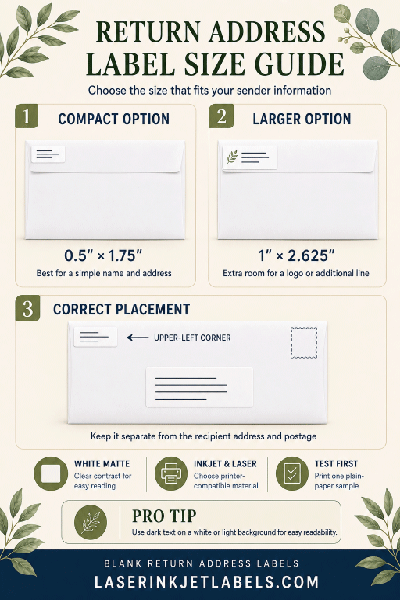
A return-address label should be compact but large enough to keep the sender’s name, street address, city, state and ZIP Code readable. For most business and personal envelopes, 0.5" × 1.75" provides an efficient low-profile format.
Recommended label sizes:
- 0.5" × 1.75" – compact return-address label
- 1" × 2.625" – larger return address with a logo or additional line
Place the return address in the upper-left area of the address side, leaving clear separation from the recipient address and postage.
Best Label Size for Standard Mailing Addresses
The classic 1" × 2.625" rectangle is the most common choice for recipient addresses on letter envelopes. It provides room for a typical three- or four-line address while fitting 30 labels on many standard 8.5" × 11" sheet layouts.
Recommended label sizes:
- 1" × 2.625" – standard address label
- 4" × 1.33" – long names, departments or additional address lines
The 1" × 2.625" layout is compatible with commonly used 5160- and 8160-style templates, making it a practical choice for mail merges and bulk correspondence.

Best Label Size for Large Envelopes and Padded Mailers
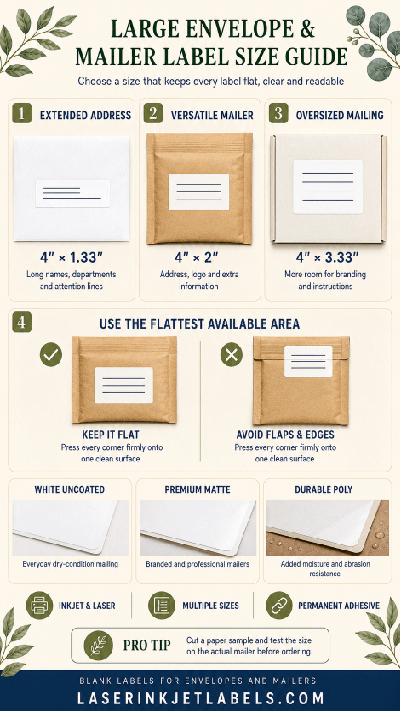
Catalog envelopes and padded mailers usually offer more printable area than letter envelopes. A larger label improves readability and provides room for a business logo, department name, order number or handling information.
Recommended label sizes:
- 4" × 1.33" – extended address format
- 4" × 2" – large address with branding or extra lines
- 4" × 3.33" – oversized mailing label with room for additional information
Avoid positioning the label over a padded mailer’s edge or closure strip. Apply it to the flattest available area and press every corner firmly.
Best Label Size for Packages and Carrier Shipping Labels
For a simple address-only package label, 4 x 2 inches or 4 x 3.33 inches may provide enough space. For a paid label generated by a carrier or shipping platform, select one of that service's supported print formats and matching stock. A 4 x 6 inch layout is common for dedicated label printers. Some services also provide letter-size sheet layouts. Preserve the complete generated label, including routing information, tracking numbers and barcodes.
Recommended label sizes:
- 4" × 2" – address-only package label
- 4" × 3.33" – larger package label
- 4" × 6" – complete carrier shipping label
Never reduce a carrier-generated label merely to make it fit a smaller sheet format. Use the size and print settings specified by the shipping platform so barcodes remain properly proportioned and readable.

How to Format a Mailing Address Label
A well-formatted address is as important as the label size. Keep the recipient address easy to distinguish from logos, promotional messages and return information.
- Place the address and postage on the same side of the mailpiece.
- Keep the address parallel to the longest side of a letter.
- Use a simple, highly readable font and strong contrast.
- Left-align the delivery address and avoid decorative backgrounds behind it.
- Keep apartment, suite and directional information complete.
- Leave carrier barcodes and their surrounding clear areas unobstructed.
- Follow the current requirements of the postal or shipping service you use.
For additional address-layout guidance, see our USPS mailing guidelines.

Best Materials for Mailing Labels
Most indoor correspondence and routine shipments work well with economical white paper labels. Packages exposed to rain, condensation, abrasion or repeated handling may benefit from a more durable material that is compatible with the printer being used.
| Material | Recommended Use |
|---|---|
| White Uncoated Paper | Everyday envelopes, bulk mailings and dry indoor shipping |
| Premium White Matte Paper | Branded correspondence and sharper presentation |
| White Semi-Gloss Paper | Color logos and promotional mailers |
| Brown Kraft Paper | Natural-looking envelopes, boxes and boutique shipments |
| Printer-Compatible White Poly | Packages requiring added moisture and abrasion resistance |
| Removable Paper | Temporary routing, reusable bins and short-term identification |
Choose the material for your exact printing method. Inkjet and laser printers use different printing processes, and a material intended for one may not perform correctly in the other. Clear labels can create a subtle appearance on envelopes, but they are not the best choice when the background reduces address contrast, and clear material should not be assumed to be waterproof.

Sheet Labels, Roll Labels or Integrated Labels?
The best format depends on the printer, mailing volume and fulfillment process. Desktop users usually choose sheet labels, while some dedicated roll-fed inkjet or laser label printers use roll labels. Ecommerce operations can combine packing documents and a peel-off shipping label with integrated label forms.
| Sheet Labels | Roll Labels | Integrated Labels |
|---|---|---|
| Best for desktop inkjet and laser printers | For compatible dedicated roll-fed printers | Paper form with a built-in peel-off label |
| Easy for mail merges and small batches | Efficient for recurring production | Prints packing slip and label together |
| Many labels per 8.5" × 11" sheet | Continuous supply reduces sheet handling | Helps reduce fulfillment mismatches |
| Common choice for addresses and 2-up shipping labels | Confirm printer, core and roll-size compatibility | Useful for ecommerce orders and returns |
Learn more about integrated label forms for packing slips, invoices and shipping workflows.

Common Mailing Label Mistakes
- Using a label too small for the full address or carrier-generated design.
- Placing the label over an envelope edge, box seam, mailer flap or closure.
- Reducing a carrier label until its barcode is difficult to scan.
- Choosing a low-contrast material or printing a busy design behind the address.
- Using inkjet material in a laser printer, or laser-only material in an inkjet printer.
- Covering postage, tracking barcodes or required package markings.
- Applying a standard paper label to a damp, dusty, oily or heavily textured surface.
- Forgetting to test the sheet layout, margins and print scaling before a large mail merge.
Buying Tips
Before ordering mailing labels, confirm:
- Whether you need a return address, recipient address or complete carrier label.
- The flat usable area on the envelope, mailer or package.
- The printer type and the label material it supports.
- Whether the shipment may encounter moisture or rough handling.
- The required sheet layout or roll configuration.
- Whether your software expects a specific template or page size.
- Whether a permanent or removable adhesive is appropriate.
- The mailing volume and whether integrated labels would simplify fulfillment.
Related Label Size Guides and Resources
- What Size Label for Shipping Boxes?
- What Size Label for Product Boxes?
- What Size Label for Barcodes?
- Address Labels
- USPS Mailing Guidelines
- Integrated Label Forms
Shop Blank Mailing Labels
Print return addresses, recipient addresses and shipping information in-house with blank mailing labels for compatible inkjet and laser printers. Choose a size based on the information you need to print, the available space and your mailing workflow.
Frequently Asked Questions About Mailing Label Sizes
What is the standard size for a mailing address label?
The most common mailing-address label is 1" × 2.625". It provides enough room for a typical recipient address and is widely used on letter envelopes and in standard 30-per-sheet layouts.
What size should a return-address label be?
A 0.5" × 1.75" label works well for most compact return addresses. Use 1" × 2.625" if you need more room for a logo, department name or additional address line.
What size label should I use for a #10 envelope?
A 1" × 2.625" label is the standard choice for the recipient address on a #10 business envelope. A 0.5" × 1.75" label is a popular size for the return address.
What size label works for a padded mailer?
A 4" × 2" label works well for an address-only padded mailer. Use 4" × 6" when printing a complete carrier shipping label with routing and tracking information.
What is the standard shipping-label size?
A 4 x 6 inch layout is a common carrier shipping-label format. Some services also offer letter-size sheet layouts. Use the format provided by your carrier or shipping platform and match the label stock, orientation and printer settings to that output.
Does an address label include postage?
No. A blank label printed with an address does not pay postage. Add the required postage separately or use a paid shipping label generated through a supported postal or shipping service.
Is a mailing label the same as a shipping label?
Not always. A mailing label may contain only a recipient address and can be as small as 1" × 2.625". A complete shipping label normally includes routing information, a tracking number and carrier barcodes, which is why 4" × 6" is commonly used.
Can I use 4" × 2" labels for shipping?
Yes, 4" × 2" labels can work for address-only package labels or other shipping information. If your carrier or shipping platform generates a complete 4" × 6" label, use the full required size rather than shrinking it.
How many 1" × 2.625" address labels fit on a sheet?
A common 8.5" × 11" layout holds 30 labels measuring 1" × 2.625". Always confirm the exact sheet configuration and use the template that matches the product you order.
How many 4" × 6" shipping labels fit on a sheet?
A common letter-size sheet layout holds two 4" × 6" labels. Select the matching half-sheet or 2-up setting in your shipping software when that format is supported.
Can mailing labels be printed with an inkjet printer?
Yes. Choose sheet or roll label material specifically compatible with inkjet printing and use the template that matches the label layout.
Can mailing labels be printed with a laser printer?
Yes. Use laser-compatible label material designed to withstand the heat and printing process of a laser printer.
Are mailing labels waterproof?
Standard white paper labels are not waterproof. For packages likely to encounter moisture or abrasion, choose a durable printer-compatible poly material. Clear labels should not be assumed to be waterproof.
What color is best for mailing labels?
White or another light, solid background with dark printing provides the clearest contrast for addresses and barcodes. Decorative designs should not interfere with readability.
Where should I place a mailing label on an envelope?
Place the recipient address on the address side of the envelope, parallel to the longest edge, with clear separation from the return address and postage. Do not wrap the label around an edge.
Where should I place a shipping label on a box?
Apply it to the largest flat surface available, away from seams, closures and box edges. Make sure the entire label adheres smoothly and that tape, straps or other labels do not cover the barcode.
Should I choose sheet, roll or integrated mailing labels?
Choose sheets for desktop inkjet and laser printers, rolls for compatible dedicated roll-fed printers, and integrated labels when you want to print a packing slip and peel-off shipping label together.
Can I print mailing labels from a spreadsheet?
Yes. Addresses stored in a spreadsheet can be merged into a compatible label template using common word-processing and mail-merge software. Test one sheet on plain paper before printing the full list.
Do I need a template to print mailing labels?
For address labels on sheets, use a template that matches the exact label dimensions, labels per sheet, margins and spacing. For a carrier-generated label, use the shipping service's output format. Dedicated roll printers also require the correct label dimensions and media settings in compatible software.
Can I request samples before ordering?
Yes. Testing samples helps confirm the label size, material, printer compatibility, adhesive and fit on the actual envelope, mailer or package.

