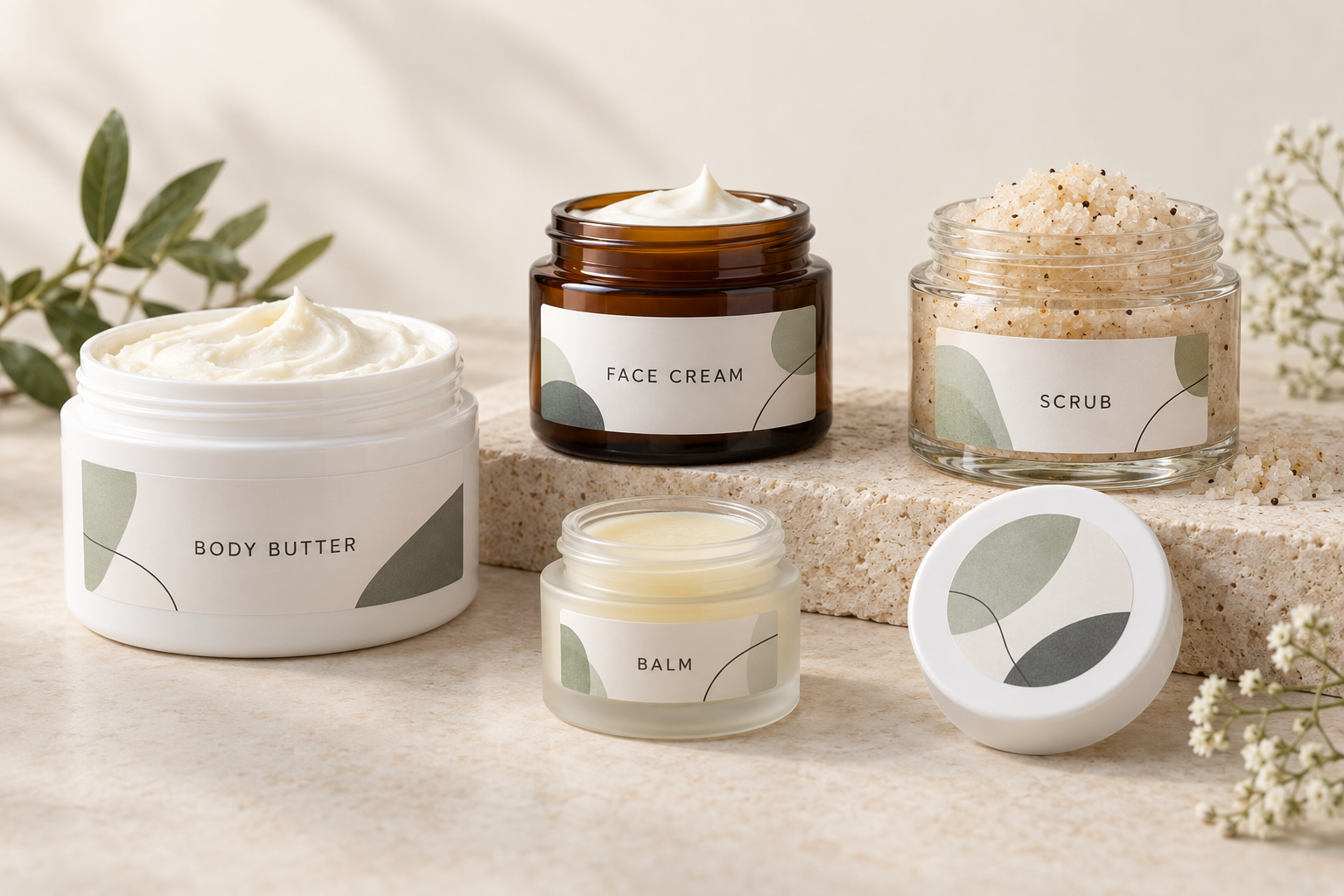
Cosmetic jar labels should fit the jar’s smooth labeling area, match your printer, and remain readable through everyday handling. Start with the actual container rather than its ounce capacity. For creams, scrubs and body butters exposed to wet hands or product residue, test a printer-compatible synthetic label and the finished print before ordering a production quantity.
A beautiful label can still fail if its edges cross a curved shoulder, the ink smears, or the ingredient panel becomes too crowded. This guide brings sizing, material selection, printing and application into one workflow for skincare brands, handmade bath-and-body businesses and growing cosmetic manufacturers.
For shopping options, visit our Cosmetic Labels hub. For a dedicated sizing reference, see the Cosmetic Jar Label Size Guide.
Quick answer: how do you choose cosmetic jar labels?
Measure the straight sidewall and flat lid area. Choose a front, back, wrap or lid layout that leaves clearance around curves and seams. Match the label coating to your inkjet, laser or dedicated roll printer. Print a paper fit test at actual size, then test an adhesive sample for fit, rubbing, moisture and contact with your own product.
The key distinction: jar capacity does not determine label dimensions, and waterproof label stock does not automatically make every printed image waterproof.
1. Choose the label layout before choosing dimensions
Begin with the job your packaging must do. A small balm jar sold inside a carton has different space constraints from an unboxed body butter jar. A lid label may display the brand well when products sit flat on a market table, while a side label makes the product easier to identify on a shelf. Consider both views before committing to artwork.
List the information you need to accommodate, then decide how to distribute it. Keep the product name easy to recognize and leave an organized area for supporting text. Adding another panel can be more practical than shrinking every line onto the front. Check the information requirements for your particular product and packaging configuration before finalizing that arrangement.
| Layout | Useful when | Main fit check |
|---|---|---|
| Front and back labels | You want clear branding plus a separate information panel. | Both panels fit the smooth sidewall without crossing seams. |
| Single wrap label | You need one continuous design with room around a cylindrical jar. | The jar is sufficiently straight and the wrap ends align. |
| Round lid label plus side panel | The lid is an important display surface. | The circle stays inside the flat lid area and the side panel remains readable. |
| Small front label plus carton | The jar has little usable surface and is sold with outer packaging. | The complete package accommodates the required information. |
A decorative sticker crossing the lid and jar may show that a package has been opened, but an ordinary label is not automatically a validated tamper-evident system. Select that feature separately if your product or distribution requirements call for it. Keep closure graphics distinct from the area people need to grip when opening the jar.
2. Measure the container you will actually use
Order or obtain a sample from the production jar supplier before selecting labels. Two jars sold as “4 oz” can differ in diameter, height, shoulder shape and lid size. Capacity describes what the container holds; it does not describe the surface available for a sticker. Double-wall jars and thick glass bases can make that difference especially noticeable.
Measure the straight sidewall
Use a ruler to find the uninterrupted vertical area between the upper shoulder and the base curve. Exclude ribs, seams, raised lettering and any surface that changes angle. Leave clearance rather than making the label exactly as tall as this area. A paper rectangle taped in place makes it easier to see whether the bottom corners extend onto a curve.
For a front label, measure the width that looks appropriate on the jar while keeping the text visible from the front. A wide label on a small cylinder may technically fit but force customers to rotate the container to read the product name. Evaluate the visual layout on the jar, not only on a flat design screen.
Measure the circumference for a wrap
Wrap a narrow paper strip around the labeling band, mark where the ends meet, then measure the strip flat. For a true cylinder, circumference can also be estimated as diameter multiplied by pi. The strip method is useful because it measures the actual surface where the label will sit, including small manufacturing variations.
Worked example: a cylindrical jar with a measured diameter of 2.5 inches has an approximate circumference of 7.85 inches. If your design calls for a 0.125-inch gap, the starting wrap width is about 7.73 inches. This is a calculation example, not a stocked-size recommendation. Confirm the final width with a physical test and available label dimensions.
A deliberate gap can help keep the ends from overlapping unevenly. If the design requires an overlap, test whether the adhesive bonds adequately to the printed label surface beneath it. Do not assume that an adhesive designed for a jar will perform identically when attached to a glossy coating or printed ink.
Measure the lid separately
Measure only the flat lid surface inside its raised rim or bevel. The outside lid diameter can be larger than the labelable area. A circle that reaches onto a rounded lip is more likely to be disturbed during opening and handling. Recessed lids may need a smaller circle even when the overall closure appears large.
Check for taper
Measure around the top and bottom of the intended labeling band. If the measurements differ, the surface is tapered. A rectangular wrap may wrinkle, angle upward or leave mismatched ends. A shorter front label can sometimes avoid the problem; another option is a label shape designed for that container. Test before ordering an entire roll.
3. Use size charts as starting points, not guaranteed fits
The following dimensions are examples to cut from paper and compare with your containers. They are expressed as applied width × applied height. Product listings may describe the dimensions in a different orientation, especially on rolls. Confirm which dimension runs across the roll and which runs in the feed direction before purchasing.
| Container or labeling area | Starting paper test | What to verify |
|---|---|---|
| Very small sample or balm jar | 1.5″ × 1″ front label; 1″ or 1.5″ lid circle | Text space and flat lid diameter may be especially limited. |
| Small cream jar with a short sidewall | 2″ × 1.5″ front label | The full 1.5″ height stays between the curves. |
| Medium jar with a taller sidewall | 3″ × 2″ front label | The width remains visually balanced around the cylinder. |
| Wide body butter or scrub jar | 4″ × 2″ front label, or a measured wrap | The container actually has 2″ of usable label height. |
| Flat lid with adequate clearance | 2″, 2.5″ or 3″ circle | The selected circle fits inside the rim or bevel. |
A shallow, wide jar may accommodate a large lid circle but only a low side strip. A taller jar can offer more vertical room even when its capacity is smaller. Use your measured surface to eliminate unsuitable examples immediately. Do not force a familiar label size onto a container simply because it worked on another product.
Once the paper test fits, compare available sizes and matching layouts in our label templates and sizes directory. The directory lets you move from the physical test to the correct production template without recreating the label layout by guesswork.
Practical tip: label several sample jars and place them together as they will appear for sale. Check whether names, scents and product variants can be distinguished quickly. A size that looks attractive on one isolated jar may be less useful when ten similar products sit next to one another.
4. Match the material to moisture, product residue and handling
Think about where the finished product will live. A dry gift set, a bathroom shelf and a shower ledge create different demands. The formula itself also matters: oils, creams and scrubs can reach the label through filling, application or customer handling. Test the actual formula rather than relying on water exposure alone.
| Material or finish | Why consider it? | What to test |
|---|---|---|
| Matte paper | A nonreflective look for products kept mainly dry. | Staining, tearing and rubbing under expected handling. |
| Glossy paper | A reflective finish for colorful branding. | Moisture exposure and compatibility with your printer. |
| White synthetic film | A durable face material for moisture-prone packaging. | Adhesion, finished-print resistance and contact with the formula. |
| Clear synthetic film | A transparent background that lets the container show through. | Text contrast, visible adhesive and printer limitations. |
| Professionally printed label with a suitable protective finish | A way to specify print and surface protection together. | The particular coating or laminate under intended use. |
Visit our waterproof and water-resistant labels page to compare the available material paths. Select the exact material listed for your printing method. “Synthetic,” “poly” and “BOPP” describe material families; those terms alone do not establish printer compatibility, adhesive suitability or chemical resistance.
Waterproof material and waterproof printing are separate questions
A film face stock can resist water while the image printed on it still smears or rubs away. The result depends on the coating, ink or toner, drying or curing conditions, and any protective finish. Test the complete printed label, not just an unprinted sample. Check both immediately after the recommended drying period and after realistic storage and handling.
A useful sample test includes a dry rub, wet-finger handling and a small amount of the actual product on the label surface. Inspect whether the color transfers, fine text becomes unreadable, edges lift or the film changes appearance. Follow the material supplier’s instructions and use test conditions that reflect your packaging’s real environment.
Matte, gloss or clear?
Matte surfaces can reduce reflections and support a restrained design. Gloss can make color appear more vivid but may produce glare under retail lighting. Clear labels let glass or plastic become part of the design. None of these finishes is a universal durability ranking; compare the actual material specification and test the finished package.
Most ordinary desktop inkjet and laser printers do not print white ink. On a clear label, white areas in the artwork generally remain transparent. Dark jars, dark formulas and colored containers can reduce contrast. If the design requires an opaque white logo or white underprinting, discuss a printing process that supports it before approving the artwork.
Check the adhesive as well as the face stock
Glass, rigid plastic and flexible plastic can behave differently. Texture, coatings and surface contamination also influence adhesion. Use the production jar for testing, including any decorative coating. A sample applied to a clean drinking glass does not prove that the same label will remain secure on a coated plastic cosmetic jar.
5. Choose sheets, rolls or custom printing around your workflow
The right format depends on your equipment, quantities, number of product variants and available production time. A small business may start with sheets for flexibility and later move selected products to rolls. Another brand may choose professionally printed labels from the beginning because repeatability and staff time matter more than printing every change in-house.
| Approach | Practical advantages | Checks before ordering |
|---|---|---|
| Blank sheet labels | Small runs, design revisions and use with a compatible desktop printer. | Sheet layout, supported media, feed path and material compatibility. |
| Blank roll labels | Continuous production with a compatible dedicated label printer. | Core, roll diameter, width, sensor detection and winding orientation. |
| Custom printed labels | Labels arrive printed and ready for application. | Artwork proof, material, finish, quantities and application requirements. |
For sheets, use material explicitly intended for your laser or inkjet printer. Inkjet and laser processes differ, and their label coatings are not automatically interchangeable. Start with the printer manufacturer’s supported media guidance and the label supplier’s compatibility information. Do not assume that every printable film can safely pass through a laser printer.
For rolls, label width and height are only part of the order. Check the maximum media width, core size and outside roll diameter supported by the printer. Verify how the machine detects each label, such as a gap or black mark. If labels will be machine-applied, confirm unwind direction and which edge leaves the roll first with the equipment operator.
Compare blank sheet labels, blank roll labels and custom printed roll labels before choosing the production method. Include setup, rejected prints, application time and design changes when comparing your own costs. The lowest material price is not necessarily the lowest cost per usable finished jar.
6. Prepare artwork that stays readable at actual size
Open the template that matches the exact label product and layout. Two labels with the same outside dimensions can have different sheet margins, spacing or corner shapes. Keep a clean master template and save a separate artwork file for each product variant. This makes it easier to update a scent or ingredient panel without accidentally shifting the entire print layout.
Keep essential text and logos within the template’s safe area. Extend backgrounds into the bleed area when the template or printer requires bleed. Avoid placing a thin decorative border exactly on the cutting edge, where small print-position variations become obvious. Use the supplied template specifications rather than applying one universal margin to every label.
For raster images, prepare sufficient resolution at the final printed size; 300 pixels per inch is a common artwork target for detailed printing. Keep logos and small text as vectors when the design software and production process support them. Enlarging a small screenshot does not restore the original detail. Inspect fine text and lines on a physical printed sample.
Use clear contrast and a deliberate hierarchy. The customer should be able to find the product identity quickly, then locate the supporting information. Decorative scripts may work for a short brand name but become difficult to read in a dense paragraph. Check the design at arm’s length under ordinary room lighting as well as close up.
Print a paper proof before using label stock
Print at 100% or actual size, with scaling such as “fit to page” turned off unless your particular workflow explicitly requires otherwise. Compare the output with the template dimensions using a ruler. For sheets, hold the paper proof against the label sheet to check alignment. For a wrap, cut it out and place it around the jar.
Once the paper proof is correct, print a small adhesive test. Check the beginning and end of a sheet or run, because a design can align near the top while drifting elsewhere. Adjust the printer settings or layout systematically. Save the successful settings with the product record so the next batch starts from a documented setup.
7. Leave space for product information before finalizing the design
For U.S. retail cosmetics, FDA’s labeling overview addresses product identity, net contents, business information, ingredient declarations and applicable warnings. Placement and legibility matter, not just the presence of the words. Plan the information panel before choosing a very small label. Consult the FDA summary of cosmetics labeling requirements for your packaging configuration.
MoCRA also requires a domestic address, domestic phone number or electronic contact information through which the responsible person can receive adverse-event reports. FDA discusses this in its cosmetic registration and listing guidance. Claims to treat disease or affect body structure or function can change a product’s regulatory classification. These links support packaging planning; a label size alone does not establish compliance.
Beyond the required information, reserve space for useful production details such as a batch identifier when your workflow uses one. Keep the variable area accessible and easy to print consistently. Avoid putting a batch code across a fold, seam or highly curved surface where it may become difficult to read.
If you add a QR code, give it a clear purpose and test it on the finished jar. Scan it with more than one phone under realistic lighting. Curvature, a glossy reflection, low contrast or a tiny printed code can interfere with scanning. Keep the linked destination current and make essential on-pack information easy to locate without depending on a phone.
8. Apply labels to clean, dry jars and test a complete package
Prepare the container according to the jar and adhesive suppliers’ recommendations. Remove visible product residue and allow the surface to dry completely. If you use a cleaning agent, confirm that it will not damage the container’s coating or leave a film. Avoid applying labels to condensation or to jars that are still wet from cleaning.
Use a repeatable alignment reference, such as a simple application guide suitable for the container. Place the label gently, then smooth it with even pressure across the surface. For a wrap, keep the starting edge square to the jar’s axis so the ends meet at the intended height. Avoid stretching the label while applying it.
Allow the adhesive the dwell time recommended for the selected material before judging final bond strength or exposing it to moisture. Adhesion immediately after application may differ from adhesion after the bond develops. Store and apply labels within the supplier’s temperature and humidity guidance, and keep unused stock clean and protected.
Build a sample test around real use
Test filled, closed jars as well as empty containers. Include the handling conditions the customer is likely to create: opening the lid, wet fingers, a little formula on the side and ordinary rubbing during packing or transport. Inspect the print, corners and adhesive separately. Record what you observed instead of relying on a general “looks good” judgment.
For a new supplier or jar change, repeat the fit and adhesion checks. A nearly identical container can have a different surface treatment, seam or sidewall profile. Keep one approved labeled sample as a visual reference for later batches. That reference helps staff spot a changed label position or color before a large quantity is packed.
9. Troubleshoot the symptom before changing everything
| Problem | First things to check | Useful next test |
|---|---|---|
| Wrinkles or uneven wrap ends | Taper, excessive label height or skewed application. | Try a shorter paper label and compare top and bottom circumference. |
| Edges lift | Curves, residue, surface compatibility or insufficient application pressure. | Test a smaller label on a clean production jar. |
| Ink smears | Coating compatibility, printer settings and drying time. | Compare finished samples after the specified drying period. |
| Print alignment drifts | Wrong template, automatic scaling or media feeding. | Measure a 100%-scale paper proof across the full layout. |
| Clear-label text disappears | Low contrast against the jar or product color. | Test darker text, a white label or a suitable white-ink process. |
| Label stains during use | Face material, coating and contact with the formula. | Compare printed samples using the actual product. |
Change one variable at a time so the result tells you something. If you change the adhesive, artwork, container and application method together, you may solve the immediate issue without learning its cause. Keep notes about the jar, material, printer settings, application conditions and test outcome for each sample.
When requesting help, provide the jar material and dimensions, the printer model, the label product and a description of the exposure that caused the failure. Photos of the label on the actual jar can be more useful than an artwork screenshot alone. They show the curves, seams and closure details that affect performance.
Cosmetic jar label ordering checklist
- Measure the smooth sidewall, circumference and flat lid surface.
- Confirm the panel layout and information space before final artwork.
- Cut and apply an actual-size paper fit test.
- Choose a material and adhesive for the container and expected use.
- Confirm printer compatibility and, for rolls, core and winding requirements.
- Use the exact matching template and proof the print at 100% scale.
- Test moisture, rubbing and contact with your cosmetic formula.
- Approve one complete labeled sample before the production order.
Frequently asked questions about cosmetic jar labels
What size label fits a 2 oz or 4 oz cosmetic jar?
There is no universal fit based on ounces. Measure the actual jar’s straight sidewall and flat lid area. A 2″ × 1.5″ or 3″ × 2″ paper rectangle can be a useful front-label test if the measured area accommodates it, but neither size is guaranteed by capacity.
Should cosmetic jar labels be waterproof?
Moisture-resistant packaging is worth considering for products handled with wet hands or kept near water. Test both the label material and the printed image. A waterproof film does not guarantee that every ink, coating or adhesive will resist your product and its use conditions.
Can I print cosmetic jar labels with a home printer?
Yes, if the label material and sheet format are compatible with that printer. Use the exact template, confirm the manufacturer’s media guidance and test a small batch. A dedicated roll printer needs compatible roll media and the correct core, dimensions and detection method.
Are clear labels suitable for amber or dark cosmetic jars?
They can be, but the jar color affects readability. Most ordinary desktop printers do not print white ink, so white artwork areas remain transparent. Test the design on the actual container or consider a white label or a printing process that supports white ink.
Why do rectangular labels wrinkle on my jars?
The label may cross a curve or wrap around a tapered surface. Compare the circumference at the top and bottom of the labeling band. Try a shorter front label, reduce label height or investigate a shape designed for the specific container.
Should I use a lid label or a side label?
Choose according to the way customers view the package and the information it needs. A lid label is useful for top-down display, while a side panel supports shelf identification and product details. Many packages benefit from both, subject to their information and fit requirements.
Are sheet labels or roll labels better for a skincare business?
Sheets can suit small batches and frequent design changes with a compatible desktop printer. Rolls suit compatible dedicated printers and continuous production. Compare equipment requirements, variants, application time and rejected prints rather than choosing solely by business size.
How do I stop cosmetic labels from peeling?
Keep the label off curves, apply it to a clean and dry production container, use an appropriate adhesive and follow the supplier’s application and dwell-time guidance. Test the actual jar surface and formula before increasing the order quantity.
Find labels and templates for your cosmetic jars
Start with the container measurements and your printing method. Then compare compatible materials and test the finished package. LaserInkjetLabels.com offers shopping paths for blank labels on sheets, blank labels on rolls and custom printed labels so you can choose a workflow that fits your products.
Shop Cosmetic LabelsShop Sheet LabelsShop Roll LabelsExplore Custom Printing
Find matching label sizes and templates or return to the Cosmetic Jar Label Size Guide for the dedicated sizing reference.
