Can You Use Laser Labels in an Inkjet Printer? Find Out!

Curious if you can use laser labels in an inkjet printer? Discover the surprising compatibility of these two printing technologies and make your labeling tasks easier!

Understanding Laser Labels vs. Inkjet Labels

When it comes to labeling your products, packages, or personal items, the type of label you choose can make a significant difference. Laser labels and inkjet labels are the two primary types available in the market, and understanding their distinctions can help you make an informed choice.

Laser labels are specifically designed for use with laser printers. These labels are typically made from materials that can withstand the high heat generated by laser printers during the printing process. Laser printers use a laser beam to produce an image on a drum, which is then transferred onto the paper using toner. The toner, a powder, is fused onto the paper with heat and pressure, resulting in a durable and smudge-resistant print.

Inkjet labels, on the other hand, are formulated for use with inkjet printers. These printers work by spraying microscopic droplets of liquid ink onto the paper to create an image. The inkjet labels are usually coated to absorb the ink quickly, preventing smudging and ensuring sharp, vivid print quality. Inkjet labels are typically not designed to withstand the heat of a laser printer, which can lead to melting or warping.

Understanding the specific needs of your printer and the labels designed for it is crucial to achieving the best print quality and maintaining the longevity of your equipment. Using the wrong type of label can result in poor print quality, printer damage, or both. Therefore, it is essential to match your labels to the appropriate printer technology.

How Inkjet Printers Work

To grasp the compatibility of laser labels with inkjet printers, it is essential to understand how inkjet printers work. Inkjet printers are popular for their versatility, affordability, and ability to produce high-quality prints with vivid colors and sharp details.

Inkjet printers use a printing technology that involves spraying tiny droplets of liquid ink onto the paper. The print head, which contains multiple nozzles, moves back and forth across the paper, depositing ink droplets in a precise pattern to form text and images. These droplets are incredibly small, typically measured in picoliters, allowing for detailed and accurate prints.

The ink used in inkjet printers is usually water-based and can be either dye-based or pigment-based. Dye-based inks are known for their vibrant colors and smooth gradients, making them ideal for photo printing. Pigment-based inks, on the other hand, are more durable and resistant to fading, making them suitable for documents and labels that require longevity.

Inkjet printers come in various types, including single-function printers, all-in-one printers, and photo printers. They are widely used in homes, offices, and businesses due to their ability to handle a wide range of media types, including plain paper, glossy photo paper, and specialized labels. However, the compatibility of these printers with different types of labels, such as laser labels, requires careful consideration due to the differences in printing technology.

The Compatibility of Laser Labels with Inkjet Printers

The question of whether you can use laser labels in an inkjet printer is a common one, and the answer is not as straightforward as a simple yes or no. The compatibility of laser labels with inkjet printers depends on several factors, including the label material, the printer’s capabilities, and the specific printing requirements.

Laser labels are designed to withstand the high heat and pressure of laser printers. These labels are often made from materials like polyester, vinyl, or other heat-resistant substances. While these materials can be durable and produce excellent results in laser printers, they may not be optimized for the liquid ink used in inkjet printers. The coating on laser labels is typically not designed to absorb ink, which can lead to smudging, poor print quality, or slow drying times when used with inkjet printers.

In some cases, manufacturers produce multi-purpose labels that are compatible with both laser and inkjet printers. These labels are specially coated to handle the different printing technologies and provide acceptable results with either type of printer. However, it is essential to check the label packaging or product specifications to ensure they are suitable for use with your inkjet printer.

It is also worth noting that while some inkjet printers may handle laser labels without significant issues, others may struggle with feeding the thicker or more rigid materials through the printer. This can result in paper jams, misfeeds, or damage to the printer components. Therefore, it is crucial to test a small batch of labels before committing to a large print job to ensure compatibility and avoid potential printer damage.

Risks of Using Laser Labels in Inkjet Printers

While the idea of using laser labels in an inkjet printer may seem convenient, it comes with several risks that could affect both your printing quality and the longevity of your printer. Understanding these risks can help you make an informed decision and avoid potential problems.

One of the primary risks of using laser labels in an inkjet printer is poor print quality. Laser labels are not typically coated to absorb ink, which can result in smudging, bleeding, or uneven ink distribution. This can lead to illegible text, blurry images, and an overall unprofessional appearance. Additionally, the ink may take longer to dry on laser labels, increasing the risk of smudging or transferring when handled.

Another significant risk is the potential for printer damage. Inkjet printers are designed to handle specific types of media, and using materials not intended for inkjet printing can cause mechanical issues. Laser labels are often thicker and more rigid than inkjet labels, which can lead to paper jams, misfeeds, or damage to the printer’s feed mechanism. In some cases, the adhesive used on laser labels may not be compatible with inkjet printers, causing labels to peel off inside the printer and create sticky residue that can affect future print jobs.

Using laser labels in an inkjet printer can also void your printer’s warranty. Manufacturers typically specify the types of media that are compatible with their printers, and using non-recommended materials can be considered misuse. If your printer encounters issues due to the use of laser labels, the manufacturer may refuse to honor the warranty, leaving you responsible for repair or replacement costs.

Benefits of Using the Right Labels for Your Printer

Using the appropriate labels for your printer offers several benefits that can enhance your printing experience and ensure the best possible results. By matching the labels to your printer’s technology, you can achieve optimal print quality, maintain the longevity of your printer, and avoid potential issues.

One of the most significant benefits of using the right labels is the superior print quality. Inkjet labels are specifically designed to absorb ink quickly and evenly, resulting in sharp, vibrant prints with crisp text and clear images. This is particularly important for labels that need to convey important information, such as shipping labels, product labels, or barcode labels. By using labels designed for your inkjet printer, you can ensure that your prints are legible and professional-looking.

Another benefit is the reduced risk of printer damage. Inkjet labels are formulated to work seamlessly with the feeding mechanism of inkjet printers, minimizing the chances of paper jams, misfeeds, or other mechanical issues. This helps maintain the smooth operation of your printer and reduces the likelihood of costly repairs or downtime. Additionally, using the correct labels ensures that the adhesive is compatible with your printer, preventing residue buildup that can affect future print jobs.

Using the right labels can also extend the life of your printer. Printers that consistently handle compatible media are less likely to experience wear and tear on their components. This can result in fewer maintenance issues and a longer lifespan for your printer. By investing in the appropriate labels, you can protect your printer investment and enjoy reliable performance for years to come.

Tips for Printing on Laser Labels with Inkjet Printers

If you find yourself in a situation where you need to use laser labels with an inkjet printer, there are several tips you can follow to achieve the best possible results. While this is not the ideal scenario, these strategies can help mitigate some of the risks and improve print quality.

First, consider testing a small batch of labels before committing to a large print job. This allows you to assess how well the ink adheres to the label surface and whether there are any issues with smudging or drying times. Adjust your printer settings to optimize print quality, such as selecting a higher print resolution or adjusting the ink density. This can help improve the appearance of your prints and reduce the likelihood of smudging.

Second, allow ample drying time for the printed labels. Since laser labels are not designed to absorb ink quickly, the ink may take longer to dry compared to inkjet labels. After printing, place the labels in a well-ventilated area and avoid stacking them until the ink is fully dry. This can help prevent smudging and ensure that the labels are ready for use.

Another tip is to handle the labels carefully to avoid smudging or transferring the ink. Use clean, dry hands when handling the labels, and avoid touching the printed areas as much as possible. If you need to apply the labels to products or packages, wait until the ink is completely dry to prevent any transfer of ink.

Finally, consider using a spray fixative to protect the printed labels. A light coating of fixative can help seal the ink and reduce the risk of smudging. Be sure to test the fixative on a small batch of labels first to ensure it does not affect the print quality or adhesive properties of the labels.

Alternatives to Laser Labels for Inkjet Printing

While it is possible to use laser labels in an inkjet printer with some adjustments, there are better alternatives available that are specifically designed for inkjet printing. Exploring these options can help you achieve superior print quality and avoid the risks associated with using incompatible labels.

One of the most straightforward alternatives is to use inkjet labels. These labels are designed to work seamlessly with inkjet printers, providing excellent print quality and quick drying times. Inkjet labels come in various sizes, shapes, and materials, making it easy to find the perfect match for your labeling needs. Whether you need glossy photo labels, matte address labels, or weather-resistant labels, there is an inkjet label option available.

Another alternative is to use multi-purpose labels that are compatible with both laser and inkjet printers. These labels are coated to handle the different printing technologies, providing acceptable results with either type of printer. Multi-purpose labels can be a convenient option if you have both laser and inkjet printers and want to use the same labels for different printing tasks. However, it is important to check the label packaging or product specifications to ensure they are suitable for your specific printer model.

For specialized labeling needs, consider using label materials that are designed for specific applications. For example, if you need durable labels for outdoor use, look for weather-resistant inkjet labels made from materials like polyester or vinyl. These labels are designed to withstand exposure to moisture, UV light, and other environmental factors, ensuring that your labels remain legible and intact.

By exploring these alternatives, you can find the right labels for your inkjet printer and avoid the potential issues associated with using laser labels. Investing in compatible labels can help you achieve the best possible results and maintain the longevity of your printer.

Customer Experiences and Testimonials

Hearing from customers who have experimented with using laser labels in inkjet printers can provide valuable insights and help you make an informed decision. While individual experiences may vary, these testimonials can highlight common challenges and potential solutions.

One customer, Sarah, shared her experience of using laser labels in her inkjet printer for a small batch of address labels. She found that the print quality was initially acceptable, but the ink smudged easily when handled. To mitigate this issue, Sarah allowed the labels to dry for several hours before using them. While this approach worked for her short-term project, she ultimately decided to switch to inkjet labels for future printing tasks to avoid the drying time and potential smudging.

Another customer, Mark, attempted to use laser labels in his inkjet printer for product labeling. He encountered issues with the labels feeding through the printer, resulting in frequent paper jams and misfeeds. After several frustrating attempts, Mark realized that the thicker material of the laser labels was not compatible with his inkjet printer’s feeding mechanism. He switched to inkjet-compatible labels and noticed an immediate improvement in print quality and printer performance.

On the other hand, Lisa, a small business owner, successfully used multi-purpose labels with both her laser and inkjet printers. She appreciated the convenience of using a single type of label for different printing tasks and found that the multi-purpose labels provided satisfactory results with both printer types. Lisa’s experience highlights the potential benefits of using labels specifically designed for compatibility with multiple printing technologies.

These customer experiences underscore the importance of using the right labels for your printer and the potential challenges of using incompatible materials. While some customers found temporary workarounds, the overall consensus is that using inkjet-compatible labels provides the best results and minimizes potential issues.

Frequently Asked Questions about Labels and Printers

To further clarify the topic of using laser labels in inkjet printers, here are some frequently asked questions and their answers:

Can I use laser labels in an inkjet printer?

While it is possible to use laser labels in an inkjet printer, it is not recommended due to potential issues with print quality, drying times, and printer compatibility. Inkjet labels are specifically designed for use with inkjet printers and provide better results.

What happens if I use the wrong type of label in my printer?

Using the wrong type of label can result in poor print quality, smudging, paper jams, and potential printer damage. It is essential to use labels that are compatible with your printer’s technology to achieve the best results and avoid issues.

Are there labels that work with both laser and inkjet printers?

Yes, there are multi-purpose labels that are designed to be compatible with both laser and inkjet printers. These labels are coated to handle different printing technologies and provide acceptable results with either type of printer.

How can I improve print quality when using laser labels in an inkjet printer?

If you need to use laser labels in an inkjet printer, consider testing a small batch first, adjusting printer settings for higher resolution, allowing ample drying time, and handling the labels carefully to avoid smudging. Using a spray fixative can also help protect the printed labels.

What are the benefits of using inkjet labels with an inkjet printer?

Using inkjet labels with an inkjet printer ensures superior print quality, reduces the risk of printer damage, and extends the life of your printer. Inkjet labels are designed to absorb ink quickly and evenly, resulting in sharp, vibrant prints with minimal drying time.

Can using the wrong labels void my printer’s warranty?

Yes, using labels that are not recommended by the printer manufacturer can void your printer’s warranty. Manufacturers specify compatible media types, and using incompatible materials can be considered misuse, leading to warranty denial.

What should I do if my printer jams when using laser labels?

If your printer jams when using laser labels, stop the print job and carefully remove the jammed labels. Switch to inkjet-compatible labels to prevent future jams and ensure smooth printer operation. If the problem persists, consult your printer’s user manual or contact the manufacturer for assistance.

Conclusion: Making the Right Choice for Your Printing Needs

In conclusion, while it is technically possible to use laser labels in an inkjet printer, it is not the ideal solution due to potential issues with print quality, drying times, and printer compatibility. Laser labels are designed for the high heat and pressure of laser printers, whereas inkjet labels are formulated to work seamlessly with the liquid ink used in inkjet printers. By using the correct labels for your printer, you can achieve superior print quality, maintain the longevity of your printer, and avoid potential problems.

When selecting labels for your printing needs, consider the specific requirements of your printer and the type of labels best suited for your tasks. Inkjet labels provide the best results for inkjet printers, offering sharp, vibrant prints with quick drying times. Multi-purpose labels can be a convenient option if you use both laser and inkjet printers, but it is essential to ensure they are compatible with your printer model.

Customer experiences and testimonials highlight the challenges and potential solutions associated with using laser labels in inkjet printers. While some customers found temporary workarounds, the overall consensus is that using inkjet-compatible labels provides the best results.

By making informed choices and investing in the right labels for your printer, you can achieve professional-looking prints, protect your printer investment, and enjoy reliable performance for all your labeling tasks.

Creative Uses for 4 x 6 Blank Labels on Sheets and Rolls

By LaserInkjetLabels.com  |  Labels & Printing Tips

The 4″ x 6″ label is one of the most versatile sizes in the labeling world. Whether you need them on sheets for your laser or inkjet printer at the office, or on rolls for a dedicated label printer in a production environment, this size punches well above its weight. Here’s a look at some of the most practical and creative ways to put 4 x 6 blank labels to work.

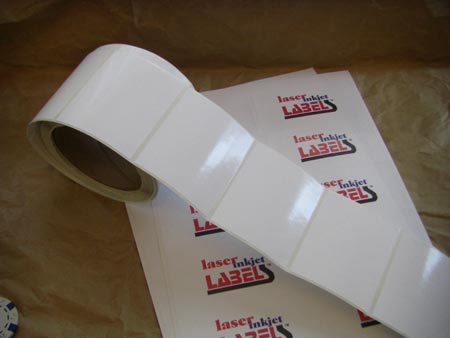
4 x 6 labels are available in both sheet and roll formats, compatible with most laser and inkjet printers.

Shipping and Order Fulfillment

The 4 x 6 size is the de facto standard for shipping labels — and for good reason. It gives you enough room to print a full delivery address, return address, barcodes, and handling instructions all in one clean, legible label. On sheets, you typically get 2 labels per page, making it easy to batch-print orders right from your desktop laser or inkjet printer. On rolls, you can feed them directly through a compatible inkjet roll label printer for faster, higher-volume fulfillment without the hassle of handling individual sheets.

Product Labels for Small Businesses

Cottage food producers, craft beverage makers, candle companies, and soap artisans all love 4 x 6 labels for their product packaging. The generous surface area gives you space to include your brand name, logo, ingredient list, net weight, and any required regulatory information — all on one label. When ordered on rolls, they feed smoothly through inkjet roll label printers like Primera LX series and Epson Colorworks models, letting small-batch producers label efficiently without outsourcing to a print shop.

Warehouse and Inventory Management

In a warehouse or stockroom setting, 4 x 6 labels are ideal for bin labels, pallet tags, location markers, and inventory tracking stickers. The size is large enough to be spotted quickly on shelves and racks, and the blank surface works with any inkjet or laser printer, giving you the freedom to customize layouts as your inventory system evolves. Roll format labels are particularly useful here — print on demand, right at the packing station, with no paper waste.

Roll labels allow for fast, on-demand printing — ideal for shipping stations and inventory workflows.

Event and Trade Show Materials

Need name badges, table tent labels, product sample tags, or booth display labels for an upcoming event? A stack of 4 x 6 sheet labels and your office inkjet printer is all you need. Design them the night before, print in the morning, and peel-and-stick in minutes. The large format also makes them effective as promotional stickers for giveaway items or branded packaging at trade shows.

Food and Meal Prep Labeling

Meal prep services, catering companies, and restaurant operators use 4 x 6 labels to mark containers with contents, prep dates, allergen information, and reheating instructions. The size accommodates a clean, readable layout without crowding — important when kitchen staff are moving fast. With a roll label printer on the prep line, you can generate customized labels for dozens of menu items quickly and consistently.

Sheets vs. Rolls: Which Is Right for You?

Sheet labels are the right choice when you need flexibility, occasional printing, or the convenience of a standard desktop laser or inkjet printer. They’re easy to store, require no special equipment, and are perfect for low-to-medium volume needs.

Roll labels shine in higher-volume environments. When you’re printing dozens or hundreds of labels per day, a dedicated inkjet roll label printer paired with 4 x 6 rolls saves time, reduces waste, and produces a more professional finished product. At LaserInkjetLabels.com, our 4 x 6 rolls are available in standard and double-capacity configurations to match your print volume.

Ready to find the right 4 x 6 label for your needs? Browse our full catalog of blank sheet and roll labels, or contact us and we’ll help you find the perfect match for your printer and application. See other Popular Label Sizes for shipping.

Custom printed waterproof labels

Uncompromising Durability: Why Your Brand Needs Custom Weatherproof Labels

In a world where products face diverse and often demanding conditions, the integrity of your brand’s labeling is paramount. Simply put, labels that defy the elements aren’t just an option—they’re a necessity. Our Custom Printed Weatherproof Labels are meticulously engineered to endure, ensuring your products maintain a professional appearance and your critical message remains perfectly clear, no matter what environment they encounter.

Imagine your products exposed to the scorching summer sun, the biting cold of winter, unexpected downpours, or even the constant friction of handling. Standard labels often fail under such stress, peeling, fading, or simply falling off. This not only diminishes your product’s appeal but can also lead to critical information being lost, impacting compliance and customer satisfaction.

What sets our weatherproof labels apart? It begins with the foundation: the materials. We offer an expertly curated variety of exceptionally durable options, including:

  • Vibrant White or Eye-Catching Yellow Vinyl: These materials offer excellent flexibility and resistance to moisture and tearing, making them perfect for a wide range of indoor and outdoor applications.
  • Sleek Silver Mylar: For a premium look and enhanced resistance to chemicals and extreme temperatures, silver mylar provides an unmatched level of sophistication and resilience.
  • Elegant Clear Material: Ideal for a “no-label look,” our clear weatherproof labels allow your product to shine through while providing robust protection against the elements.

Each of these high-performance materials undergoes rigorous testing to withstand the challenges of extreme heat, biting cold, sustained moisture, harmful UV exposure, and everyday abrasion. This ensures they don’t just cling to your product but actively resist peeling, fading, and withering, preserving your brand’s integrity over time.

Beyond their inherent durability, these labels empower your branding with crisp, high-impact designs. We print with precision, utilizing 1 to 3 spot colors to ensure your logo, product information, and essential details pop with clarity and vibrance. And to make high-quality, durable labeling more accessible than ever, the price you see already includes your first ink color.

Choosing custom printed weatherproof labels is an investment in your brand’s longevity and reputation. Ensure your labels protect your brand’s image in any condition, maintaining their professional appearance and legibility from shelf to consumer, and beyond.

Labels for Primera LX4000

Elevate Your Product Presentation with the Primera LX4000
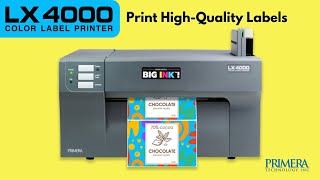
In today’s competitive market, striking product labels are essential for capturing customer attention. The Primera LX4000 inkjet roll label printer is a fantastic solution for businesses looking to produce high-quality, full-color labels on demand. This compact yet powerful printer brings professional-grade printing capabilities right to your desktop, allowing you to create stunning labels with vibrant colors and sharp details, all without the need for large print runs.

Whether you’re launching a new product, updating branding, or simply need short runs of custom labels, the LX4000 offers incredible flexibility and cost-effectiveness. Its ability to print beautiful, durable labels quickly makes it an invaluable asset for small to medium-sized businesses.

At LaserInkjetLabels.com, we understand the importance of reliable supplies. That’s why we offer a wide variety of Standard Roll Labels specifically designed and tested to perform flawlessly with your Primera LX4000. Our extensive selection includes diverse materials and sizes, ensuring you find the perfect match for your product and application. From glossy and matte papers to durable synthetics, we have the ideal roll labels to bring your designs to life.

Explore our full range of compatible roll labels and find the perfect fit for your LX4000 today: Explore Labels

Foil Stamping on Clear Laser Labels

How to Foil Stamp Using Clear Laser Labels (8.5″ x 11″)

Foil stamping is a simple yet powerful way to enhance the appearance of your printed materials, giving them a premium, eye-catching finish. At LaserInkjetLabels.com, our 8.5″ x 11″ clear laser labels are a popular choice for DIY foil stamping projects—especially among small business owners, crafters, and designers who want to elevate packaging, invitations, or promotional products.

In this guide, we’ll walk you through how to foil stamp using our clear laser labels, including the types of printers that work best, proper printer settings, and key tips to get the best results.


What Is Foil Stamping?

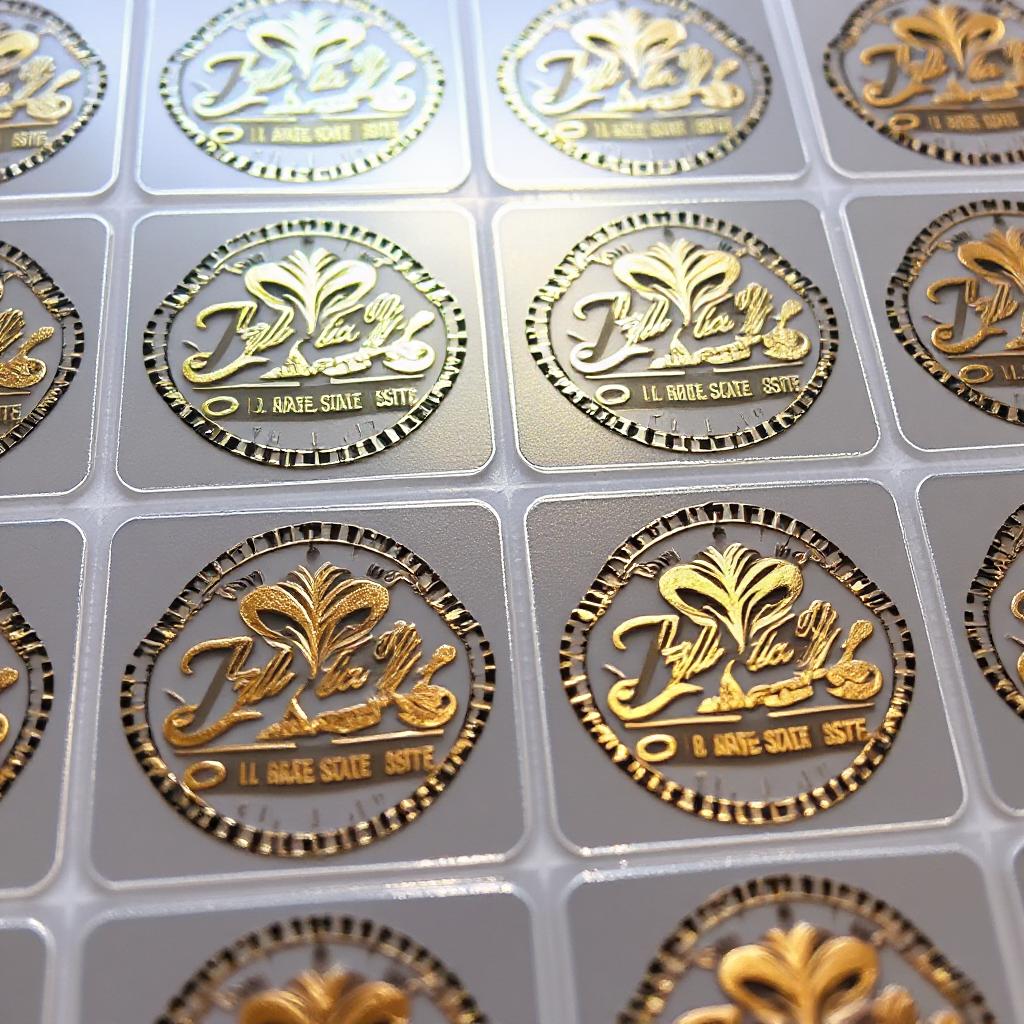
Foil stamping is a process where metallic foil (usually in gold, silver, or holographic finishes) is adhered to printed toner using heat and pressure. When used with clear labels, the effect is especially stunning: the foil appears to float seamlessly on the surface it’s applied to, whether it’s glass, plastic, or product packaging.


Materials You’ll Need

To get started with foil stamping on our 8.5” x 11” clear laser labels, you’ll need the following:

  • Clear Gloss Laser Labels (available by the sheet at LaserInkjetLabels.com)
  • A monochrome laser printer (see recommended types below)
  • Foil transfer sheets (available from craft suppliers in various finishes)
  • A laminator or foil applicator machine (capable of reaching high temperatures)

Best Printers for Foil Stamping

For successful foil transfer, it’s essential to use a laser printer that deposits a thick, even layer of toner, as foil adheres only to the toner (not to ink or unprinted areas).

Recommended printer types:

  • Monochrome Laser Printers – These are ideal for foil stamping because they apply dense black toner without color mixing. Models by HP, Brother, and Canon are commonly used.
  • Color Laser Printers (with caution) – Some color laser printers work well, but results can vary due to differences in toner formulation. If you already own a color laser printer, we recommend testing with our free sample sheets.

Avoid using:

  • Inkjet printers (toner is required)
  • Low-heat or eco-mode laser printers (insufficient toner melting may occur)

Printer Settings for Best Results

Proper printer setup is crucial to successful foil stamping. Follow these steps:

  1. Use the correct media setting
    Set your printer to “Labels,” “Heavy Paper,” or “Transparency” mode. This increases the fuser temperature and slows down the feed, ensuring better toner adhesion to the clear polyester surface.
  2. Set to monochrome (black only)
    Foil transfer only works on black toner. If you’re using a color laser printer, make sure your design is set to print in 100% black.
  3. Print at the highest quality setting
    Choose “Best” or “High Resolution” in your printer preferences to maximize toner density.
  4. Let the toner cool
    After printing, allow the sheet to cool for 1–2 minutes to prevent smudging during foil application.

How to Apply the Foil

Once your label sheet is printed, it’s time to apply the foil:

  1. Place the foil
    Cut a piece of foil slightly larger than the printed area. Lay it shiny side up over the toner design.
  2. Sandwich the label sheet
    Use a protective carrier folder (such as parchment paper or a Teflon sheet) to prevent foil residue from damaging your laminator.
  3. Run through a laminator
    Set your laminator to high heat (around 300°F / 150°C) and slow speed. Run the label sheet with foil through the laminator once or twice to ensure good adhesion.
  4. Peel the foil
    Allow the sheet to cool, then gently peel away the foil. You should see the metallic foil precisely covering the toner areas on your clear label.

Tips for Best Results

  • Always test first: Printer toner and foil results can vary. We strongly recommend ordering a free sample of our clear labels to test your setup.
  • Avoid overly fine lines: Thin fonts or intricate designs may not transfer foil cleanly.
  • Try different foils: Not all foils are equal—some work better with certain toners or laminator heat settings.
  • Laminate for durability: If you’re using the foil-stamped labels outdoors, consider applying a clear laminate for extra protection.

Bring Your Designs to Life

Whether you’re creating luxury product labels, wedding invitations, or custom stickers, foil stamping on our clear laser labels adds a professional, polished look with minimal equipment. With a little practice, you can create standout labels at a fraction of the cost of outsourced foil stamping.

Ready to get started? Browse our clear gloss laser labels and request your free sample sheet today!


5 Reasons to Choose Blank Inkjet Semi-Gloss Labels

If you’re looking for high-quality labels that deliver a professional look, Inkjet Semi-Gloss Labels are the perfect choice. Whether you’re labeling products, packaging, or marketing materials, these labels provide a polished appearance with excellent print quality. Here’s why they stand out:

1. Vibrant, High-Quality Printing

Semi-gloss labels enhance color vibrancy and sharpness, making your designs pop. Whether you’re printing logos, barcodes, or full-color images, these labels ensure crisp, professional results.

2. Sleek, Polished Appearance

With a slight sheen, semi-gloss labels offer a premium look without excessive glare. This makes them perfect for branding, product packaging, and promotional materials that need to stand out.

3. Durable & Smudge-Resistant

Designed for inkjet printers, these labels quickly absorb ink to prevent smudging. Their semi-gloss coating adds durability, making them resistant to handling and minor moisture exposure.

4. Versatile for Various Applications

Ideal for bottles, jars, mailers, boxes, and more, these labels are a go-to choice for businesses and DIY projects alike. Whether you’re labeling handmade goods or shipping products, they provide a professional touch.

5. Easy to Print & Apply

Compatible with most inkjet printers, these labels are user-friendly and hassle-free. Their strong adhesive ensures they stick securely to different surfaces, keeping your labels looking flawless.

Upgrade your branding today! Order your White Semi-Gloss Inkjet labels now!

Roll Label Printing vs Sheet Label Printing

Roll label printing and sheet label printing are two popular methods used for creating labels. Both methods have their own advantages and disadvantages, making them suitable for different applications. Roll label printing involves printing labels on a continuous roll of material, which can be cut into individual labels as needed. This method is ideal for large volume production runs, as it allows for efficient printing and cutting of large quantities of labels

.roll labels and sheets labels

Additionally, roll labels tend to be more durable than sheet labels, making them suitable for labeling products that may be exposed to harsh conditions. Sheet label printing involves printing individual labels on a sheet of material that is then cut into separate labels. This method is ideal for smaller production runs or when multiple designs are needed on the same sheet.

Sheet labels are also often used in office settings for labeling files, folders, and other documents.

Roll label printing and sheet label printing are two of the most commonly used methods for producing labels. While both methods result in high-quality labels, there are some key differences between the two. Roll label printing involves printing labels on a continuous roll of material. This method is ideal for large-scale production runs, as it allows for faster printing speeds and reduced set-up time.

Roll labels are also easier to apply with automated labeling machines, making them popular in industries such as food and beverage, pharmaceuticals, and logistics. Sheet label printing involves printing individual labels on pre-cut sheets of material. This method is ideal for smaller production runs or custom jobs that require variable data or designs. Sheet labels can be easily handled and stored, making them popular in office environments or for small businesses.

Ultimately, the choice between roll label printing and sheet label printing will depend on factors such as the quantity of labels needed, the complexity of the design, and the intended application.

Roll label printing offers several advantages. Firstly, it is a more efficient method for large-scale printing, as it allows for faster print speeds and reduced downtime between jobs. Secondly, roll labels are easier to apply to products, as they can be easily dispensed using a label applicator or dispenser. Finally, roll labels take up less storage space and are easier to transport than sheet labels.

However, there are also some disadvantages to roll label printing. One of the main drawbacks is that it requires specialized equipment and machinery to print and apply the labels. Additionally, roll labels can be more expensive per unit than sheet labels for smaller print runs. On the other hand, sheet label printing has its own set of advantages. It is more cost-effective for smaller print runs and does not require specialized equipment or machinery.

Printing Custom Label Shapes

Create Custom Shaped Labels on Rolls

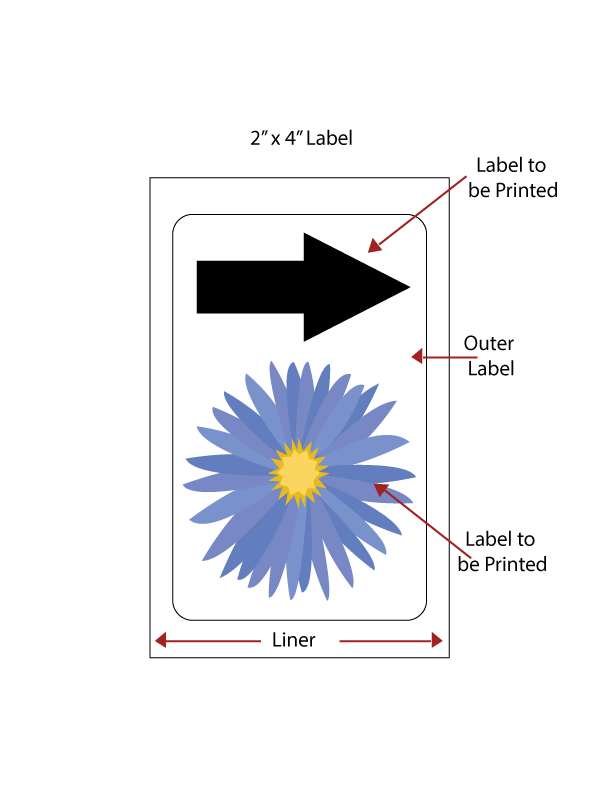
Our roll labels offer the ability to effortlessly print custom label shapes. With this innovative solution, you can forgo the usual setup and registration hassles involved in printing odd shaped labels. Our custom roll label shapes have been specifically designed to streamline the process of aligning your artwork. Gone are the days of worrying about the printer’s optical eye registration missing or misinterpreting the label spacing. With our method, each shape will be consistently printed exactly where you need it.

The beauty of our approach lies in its simplicity. We enclose your chosen shape inside a rectangle, as depicted in the accompanying image. For instance, if you opt for a heart-shaped label, our technique ensures that your printer will unfailingly recognize the label gap, allowing for precision printing. Have several smaller labels? We can several label sizes into a rectangle so you can print several in one pass. Moreover, our method offers the added benefit of extending the color beyond the edge of the custom-shaped label. This feature enables the color to bleed off the label without any concerns about ink spreading to the liner, rollers, or the next label, which could otherwise compromise the image quality.

LaserInkjetLabels.com can create any shape you need to print. Call now or email us for a quote.

Matte vs Glossy Labels

Labels play an essential role in product packaging as they convey important information about the product and its contents. The choice of label finish can significantly impact the overall look and feel of the package. Matte and glossy labels are two popular options for labeling products, each with their unique characteristics. Matte labels have a flat, non-reflective finish that gives them a more understated and subtle appearance.

They are ideal for products that require a more natural or rustic look, such as organic food or handmade goods. On the other hand, glossy labels have a shiny, reflective finish that enhances the colors and graphics on the label, making them stand out more prominently. They are often used for products that require a sleek and professional appearance, such as electronics or cosmetics.

Ultimately, selecting between matte and glossy labels depends on the product’s branding needs and design goals to create an eye-catching package that appeals to customers.

When it comes to choosing between matte and glossy labels, there are several factors to consider. Matte labels have a non-shiny finish that makes them ideal for product labeling. They are also more durable and resistant to smudging, making them suitable for products that will be handled frequently. In addition, matte labels are great for printing small text and barcodes as they provide better contrast.

On the other hand, glossy labels have a shiny finish that gives them a more professional look. They are perfect for high-end products and promotional materials because they catch the light and draw attention. Glossy labels also have a protective layer that makes them more resistant to water damage. However, glossy labels can be difficult to read in direct sunlight due to their reflective surface.

They are also prone to smudging and fingerprints, which can make them less appealing over time. Ultimately, the decision between matte vs glossy labels depends on your specific needs and preferences.

Commercial Label Printing

Commercial printing refers to the process of printing high-quality materials for businesses, organizations, and individuals. It involves producing large quantities of printed materials such as brochures, business cards, flyers, posters, label materials, and banners using advanced printing equipment. Commercial printers utilize various printing techniques such as digital, offset, and letterpress to create visually appealing and engaging printed products. With the advent of digital technology, commercial printing has evolved significantly over the years offering faster turnaround times and cost-effective solutions to meet the unique needs of clients.

This subtopic will explore the world of commercial printing in detail.

The beginnings of commercial printing can be traced back to the 15th century with the invention of the printing press by Johannes Gutenberg. Prior to this, books were hand-copied by scribes and were expensive and time-consuming to produce. Gutenberg’s press revolutionized the industry by allowing for mass production of printed materials, making them more affordable and accessible to a wider audience.

The first commercial printers focused on producing religious texts, but as demand grew, they expanded into other areas such as newspapers, pamphlets, and eventually advertising materials. This marked the beginning of modern commercial printing.

Advancements in printing technology have revolutionized the commercial printing industry, making it faster, more efficient and cost-effective. The introduction of digital printing has allowed for on-demand and variable data printing, enabling businesses to print smaller quantities with personalized content at a lower cost. The use of UV and LED curing technologies have also improved the quality and durability of printed materials while reducing drying time.

Modern commercial printing techniques have revolutionized the way businesses print their marketing materials. Digital printing is now the most popular technique, which uses inkjet or laser printers to produce high-quality prints with excellent color accuracy. This method is ideal for short runs and variable data printing, such as personalized direct mail campaigns. Offset printing still has its place in long-run projects that require precise color matching and consistent quality.

Commercial label printing offers numerous benefits to businesses, including cost-effectiveness, high-quality printing, and customization options. By outsourcing printing needs to a professional printer, businesses can save money on equipment and supplies while ensuring that their marketing materials are produced with the highest quality standards. Additionally, commercial printers can offer customization options such as variable data printing, which allows for personalized marketing campaigns.

Finally, commercial printers often have quick turnaround times and can handle large volume orders efficiently, allowing businesses to focus on other aspects of their operations.

The future of commercial printing is exciting, with several trends and innovations emerging. One of the most significant changes is the shift towards digital printing, which offers greater flexibility and faster turnaround times. Automation and artificial intelligence are also transforming the industry, making it easier to manage complex print jobs with fewer errors. Personalization and customization are becoming increasingly important, with companies offering tailored solutions for individual clients.

Finally, eco-friendly practices such as using sustainable materials and reducing waste are gaining traction in the industry as customers become more environmentally conscious.

Check out our Custom Label Printing Section here