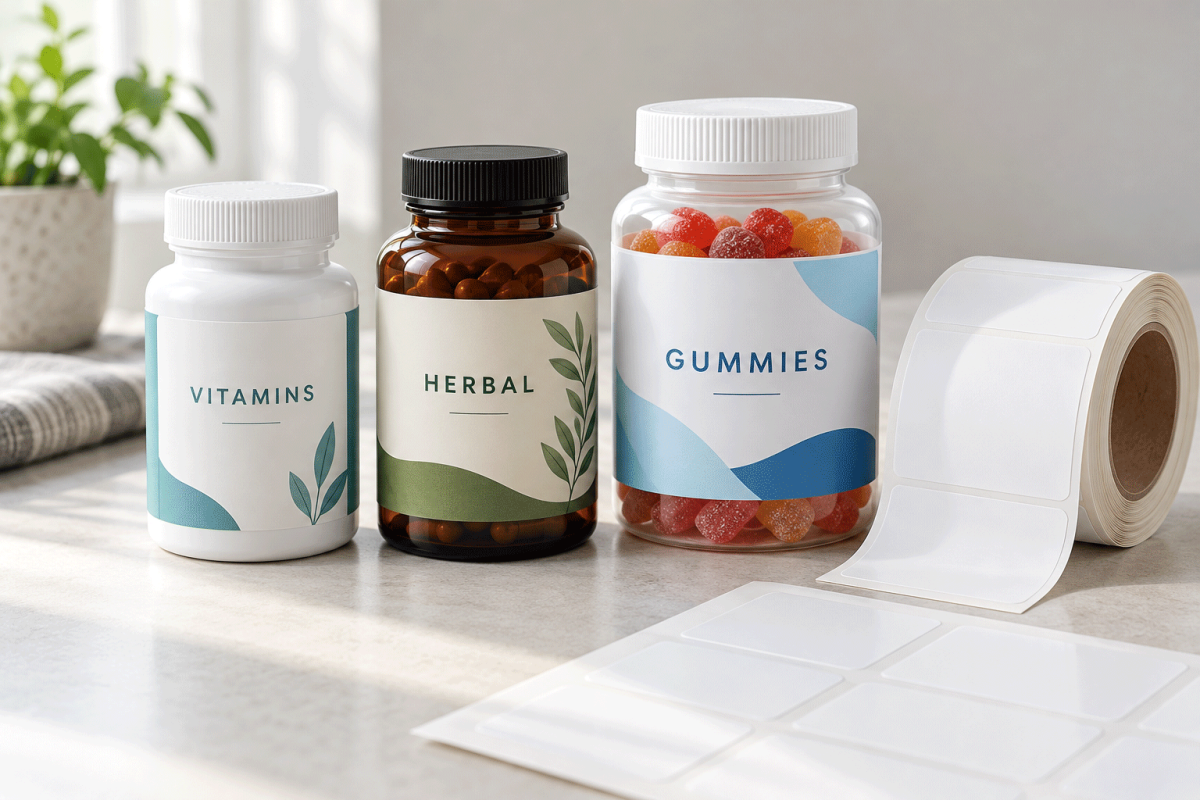
Supplement bottle labels need to do several jobs in a small space: identify the product, organize important information and stay attached through storage and daily handling. A label that looks right on a screen can still wrap crookedly, wrinkle at the bottle shoulder or leave too little room for readable text.
Start with the actual container, then choose the layout, material and printing method together. Capsule count and bottle capacity are useful descriptions, but they do not establish the dimensions of the smooth labeling panel. The same count can be packed in different bottles, and containers with the same capacity can have different shapes.
This guide walks through the practical decisions for vitamin bottles, herbal supplement containers, gummy packaging and powder tubs. For more sizing examples, use our Supplement Bottle Label Size Guide. For other container shapes, visit our Bottle Labels hub.
Quick answer: how do you choose supplement bottle labels?
Measure the bottle’s straight sidewall and circumference. Select a front-and-back or wraparound layout that provides enough space for the finished artwork. Choose label stock made for your printer and suitable for the bottle surface and expected exposure. Print a paper fit test at actual size, then test a printed adhesive sample before ordering a production quantity.
Paper can work well for dry indoor packaging. A compatible synthetic film is worth testing for bottles exposed to condensation, damp hands or frequent wiping. Water-resistant stock does not automatically make the printed ink, adhesive or complete package waterproof.
1. Choose a layout before designing the label
Begin with the information the package must carry. Reserve space for the main product identity and the supporting information before adding decorative artwork. If the design feels crowded, reconsider the layout or container rather than reducing all the type until it becomes difficult to read.
| Layout | Practical advantage | Check before ordering |
|---|---|---|
| Separate front and back | Creates a focused front design and a dedicated information area. | Both labels fit the smooth panel and can be applied consistently. |
| Single partial wrap | Keeps branding and supporting content in one piece while leaving a visible gap. | The gap remains clear of important text and the wrap tracks level. |
| Full wrap with overlap | Uses more of the cylindrical surface. | The adhesive bonds to the printed face beneath it; the seam does not cover information. |
| Body label plus secondary code label | Separates fixed artwork from variable batch information. | Secondary labels do not obscure required information and stay legible. |
A round packer bottle usually supports a rectangular body label. A square or rectangular bottle may work better with individual face labels if its corners are tight. A broad powder tub offers more space, but its sidewall may taper enough to make a straight rectangular wrap unsuitable.
Decide where the seam should sit before placing text. Keep the main product identity centered in the intended front view, and make the information panel accessible when someone turns the bottle. Do not treat an extra label or lid sticker as a substitute for reviewing the package’s information requirements.
2. Measure the actual bottle
Use a production sample from the supplier you intend to buy from. Measuring a similar bottle or an online photograph can lead to an expensive mismatch.
- Find the straight sidewall. Identify where the shoulder ends and the bottom curve begins. The label should remain within that usable panel.
- Measure the usable height. Leave practical clearance above and below the label so normal placement variation does not push an edge onto a curve.
- Measure the circumference. Wrap a strip of paper around the intended label area, mark where it meets, then measure the strip flat.
- Check for taper. Compare the circumference near the top and bottom of the proposed label. A noticeable difference calls for a shorter label, separate panels or a shape designed for the container.
- Mark obstacles. Note molded seams, recessed panels, ribs and textured surfaces that could interrupt adhesion.
- Test the proposed size. Cut a paper rectangle, wrap it around the bottle and inspect it from every side.
A worked wrap-label example
Suppose your measured circumference is 7.25 inches and you want a 0.125-inch gap. The planned wrap width would be 7.125 inches: 7.25 minus 0.125. If the usable straight panel is 2.75 inches tall, a 2.5-inch-high test label would leave 0.25 inch of total vertical clearance when centered.
These measurements are an example, not a recommended stock size for every supplement bottle. Choose the final gap and clearance for your actual container, label construction and application process. If a nearby standard size changes the gap, test that size rather than scaling the artwork to fit an unsuitable label.
3. Compare size starting points without relying on capsule count
A short front label and a wraparound label serve different purposes. A front panel that fits well may still be too small for the entire package design. The examples below describe possible layouts; they are not guaranteed fits or a statement of stock availability.
| Test size | Possible role | Main limitation |
|---|---|---|
| 2 × 1 inches | Compact front panel or secondary identifier. | Limited room for supporting text. |
| 3 × 2 inches | Front or back panel on a suitably sized bottle. | Measure curvature and available panel height. |
| 4 × 3 inches | Larger front panel or partial wrap. | May be too tall for a short packer bottle. |
| 6 × 2 inches | Wrap candidate for a measured cylindrical bottle. | Confirm circumference, seam location and information space. |
| 8 × 3 inches | Larger bottle or tub wrap candidate. | Check printer limits and container taper. |
In this table, width means the dimension traveling around the bottle. Roll-label product dimensions may describe the stock’s orientation across and along the roll. Check the listing and printer settings rather than assuming the first number always describes your artwork’s horizontal edge.
For capacity-based planning examples and additional measurement guidance, see the dedicated supplement bottle size guide. Keep the measured bottle specification with the artwork so a future packaging change triggers a new fit test.
4. Match the material to storage, handling and appearance
Think about where the bottle will spend its life. A dry cabinet, refrigerated product, busy retail shelf and gym bag present different conditions. Choose for those conditions before choosing a finish solely for appearance.
| Material or finish | Useful starting point | What to test |
|---|---|---|
| White matte paper | Dry indoor packaging with a clean, low-glare appearance. | Scuffing, moisture exposure and adhesion. |
| Gloss or semi-gloss paper | Colorful designs and a polished retail look. | Ink compatibility, glare and rubbing. |
| Kraft paper | Earth-toned herbal product branding. | Contrast and how the brown background changes printed colors. |
| White synthetic film | Bottles needing greater moisture resistance. | Printed-image durability, adhesive performance and edge lift. |
| Clear film | A transparent-label look on suitable containers. | Text contrast against both the bottle and its contents. |
Use stock specifically coated for your printing process. A material intended for laser printing may not accept inkjet ink correctly, and inkjet-only stock should not be put through a laser printer unless its manufacturer explicitly supports that use.
Clear labels need special attention on amber, dark or translucent bottles. Many desktop printers do not print white ink. A white area in the design can therefore remain transparent, and dark text may lose contrast against the package. Review a physical printed proof with the bottle filled as it will be sold.
Paper versus waterproof labels
Paper is a sensible option when the package remains dry and the printed sample survives the expected handling. For moisture exposure, compare appropriate waterproof label options and test the complete printed construction. Facestock, coating, ink or toner, adhesive and bottle surface all affect the result.
For refrigerated products, follow the label supplier’s application-temperature guidance. Applying a label to a cold, wet bottle can produce different results from applying it to a clean, dry bottle before refrigeration. Test the intended production sequence, including condensation after removal from cold storage.
5. Compare sheets, rolls and custom printing
The right format depends on your printer, order pattern and artwork. Small runs with frequent revisions favor flexibility. Repeated runs of approved artwork may benefit from a more streamlined production process.
| Format | Often useful for | Confirm first |
|---|---|---|
| Blank sheet labels | Short runs, multiple products and compatible desktop inkjet or laser printers. | Sheet layout, printable area, media setting and alignment. |
| Blank inkjet roll labels | Repeated batches on a dedicated compatible roll-label printer. | Print width, core, roll diameter, gap sensing and material compatibility. |
| Custom printed roll labels | Stable designs and labels supplied ready to apply. | Proof, material, quantity, winding direction and application requirements. |
A desktop sheet printer generally cannot accept label rolls. A thermal shipping-label printer also should not be assumed compatible with blank color-inkjet roll stock. Match the exact printer and media requirements before choosing the format.
If you apply labels with equipment, confirm the required roll direction, label presentation and liner arrangement with the applicator supplier. A roll that prints correctly can still be inconvenient or unsuitable at the application stage.
6. Build artwork around readable information
Start with the correct template at the final label dimensions. Keep important content inside the template’s safe area and extend backgrounds into the specified bleed area when the production process calls for it. Bleed and safe-area measurements vary, so use the requirements for the actual product or print provider.
Give dense information a plain, high-contrast background. Avoid placing decorative textures behind small type. Judge the proof at actual printed size rather than zooming into a screen preview, and inspect it under the lighting where customers will read it.
Keep a clear area around the barcode and preserve its required proportions and quiet zones. Do not stretch it to fill a decorative box. Test the final printed code on the curved bottle using the scanning equipment expected in your sales channel; a phone test alone does not establish retail barcode quality.
For reusable artwork help, visit our Label Templates hub or our Canva template instructions. Templates help with placement, but they do not verify product claims or regulatory compliance.
7. Reserve space for supplement-specific information
For U.S. dietary supplements, FDA identifies five basic labeling elements: product identity, net contents, nutrition information, ingredients, and the responsible manufacturer, packer or distributor’s name and business location. Identity and net contents belong on the principal display panel; other placement and formatting rules also apply.
Use FDA’s General Dietary Supplement Labeling guide and the current 21 CFR 101.36 as review references. Have the finished package and claims checked for your specific product before printing a production run.
A blank label, template or attractive mockup does not establish that a finished supplement package meets applicable requirements. Plan the information area early so the final review does not force a complete redesign.
8. Print a proof before the full run
- Confirm that the template matches the exact label product.
- Print a plain-paper proof at 100% or actual size; turn off automatic fitting or scaling.
- Check alignment against the sheet or a cut paper sample.
- Print a small quantity on the real label stock with appropriate media settings.
- Allow the print to dry or cure as directed by the media and printer suppliers.
- Apply samples to filled production bottles and inspect text, color, barcode and seam position.
- Approve and record the settings before continuing.
If alignment drifts progressively down a sheet, check page size, scaling and template pitch rather than moving every label separately. If every label has the same offset, verify the printer margins and template position. For rolls, confirm media calibration, sensing mode and the feed-direction dimensions.
9. Apply labels consistently and test the finished package
Start with a clean, dry surface prepared according to the bottle and adhesive suppliers’ guidance. Remove dust, handling residue and loose product powder. Do not assume a stronger cleaning solvent is better; it may damage the container or leave a residue.
Use a simple positioning guide for hand application. Tack the label in a consistent location and smooth it across the bottle without stretching it. With wrap labels, keep the leading edge square to the bottle so the ends meet level. Avoid repeatedly peeling and repositioning permanent-adhesive labels.
Allow the adhesive the recommended time to develop its bond, then test samples under the actual conditions you expect. Include normal handling, packaging contact, moisture where relevant and transport inside a packed carton. Inspect immediately and again after the chosen storage and handling period.
Record the bottle supplier and material, label product, printer settings, application conditions and observations. When something changes—such as a new bottle mold, adhesive, ink or cleaning method—repeat the relevant tests.
10. Troubleshoot common problems
| Problem | Possible cause | First action |
|---|---|---|
| Edges lift | Label crosses a curve, surface contamination or unsuitable adhesive. | Reduce the height if necessary and test adhesion on a clean production bottle. |
| Wrap ends do not align | Slanted placement or tapered sidewall. | Check top and bottom circumference and use an application guide. |
| Print smears | Wrong coating, unsuitable settings or insufficient drying. | Confirm printer/media compatibility and test the supplier’s recommended settings. |
| Small text is hard to read | Low contrast, crowded layout or poor print quality. | Improve the information layout and inspect an actual-size proof. |
| Barcode scans inconsistently | Distortion, low contrast, insufficient quiet zones or bottle curvature. | Check the source artwork and validate the code on the finished container. |
| Clear label appears dull or bubbly | Visible adhesive texture, trapped air or surface mismatch. | Test application pressure and a different construction on the same bottle. |
Frequently asked questions
What size label fits a 60-count supplement bottle?
There is no universal size. Capsule dimensions, bottle capacity and bottle mold vary. Measure the straight labeling panel and circumference of the actual bottle, then test the intended layout.
Are wraparound labels better than front-and-back labels?
A wrap can keep the design in one piece and provide a continuous information area. Front-and-back labels can work well when a shorter label fits the bottle better. Choose by measured fit, information space and application consistency.
Do supplement bottle labels need to be waterproof?
Dry indoor packaging may perform well with paper. For condensation, damp handling or wiping, test a compatible synthetic material and its printed image under the expected conditions.
Can I print supplement labels with a home printer?
You can use an appropriate desktop inkjet or laser printer with compatible sheet labels. Confirm the stock, template, print quality and durability with a physical proof.
Can I use clear labels on amber bottles?
Yes, if the finished design remains readable and the construction adheres well. Many desktop printers do not print white ink, so check contrast on a filled bottle before committing to clear stock.
Why are my labels lifting at the corners?
Possible causes include curved shoulders, contamination, application conditions and an adhesive that does not suit the bottle surface. Test a size contained within the straight panel and compare suitable adhesive samples.
Should a wrap label overlap?
Some layouts use a gap and others use overlap. With overlap, test adhesion to the label face and keep the seam clear of important information. The correct arrangement depends on the construction and application process.
Does a supplement label template make my packaging compliant?
No. A template establishes artwork placement and dimensions. Product-specific information, claims, formatting and the complete package still require an appropriate regulatory review.
Shop popular label options for supplement packaging
Measure your bottle, decide how much information the layout needs and test the material with your printer before ordering your full run.
- Shop blank sheet labels for compatible desktop inkjet and laser printers.
- Shop inkjet roll labels for compatible dedicated roll-label printers.
- Explore custom printed roll labels supplied ready to apply.
- Review supplement bottle label sizing before choosing dimensions.
